
Managing browser security easily with Microsoft 365 Lighthouse and Microsoft Edge

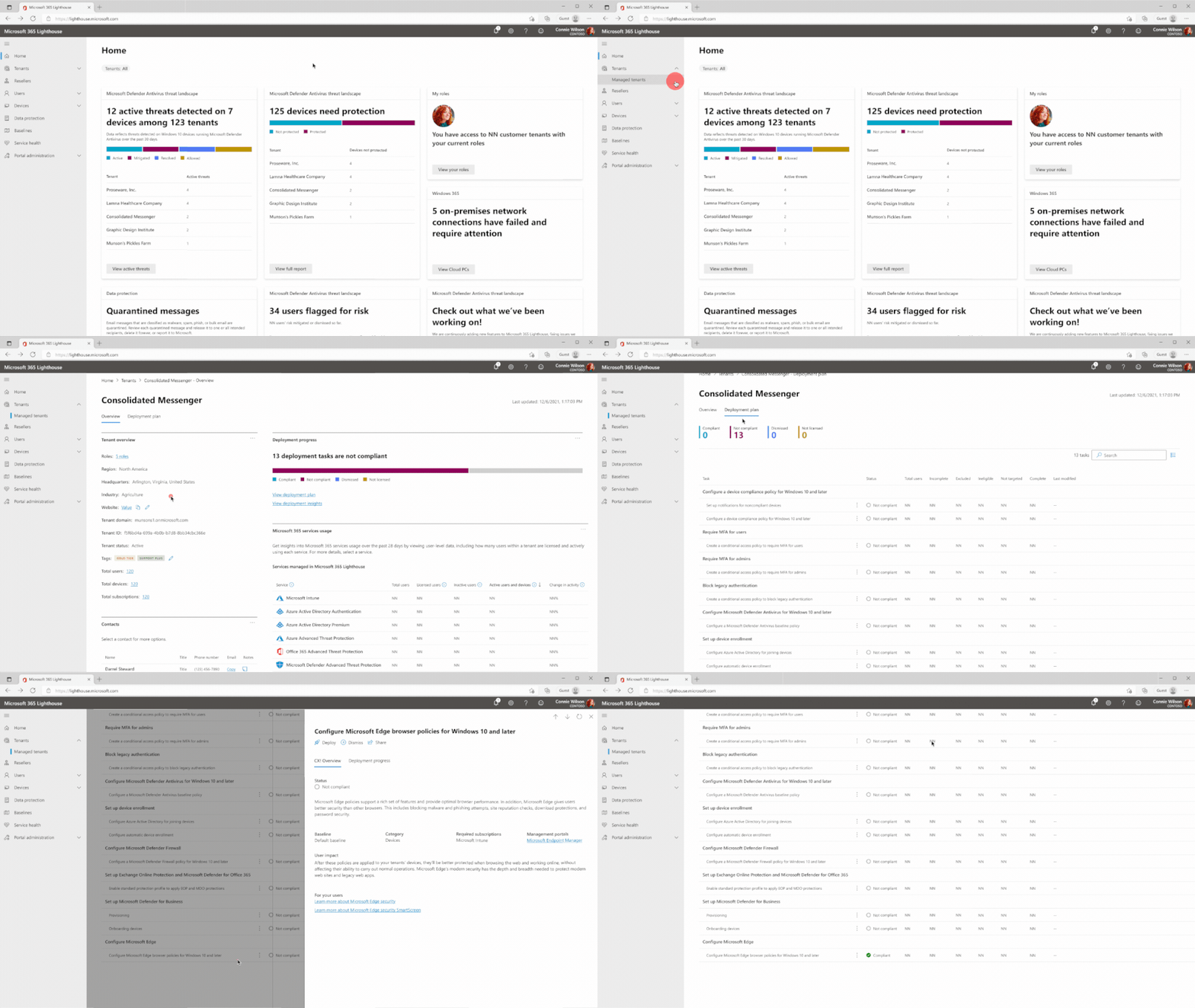
With so many customers to manage and browser security ever evolving, it can be quite a challenge for managed service providers (MSP) to keep up with the latest security recommendations and secure devices and data across their customer base. Announced at Ignite 2020, Microsoft 365 Lighthouse is a platform that allows MSPs to scale the management of their small and medium-sized business (SMB) customers in a single, comprehensive portal, available at no additional cost for eligible MSPs. With Lighthouse, MSPs can get recommended security configuration baselines tailored to SMB customers, quickly find and investigate risks, and proactively take action to get their customers to a healthy and secure state. The addition of the Microsoft Edge policy to the default baseline will make it easier for MSPs to consistently deploy Microsoft Edge security settings to users across SMB customers, saving them time and giving customers peace of mind that their users and their data are protected.
MSPs have the challenging task of managing customers across the customer lifecycle, from onboarding to troubleshooting to managing operational improvements. To simplify this challenge, Lighthouse provides recommended settings and policies, including Microsoft Edge security settings. Using Lighthouse, MSPs can see threat landscape, device compliance, risky user sign-ins, which of their tenants have Microsoft Edge policy deployed or not, and much more in a single portal. This allows MSPs to proactively manage tenants for onboarding across their customer base and quickly identify which customers need attention, as well as drive standardization to generate operational efficiencies.
With cyber-attacks on the rise, it is more important than ever for MSPs to proactively protect their customers, starting with a trusted browser. Among other benefits, Microsoft Edge is more secure than Google Chrome for your business on Windows. Because of this, many global enterprises, such as GSK, Cerner, and National Australia Bank trust Microsoft Edge for better security with less effort. MSPs now have the ability to offer this level of security easily to all their customers through a single portal.
To get started with Microsoft 365 Lighthouse and deploy Microsoft Edge security settings easily to customers, visit Sign up for Microsoft 365 Lighthouse. Lighthouse is already generally available at no cost for MSPs that meet the requirements listed here.
Deploying the Microsoft Edge Settings
Helpful Resources
- Microsoft 365 Lighthouse Overview
- Requirements for Microsoft 365 Lighthouse
- Support for Microsoft 365 Lighthouse
- Microsoft 365 Lighthouse FAQs
- Microsoft Edge Enterprise Documentation
- Announcement of Microsoft 365 Lighthouse
- CyberRatings.org Web Browsers vs. Phishing
- CyberRatings.org Web Browsers vs. Malware
Continue the conversation by joining us in the Microsoft 365 Tech Community! Whether you have product questions or just want to stay informed with the latest updates on new releases, tools, and blogs, Microsoft 365 Tech Community is your go-to resource to stay connected!
Published on:
Learn moreRelated posts
Announcing the General Availability of the Microsoft 365 Document Collaboration Partner Program
Empowering Seamless Collaboration for Modern Workforces We are thrilled to announce the general availability of the Microsoft 365 Docume...
Favorite Copilot Prompts
(Amber Plumb interviewing Michael Morales and Allison Sweet) The power of M365 Copilot is transforming the way our support team operates...
Favorite Microsoft 365 Copilot Prompts
(Amber Plumb interviewing Michael Morales and Allison Sweet) The power of M365 Copilot is transforming the way our support team operates...
Boost digital event engagement with Voting and Archiving in Teams Q&A
Managing and delivering effective town halls is key to enabling two-way dialogue with leaders in today’s hybrid world. Microsoft Teams Q&A...
Prepare now for key end of support moments in 2025
One year from today, on October 14, 2025, support will end for all Office 2016 and 2019 suites, standalone apps, and servers. This includes:&n...
Everything you should know about Visio 2016 and Visio 2019 end of support
On October 14, 2025, Visio 2016 and Visio 2019 will reach end of support. After this date, Visio 2016 and Visio 2019 will no longer receive se...
Limit frontline worker access to Teams when off shift
We’re excited to announce that the frontline working time feature is now generally available! This feature allows admins to block or warn acce...
We are removing Feed on Microsoft 365 (Office)
As part of our ongoing efforts to streamline and enhance user experiences, we will be retiring the Feed feature (shown in figure 1 below) on t...
Leveraging Partner Apps to Deliver on the Promise of AI-Led Productivity
The advent of generative AI is driving a rethink of what outcomes we deserve from our productivity software – from gains in efficiency to more...
What’s new in FLW shared devices
Discover the Latest Enhancements in Shared Device Mode (SDM) We are excited to announce a series of new features in Shared Device Mode ...