
Create multiple staff appointments with Microsoft Bookings
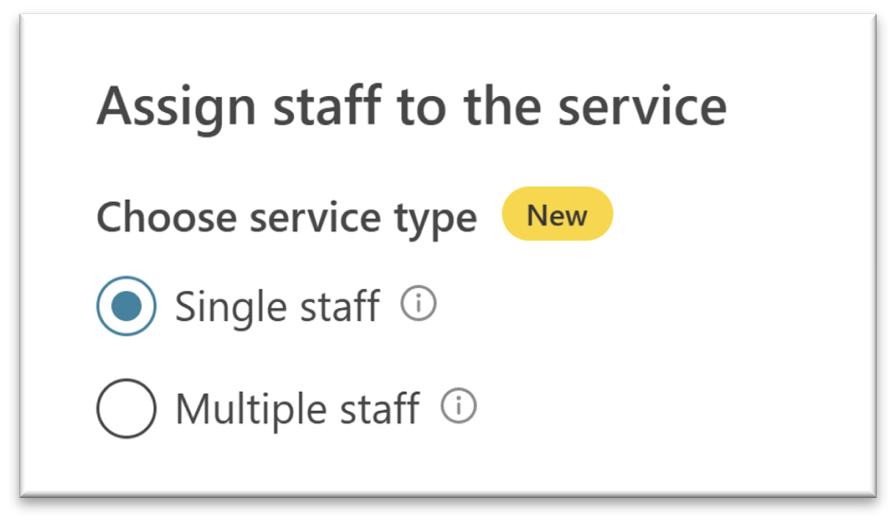
As one of the most requested features for Microsoft Bookings, we are pleased to share that you can now create a multiple staff appointment! Previously, Bookings only supported the creation of a single staff service where an appointment is scheduled with a single staff member.
With the new multiple staff appointments feature, you can create service with more than one staff member in a single appointment. Your end customers will now be able to create appointments using the multiple staff service and meet all staff members together.
How can you start using multi-staff appointments?
Now when you try to add a new service to your Bookings page, in the Assign staff to the service section, you will see two options:
- Single staff: When selected, the booking will be scheduled with a single staff member.
- Multiple staff: When selected, the booking will be scheduled with all the assigned staff members of the service. You can refer to this service as N:1 booking service.
You can read more about other controls available while defining a service here. It’s also important to note that in the case of Multiple staff service, your end customers will be able to book an appointment only when all the staff members of the service are available to attend.
You can use this feature for multiple use-cases. Here are a few examples:
1. Book panel interviews
An education institute can allow students to book interview sessions with multiple interviewers. Till now, appointments needed to be booked with the lead interviewer who had to manually add other panel members into the call. This not only added overhead to the lead interviewer, but also created problems of availability, since all the interviewers might not be available at the booked time. Now, with this new feature, you can create a multi-staff service and all the interviewers on the panel can be added to it. Students will be able to book an interview session only when all the interviewers are available together.
2. Book Privacy webinars
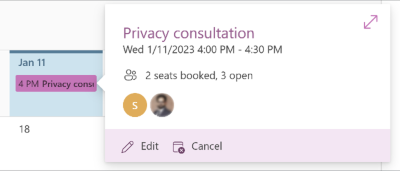
An enterprise can provide privacy webinars to multiple customers where both the privacy expert and legal expert are needed. With this feature, you can create a service with both the staff members and set the number of attendees as, say, 10. Now, up to 10 users can book the same privacy webinar slot now where both experts will be available to answer their queries. This feature is called a N:N service – a service between multiple staff and multiple attendees.
Helpful resources
If you are enjoying Microsoft Bookings, check out these recent blog posts:
Did you know? The Microsoft 365 Roadmap is where you can get the latest updates on productivity apps and intelligent cloud services. Check out what features are in development or coming soon on the Microsoft 365 Roadmap or view this roadmap item here.
Published on:
Learn moreWe can help you with Create multiple staff appointments with Microsoft Bookings
If you want help implementing, troubleshooting, or improving this product, contact us and we’ll point you in the right direction.
Related posts
Announcing the General Availability of the Microsoft 365 Document Collaboration Partner Program
Empowering Seamless Collaboration for Modern Workforces We are thrilled to announce the general availability of the Microsoft 365 Docume...
Favorite Copilot Prompts
(Amber Plumb interviewing Michael Morales and Allison Sweet) The power of M365 Copilot is transforming the way our support team operates...
Favorite Microsoft 365 Copilot Prompts
(Amber Plumb interviewing Michael Morales and Allison Sweet) The power of M365 Copilot is transforming the way our support team operates...
Boost digital event engagement with Voting and Archiving in Teams Q&A
Managing and delivering effective town halls is key to enabling two-way dialogue with leaders in today’s hybrid world. Microsoft Teams Q&A...
Prepare now for key end of support moments in 2025
One year from today, on October 14, 2025, support will end for all Office 2016 and 2019 suites, standalone apps, and servers. This includes:&n...
Everything you should know about Visio 2016 and Visio 2019 end of support
On October 14, 2025, Visio 2016 and Visio 2019 will reach end of support. After this date, Visio 2016 and Visio 2019 will no longer receive se...
Limit frontline worker access to Teams when off shift
We’re excited to announce that the frontline working time feature is now generally available! This feature allows admins to block or warn acce...
We are removing Feed on Microsoft 365 (Office)
As part of our ongoing efforts to streamline and enhance user experiences, we will be retiring the Feed feature (shown in figure 1 below) on t...
Leveraging Partner Apps to Deliver on the Promise of AI-Led Productivity
The advent of generative AI is driving a rethink of what outcomes we deserve from our productivity software – from gains in efficiency to more...
What’s new in FLW shared devices
Discover the Latest Enhancements in Shared Device Mode (SDM) We are excited to announce a series of new features in Shared Device Mode ...