
Smart buttons for incident tracking in SharePoint
Incident tracking in SharePoint lists often involves too many clicks. Users need to open each item, change a value, wait for the value to be saved, and hope they didn’t miss anything. With JSON column formatting and Power Automate, this process can be streamlined using inline action buttons.
Use case
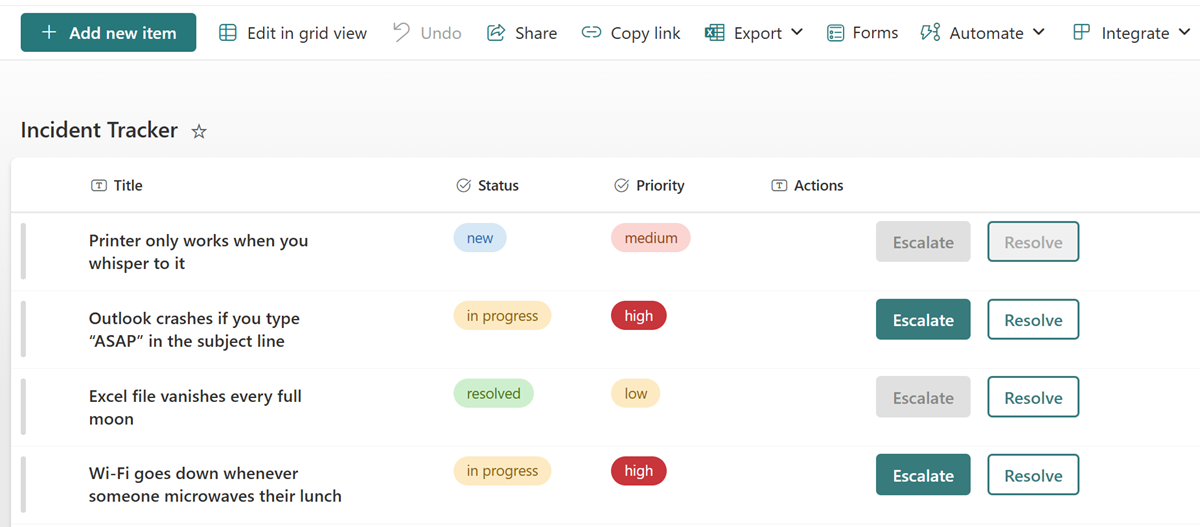
A SharePoint list tracks incidents with fields for title, priority (low, medium, high), and status (new, in progress, resolved). To improve efficiency, two buttons are added directly in the list view:
- Escalate: triggers a Power Automate flow to notify a manager
- Resolve: triggers a flow to mark the item as resolved
Both buttons are conditionally enabled: Escalate is only active when Priority = high, Resolve is only active when Status ≠ new
SharePoint List setup
Create a list with the following columns:
- Title (single line of text) (it’s already there)
- Priority (choice)
- Status (choice)
- Actions (single line of text; used for formatting only)
Power Automate flow setup
Create two flows in Power Automate:
- Escalate flow: Use “For a selected item”, then notify the people you like this to receive or start any other protocol that you might already have in place
- Resolve flow: Same trigger, update the Status column to be
resolvedand maybe send some message to the person who raised the incident
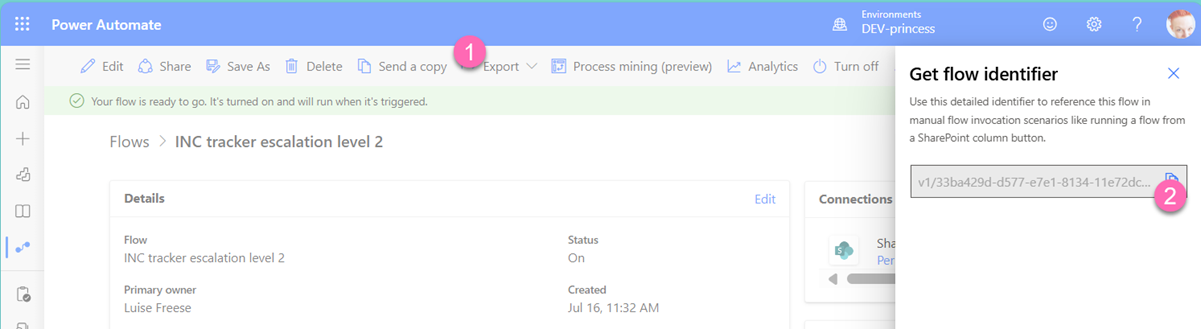
Copy the Flow IDs from their URLs.
Apply JSON formatting
Go to the Actions column → Column settings → Format this column. Paste the JSON below (replace the Flow IDs):
{
 "$schema": "https://developer.microsoft.com/json-schemas/sp/v2/column-formatting.schema.json",
 "elmType": "div",
 "style": {
 "display": "flex",
 "gap": "10px",
 "justify-content": "center"
 },
 "children": [
 {
 "elmType": "button",
 "txtContent": "Escalate",
 "style": {
 "background-color": "=if([$Priority] == 'high', '#287b7d', '#e0e0e0')",
 "color": "=if([$Priority] == 'high', 'white', '#888888')",
 "border": "2px solid transparent",
 "padding": "6px 12px",
 "border-radius": "4px",
 "cursor": "=if([$Priority] == 'high', 'pointer', 'not-allowed')",
 "font-weight": "600",
 "margin": "2px",
 "box-sizing": "border-box"
 },
 "attributes": {
 "disabled": "=if([$Priority] != 'high', true, false)"
 },
 "customRowAction": {
 "action": "executeFlow",
 "actionParams": "{\"id\": \"<FLOWID_ESCALATE>\"}"
 }
 },
 {
 "elmType": "button",
 "txtContent": "Resolve",
 "style": {
 "background-color": "=if([$Status] == 'new', '#f0f0f0', 'transparent')",
 "color": "=if([$Status] == 'new', '#aaaaaa', '#287b7d')",
 "border": "2px solid #287b7d",
 "padding": "6px 12px",
 "border-radius": "4px",
 "cursor": "=if([$Status] == 'new', 'not-allowed', 'pointer')",
 "font-weight": "500",
 "margin": "2px",
 "box-sizing": "border-box"
 },
 "attributes": {
 "disabled": "=if([$Status] == 'new', true, false)"
 },
 "customRowAction": {
 "action": "executeFlow",
 "actionParams": "{\"id\": \"<FLOWID_RESOLVE>\"}"
 }
 }
 ]
}
How it works
The root element is a div that acts as a container for the buttons, and we apply flexbox styling to align buttons horizontally with spacing between them. All buttons are nested inside the children array. We add conditional styling and call a Power Automate flow when the button gets selected.
Outcome
Users can take action directly in the list view without opening the item. You can find this soon as a sample in the PnP Listformatting repo - PR is pending 🤞🏻
Published on:
Learn moreWe can help you with Smart buttons for incident tracking in SharePoint
If you want help implementing, troubleshooting, or improving this product, contact us and we’ll point you in the right direction.
Related posts
You are holding GitHub Copilot Wrong!
Most developers think that one can’t really use GitHub Copilot wrong. There is a chat interface that lets you also choose a model, so th...
You are holding GitHub Copilot Wrong!
Part 0 showed why constant prompting, re-prompting, and steering GitHub Copilot feels fragile. Not because Copilot is unreliable, but because ...
Building a Multi-Hierarchy Ticket Classification System (Because Keywords Aren't Enough)
Look, I love a good keyword-based system as much as the next developer. They’re fast, predictable, and when your user says “VPN,&r...
Secretless cross-tenant dataverse access
Client secrets are like hiding your house key under the mat; easy to grab and impossible to audit. Certificates are just slightly better, beca...
How Azure CLI handles your tokens and what you might be ignoring
Running az login feels like magic. A browser pops up, you pick an account, and from then on, everything just works. No more passwords, no more...
How Dev Proxy teaches you to make your apps more resilient
I added Microsoft Dev Proxy to my Mermaid → Dataverse converter, because I wanted to test how it handled rate limits and API errors. What I go...
Building Azure functions that never store secrets — ever
What if your function could hit Microsoft Graph with no client secrets, no certs, and no Key Vault entries? That is exactly what a Managed id...
Introducing Mermaid to Dataverse Converter
Why diagrams matter (and why they usually fail us) Entity-Relationship Diagrams (ERDs) are the universal shorthand for talking about data mode...
It’s OK to be seen trying
It’s OK to be seen trying Somewhere along the way, we started believing that you’re only allowed to speak after you’ve figured everything out....
Stuck in pilot - Part 1: no foundations, no future
“We just need to test the AI. We’ll figure out the data later.” That sentence has quietly killed more AI pilots than any model failure ever ...