
[Relay] How to get the relay frontend IP and add it into firewall
![[Relay] How to get the relay frontend IP and add it into firewall](https://techcommunity.microsoft.com/t5/image/serverpage/image-id/367916i8E854D0633BE856F?v=v2 "[Relay] How to get the relay frontend IP and add it into firewall")
If you are Relay users and you have firewalls blocking Relay’s outbound traffic, the article may help you to config your firewalls to allow traffic from Relay.
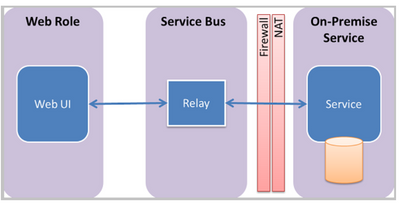
Whitelisting the Relay IP in the firewall would NOT help.
There are lots of instances behind Relay service, their IPs will change hence your Relay service does not have a dedicated outbound IP address. We recommend using the fully qualified domain names for your specific namespaces instead of using hardcoded IP addresses.
Format of Relay FQDN: <youServiceName>. servicebus.windows.net
If you still want to whitelist IP, we DO have a way.
We can try to use the following method to get the IPs.
Run nslookup <youServiceName>.servicebus.windows.net resolves to ns-sb2-prod-sy3-001.cloudapp.net as:
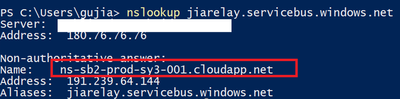
The gateways of namespaces in your cluster can be obtained as:
nslookup g0-prod-sy3-001-sb.servicebus.windows.net resolves to 13.75.152.38
nslookup g1-prod-sy3-001-sb.servicebus.windows.net resolves to 13.75.154.105
... ... ... ... ... ... ... ... ... ...
nslookup g31-prod-sy3-001-sb.servicebus.windows.net resolves to 40.126.225.100
We can use the existing script to auto obtain the gateway IP
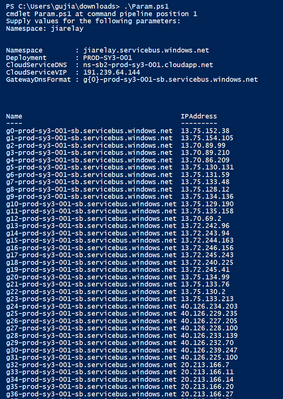
Please check here azure-relay-dotnet/GetNamespaceInfo.ps1 at master · Azure/azure-relay-dotnet · GitHub, you can run command “./GetNamespaceInfo.ps1” to run the script. It will help us to resolve all the IPs.
Here’s my testing result and please run the command to update the IP list in your firewall at least on a monthly basis.
Upcoming changes to IP addresses for Azure Relay
Recently, the Relay service team has been working on upgrading our infrastructure to the newest technologies. Due to this infrastructure change, the IP addresses associated with the namespaces are also going to be changed.
Your Relay based solutions may break if you aren't following the best practices of using domain names in your firewall or network device configurations to allow communication with this service but are instead using these IP addresses.
Published on:
Learn moreWe can help you with [Relay] How to get the relay frontend IP and add it into firewall
If you want help implementing, troubleshooting, or improving this product, contact us and we’ll point you in the right direction.
Related posts
Azure Storage - TLS 1.0 and 1.1 retirement
Overview TLS 1.0 and 1.1 retirement on Azure Storage was previously announced for Nov 1st, 2024, and it was postponed recently to 1 year later...
Efficient Management of Append and Page Blobs Using Azure Storage Actions
Overview In Azure Storage, Blob Lifecycle Management (BLM) allows you to automate the management of your data based on rules defined by...
[Azure AI Search] Internal Server Error when creating CMK encrypted objects
Scenario Customers follow the Microsoft doc to create CMK encrypted objects (data source, index etc.), but get the 500 Internal Serv...
Optimizing Azure Table Storage: Automated Data Cleanup using a PowerShell script with Azure Automate
Scenario This blog’s aim is to manage Table Storage data efficiently. Imagine you have a large Azure Table Storage that accumulates logs from ...
Optimizing Azure Table Storage: Automated Data Clean-up using a PowerShell script with Azure Automat
Scenario This blog’s aim is to manage Table Storage data efficiently. Imagine you have a large Azure Table Storage that accumulates logs from ...
Restoring Soft-Deleted Blobs with multithreading in Azure Storage Using C#
Blob soft delete is an essential feature that safeguards your data against accidental deletions or overwrites. By retaining deleted data for a...
Performing simple Azure Table Storage REST API operations using curl command.
The blog provides guidance to perform simple Table Storage REST API operations such as Create table, Delete Table, Insert entity, Delete entit...
Bulk delete all the old jobs from the batch account
Deleting a Job also deletes all Tasks that are part of that Job, and all Job statistics. This also overrides the retention period for Task dat...
Utilizing Azure Storage and Runbooks for scheduled automated backups of Azure SQL Databases
In this article, we are going to provide detailed steps to create a scheduled Azure SQL Database backup to storage account using automation. T...
[Azure Service Bus] JMS messages getting dead-lettered
The article discusses a problem where numerous messages end up in the dead letter queue (DLQ) when the JMS service bus consumer connects to th...