
Azure Storage Blob Count & Capacity usage Calculator
Overview
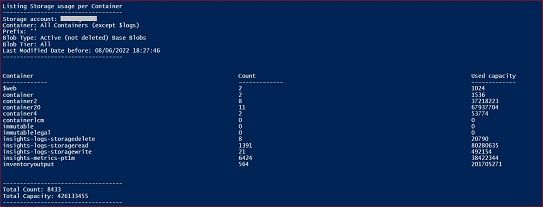
This PowerShell script allow you to count and calculate Azure Storage blob usage for Soft Deleted / non-Soft Deleted objects, by Container, by Tier, with Prefix, and considering Last Modified Date.
Azure Storage blob objects is defined as Base Blobs, Blob Snapshots or Blob Versions.
Parameters:
Specify each value in the script under "Parameters - User defined" section.
All values are mandatory and some can be empty, as described below and also in the script.
Options available are:
$storageAccountName - just run the script and the storage account name will be asked.
$containerName - specify some Container Name, or empty (default value) to list all containers
$prefix - specify some blob prefix (excluding container name) for scanning, or leave empty (default value) to list all objects
$deleted - specify 'True' to list only Soft Deleted objects, 'False' to list only non-Soft Deleted object (active objects - default value), or 'All' to list Active and Soft deleted Objects
$blobType - select 'Base' to list only base Blobs (default value), 'Snapshots' to list only Snapshots, 'Versions' to list only Versions, 'Versions+Snapshots' to list only Versions and Snapshots, or 'All Types' to list all objects (base Blobs, Versions and Snapshots)
$accessTier - select 'Hot' to list only objects in Hot tier, 'Cool' to list only objects in Cool tier, 'Archive' to list only objects in Archive tier, or 'All' to list objects in all tiers (Hot, Cool and Archive)
$Year, $Month, $Day - Define a date to list objects only before or equal of Last Modified Date - if at least one value is empty, current date will be used.
Notes:
- Just running the script will ask for your AAD credentials and to select the storage account name to list.
- By default (without any parameter change, the script will list all Base Blobs, on all containers in the storage account, from all access tiers, with Last Modified Date before or equal current date time.
- All other options (above) should be defined in the script.
- This can take hours/days to complete, depending on the number of blobs, versions and snapshots in the container or Storage account.
- $logs container is not covered by this script (not supported)
This script was tested on PSVersion 5.1.19041.1682 and Az.Storage module 4.6.0, for Blob flat namespace and Hierarchical namespace (ADLS Gen2) Storage accounts.
Other tools:
Azure Portal - Due to the historical flat name space nature of Blob service in Azure Storage, the sum of blobs or usage per container or per folder is not supported on Azure Portal. Also, listing blob snapshots or blob versions can only be verified to each specific blob and is not support list all at container level in the Portal.
Azure Storage Explorer (current version 1.24.3) tool can list, count and show usage for Active blobs, at container or subfolder level, using option "Folder Statistics".
We can list "Active and Soft Deleted blobs", "Active Blobs and blobs without current version", and "All blobs and blobs without current version". For count and capacity, we can only use it for Active Blobs.
For list snapshots and versions this option is only available at blob level.
In summary, we can list Soft Deleted Blobs, versions and snapshots but calculating its count and usage is not supported in Azure Storage Explorer.
Azure Storage data protection features:
Blob Snapshot
A snapshot is a read-only version of a blob that's taken at a point in time. A snapshot of a blob is identical to its base blob, except that the blob URI has a DateTime value appended to the blob URI to indicate the time at which the snapshot was taken. A blob can have any number of snapshots. Snapshots persist until they are explicitly deleted, either independently or as part of a Delete Blob operation for the base blob.
Blob versioning
Azure Blob storage versioning lets you automatically maintain previous versions of an object. When blob versioning is enabled, you can access earlier versions of a blob to recover your data if it is modified or deleted.
Soft delete for blobs
Blob soft delete protects an individual blob, snapshot, or version from accidental deletes or overwrites by maintaining the deleted data in the system for a specified period of time. During the retention period, you can restore a soft-deleted object to its state at the time it was deleted. After the retention period has expired, the object is permanently deleted.
Conclusion:
Calculate usage capacity on Azure storage is not always an easy task. Each client application can interact with blobs on its own way, creating snapshots and versions to protect the blobs when processing them. Also, Soft Delete can be used to protect accidental deletions.
All these features create additional blobs usually not listed in the base blob lists and even that lists are per container or per subfolder level.
For that reason, it's hard to have an idea of the global amount of blobs and storage usage per container or per subfolder, making the cost prediction very hard to calculate.
This PowerShell script should help you on calculate blob count and blob usage, based on more often filters used.
Related documentation:
Soft delete for blobs
Blob versioning
Blob Snapshots
Other techcommunity articles:
Calculate the size/capacity of storage account and it services (Blob/Table)
Analyzing Storage Capacity
Other PowerShell scripts:
Calculate the total billing size of a blob container
Calculate the size of a blob container with PowerShell
I hope this can be useful!!!
Published on:
Learn moreWe can help you with Azure Storage Blob Count & Capacity usage Calculator
If you want help implementing, troubleshooting, or improving this product, contact us and we’ll point you in the right direction.
Related posts
Azure Storage - TLS 1.0 and 1.1 retirement
Overview TLS 1.0 and 1.1 retirement on Azure Storage was previously announced for Nov 1st, 2024, and it was postponed recently to 1 year later...
Efficient Management of Append and Page Blobs Using Azure Storage Actions
Overview In Azure Storage, Blob Lifecycle Management (BLM) allows you to automate the management of your data based on rules defined by...
[Azure AI Search] Internal Server Error when creating CMK encrypted objects
Scenario Customers follow the Microsoft doc to create CMK encrypted objects (data source, index etc.), but get the 500 Internal Serv...
Optimizing Azure Table Storage: Automated Data Cleanup using a PowerShell script with Azure Automate
Scenario This blog’s aim is to manage Table Storage data efficiently. Imagine you have a large Azure Table Storage that accumulates logs from ...
Optimizing Azure Table Storage: Automated Data Clean-up using a PowerShell script with Azure Automat
Scenario This blog’s aim is to manage Table Storage data efficiently. Imagine you have a large Azure Table Storage that accumulates logs from ...
Restoring Soft-Deleted Blobs with multithreading in Azure Storage Using C#
Blob soft delete is an essential feature that safeguards your data against accidental deletions or overwrites. By retaining deleted data for a...
Performing simple Azure Table Storage REST API operations using curl command.
The blog provides guidance to perform simple Table Storage REST API operations such as Create table, Delete Table, Insert entity, Delete entit...
Bulk delete all the old jobs from the batch account
Deleting a Job also deletes all Tasks that are part of that Job, and all Job statistics. This also overrides the retention period for Task dat...
Utilizing Azure Storage and Runbooks for scheduled automated backups of Azure SQL Databases
In this article, we are going to provide detailed steps to create a scheduled Azure SQL Database backup to storage account using automation. T...
[Azure Service Bus] JMS messages getting dead-lettered
The article discusses a problem where numerous messages end up in the dead letter queue (DLQ) when the JMS service bus consumer connects to th...