
Unable to load Service Fabric Explorer
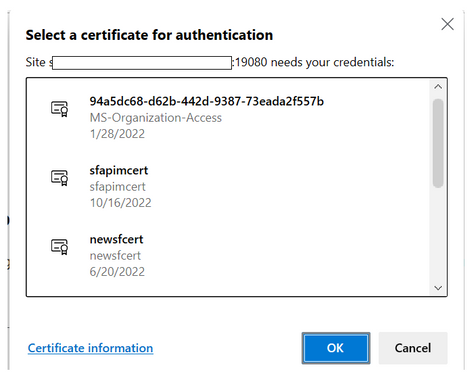
Service Fabric Explorer (SFX) is an open-source tool for inspecting and managing Azure Service Fabric clusters. To launch SFX in a web browser, browse to the cluster's HTTP management endpoint from any browser - for example https://clusterFQDN:19080. Service Fabric explorer may not load for numerous reasons. Most frequent reasons could be access denied while trying to access or unable to choose the right certificate. Following steps provide some useful insights on investigation steps and mitigations to be followed in such scenarios.
1. Check the status of the cluster and certificate that is being tried to access the cluster. If the cluster state is in “Upgrade service unreachable” then mostly, the certificate might be expired. If the certificate has a warning stating it is not under trusted root and is issued by a third-party certificate issuer, then add it to trusted root certificates and exclude the Certificate issuer from any security rules that will block the access to the site. Furthermore, if cluster is healthy, and certificate is not expired, then verify if provided certificate to the cluster is wrong.
2. If the issue persists, post verifying correct certificate usage and validity, clear the browser session and cache to get it to prompt again. Additionally, try to access from incognito mode or private window.
3. SFX fails to load due to certificate issues. Initially, To identify certificate related issues at the first level, verify if there is a pop up coming up on screen to choose the certificate before accessing the Service Fabric Explorer.
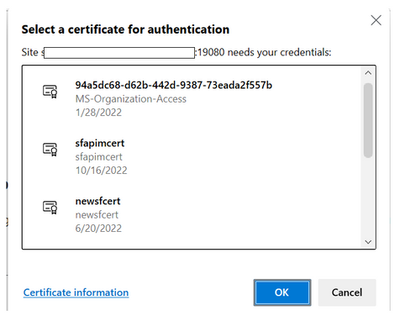
Note: Download the certificate on the machine that is been used to access the Service fabric explorer such that certificate appears on pop up while accessing SFX.
4. When loading the admin Service Fabric Explorer, use F12 (or any network traffic analyzer) to look at the call failures.

If there are call failures with 403 as shown below, it means Fabric Upgrade Service is not able to talk to gateway.

This indicates an issue with the certificate or an issue with http gateway. For certificate issues, check if certificate is ACL’d correctly to 'Network Service' and has full permissions.
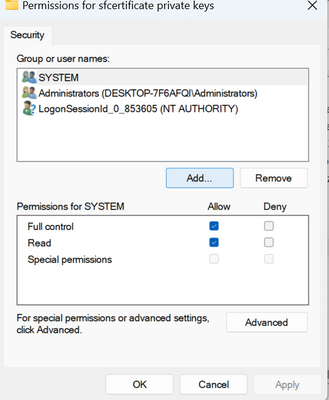
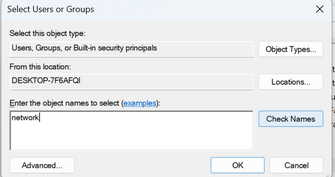

5. If a similar screen like below is visible,

Moving ahead, verify if the Inbound connectivity is blocked from the Azure portal. check if port 19000 and 19080 are open and accessible in Azure NSG, and machine’s IP of user is whitelisted when trying to access from local machine.

In case of any blockages in inbound connectivity to 19080 via network/firewall/proxy issue at client end, They must be unblocked by the client.
To help identify network issues, Using the Network Monitor Tool will help capture the traces that can be analysed further.
Furthermore, One can even use a ServiceTag to allow network traffic to/from SFRP endpoint .
6. In cases of AAD based authentication to access Service fabric explorer, verify correct permissions to access and modify from Service Fabric explorer are present as per the Set up Azure Active Directory for client authentication for Azure Service Fabric.
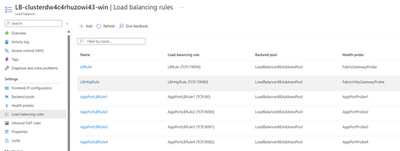
7. Further, to isolate the issue, RDP into any one of the VM that is a part of Service fabric cluster. Try to access localhost:19080 and see if service fabric explorer is visible. If yes, then check your Load balancer’s rules and allow https connection to 19080.
8. Try connecting to the cluster over PowerShell using Connect-ServiceFabricCluster. If this succeeds, FabricGateway is up and the TCP management endpoint is fine. As a next step Please reach out to Service Fabric support team to investigate traces for HttpGateway issues.
If connection to cluster fails, FabricGateway is having issues and not just the Http endpoint. The next step is to share the traces located in D:\SvcFab\Log\Traces with service fabric support team to investigate further for FabricGateway issues.
Published on:
Learn moreWe can help you with Unable to load Service Fabric Explorer
If you want help implementing, troubleshooting, or improving this product, contact us and we’ll point you in the right direction.
Related posts
Azure Storage - TLS 1.0 and 1.1 retirement
Overview TLS 1.0 and 1.1 retirement on Azure Storage was previously announced for Nov 1st, 2024, and it was postponed recently to 1 year later...
Efficient Management of Append and Page Blobs Using Azure Storage Actions
Overview In Azure Storage, Blob Lifecycle Management (BLM) allows you to automate the management of your data based on rules defined by...
[Azure AI Search] Internal Server Error when creating CMK encrypted objects
Scenario Customers follow the Microsoft doc to create CMK encrypted objects (data source, index etc.), but get the 500 Internal Serv...
Optimizing Azure Table Storage: Automated Data Cleanup using a PowerShell script with Azure Automate
Scenario This blog’s aim is to manage Table Storage data efficiently. Imagine you have a large Azure Table Storage that accumulates logs from ...
Optimizing Azure Table Storage: Automated Data Clean-up using a PowerShell script with Azure Automat
Scenario This blog’s aim is to manage Table Storage data efficiently. Imagine you have a large Azure Table Storage that accumulates logs from ...
Restoring Soft-Deleted Blobs with multithreading in Azure Storage Using C#
Blob soft delete is an essential feature that safeguards your data against accidental deletions or overwrites. By retaining deleted data for a...
Performing simple Azure Table Storage REST API operations using curl command.
The blog provides guidance to perform simple Table Storage REST API operations such as Create table, Delete Table, Insert entity, Delete entit...
Bulk delete all the old jobs from the batch account
Deleting a Job also deletes all Tasks that are part of that Job, and all Job statistics. This also overrides the retention period for Task dat...
Utilizing Azure Storage and Runbooks for scheduled automated backups of Azure SQL Databases
In this article, we are going to provide detailed steps to create a scheduled Azure SQL Database backup to storage account using automation. T...
[Azure Service Bus] JMS messages getting dead-lettered
The article discusses a problem where numerous messages end up in the dead letter queue (DLQ) when the JMS service bus consumer connects to th...