
Intelligent Kubernetes Event Summarizer: A Step-by-Step Guide with a Demo
Kubernetes is powerful but it also can be complicated due to the number of events and logs it generates. It is crucial to have the tools in place that enable you to summarise these events quickly when someone points out the root cause of an issue amongst all those logs or error traces. This article proposes a intelligent Kubernetes event summarizer that utilizes OpenAI’s language model to summarize complex event logs into abstract human-readable form. Such a tool can also help the operations team save time and respond to issues faster.
What This Tool Does?
This tool connects to your kubernetes cluster pulls out pod events and uses OpenAI language model under the hood to summarize them in a concise format. Teams can easily access the summarization output as it is exposed through RESTful API.
Key Features
- Gets events reported about the pod from Kubernetes cluster.
- Summarizes events using OpenAI API.
- Has a REST API to access event summary
Technical Architecture
Overview
- This tutorial works with kubernetes v1.30.2 to set up a local development environment with Docker Desktop 4.35.1 (173168). This version is a simple set up for experimentation.
- I use the Python Kubernetes client to connect to the cluster and Flask as my web framework for creating the API.
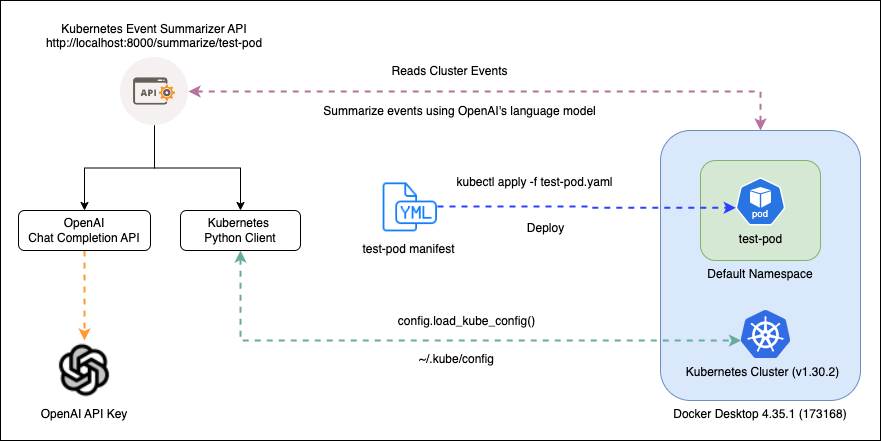
Components Explained
- Kubernetes Cluster: The source of pod events.
- OpenAI API: Summarizes the events into human-readable text.
- Flask App: Serves as an API that returns the event summary.
Note for Other Clusters:
- If you use a different cluster setup (e.g., Minikube, EKS, GKE, or AKS), make sure to handle authentication correctly. The line
config.load_kube_config()inapp.pyloads the default kubeconfig file for authentication. Adjustments may be needed to match your cluster’s authentication method. - For in-cluster deployments, use
config.load_incluster_config()to load the cluster’s service account credentials for proper authentication.
Demo Walkthrough
Setting Up the Environment
Clone the Repository:
git clone https://github.com/sprider/k8s-event-summarizer.git
cd k8s-event-summarizer
Create a Virtual Environment and Install Dependencies:
python3 -m venv venv
source venv/bin/activate
pip3 install -r app/requirements.txt
Set Up Environment Variables:
Create a .env file in the app/ directory and add the OpenAI API key:
OPENAI_API_KEY=your_openai_api_key
Running the Flask App Locally
Start the Flask App:
python3 app/app.py
Access the API:
Open a browser or use Postman to visit http://localhost:8000/summarize/<pod-name> to get summary for a specific pod.
Using Docker
Build the Docker Image:
docker build -t k8s-event-summarizer .
Run the Docker Container:
docker run -p 8000:8000 --env-file app/.env k8s-event-summarizer
Deploying a Test Pod in Your Cluster
To generate events for testing, use the test-pod.yaml file provided in the repository:
kubectl apply -f test-pod.yaml
This will create a test pod that can trigger events, which the event summarizer can then process and summarize.
Accessing Summarized Events via the API
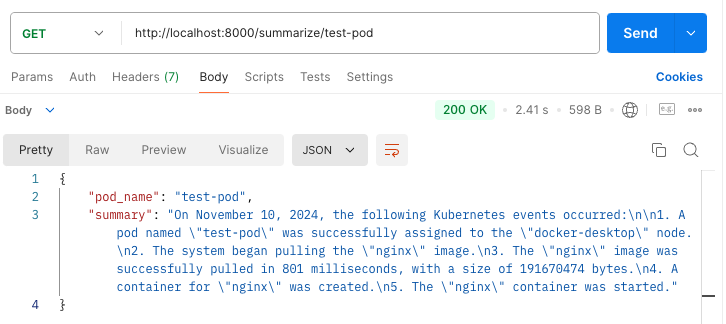
Use curl or Postman to send a GET request to the API endpoint:
curl http://localhost:8000/summarize/test-pod
Replace test-pod with the name of the pod for which you want to retrieve event summary.
Understanding the Code Structure
app.py: The main Python script that sets up the Flask API, connects to the Kubernetes cluster, fetches events, and sends them to OpenAI for summarization.requirements.txt: Lists all the Python dependencies needed for the app..env: Stores environment variables such as the OpenAI API key.Dockerfile: Contains the instructions to build and run the app as a Docker container.test-pod.yaml: A sample YAML file for creating a test pod in the Kubernetes cluster to generate events.
Wrap-Up
Kubernetes Event Summarizer — it helps in summarizing the events from the logs by creating human-friendly summaries of pod events. It can be customized to cover other use cases as well, for instance to monitor events of deployments and services and hence its very flexible. This project is a basic version which can be extended to address multiple operational requirements. This little tool can also be a game changer for your DevOps workflow if coupled with alerting systems or dashboards.
While this demo focuses on summarizing pod events, the same approach can be applied to monitoring other types of events, such as deployment events, service and ingress events, and more.
In real-world scenarios, clusters can generate millions of events. A practical next step would be to ingest these events into a vector database with embeddings, allowing the tool to function as a question-and-answer system. This would enable users to ask specific questions, with NLP capabilities extracting key attributes and calling relevant methods, resulting in a more versatile system that covers a wide range of use cases.
I hope you found this article helpful!
Published on:
Learn moreWe can help you with Intelligent Kubernetes Event Summarizer: A Step-by-Step Guide with a Demo
If you want help implementing, troubleshooting, or improving this product, contact us and we’ll point you in the right direction.
Related posts
Jev Does Not Paint: Putting TypeSafe in Front of Gemini
I wanted a reason to use TypeSafe that was not another chatbot wrapper. Most of the AI I wire into software still wants to talk. I needed some...
I Asked God to Hold My Hand
Almost 20 years ago, I was waiting outside my company to collect my documents and start my first IT job. I sat under a banyan tree. That day ...
Identity-Aware SRE Agents with kagent on Akamai LKE
I wanted a reason to put an AI agent in front of a real Kubernetes cluster and watch what happens when two different people ask it to fix the ...
Vasanam Studio: How I Built a Bible Verse Video Generator for My Church as a Hobby Project
Every morning at 5 AM, the women of my church gather for prayer. At the end of the session, our pastor’s wife shares a Bible verse and sends a...
The demo worked. That was the problem.
Over a weekend I built a small Kubernetes demo to play with zero trust. Three little services calling each other in a chain, a login page in f...
Notes from building an agent on AgentCore end to end
I wanted a reason to use AgentCore end to end. Runtime, memory, guardrails, identity, the whole thing. A Bible Q&A agent felt like a good ...
Building a Rust gRPC AI Security Gateway for LLM Traffic
I wanted a small, honest implementation of the GenAI governance shape in code: a component on every LLM call that applies policy first, option...
Claude Code Security: The Smart Way to Integrate AI
Anthropic just dropped Claude Code Security, and if you’re anywhere near AppSec or DevSecOps, you’ve probably already seen the debate lighting...
How I Built a Semantic Cache Using Only AWS Services
LLM calls are expensive and slow, but here’s the thing - users ask the same questions in different ways all the time. “What’s your refund poli...
How to Build Better AI Agent Tools: Cut Costs by 70% (MCP Server Case Study)
Building tools for AI agents isn’t the same as building regular APIs. This guide shows you how to design tools that reduce token costs by 60-7...