
Assign incidents and alerts to someone else

You can now assign incidents and alerts to someone else in your organization
To control and manage incidents and alerts in the organization, sometimes you would need to assign them to a specific analyst. Now you can do that right from the incident queue in Microsoft 365 Defender.
How does it work?
From the incident or alert side pane in the incident queue or the incident page, select Manage incident/alert and choose the user account you want to assign.
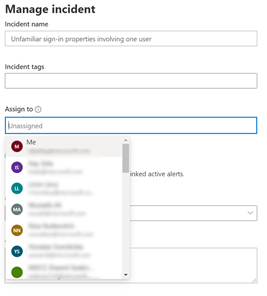
By default, the first value in the “assign to” drop menu will be yourself (“Me” at the title).
Note that you can choose all users from the organization, but only users with access to the Microsoft 365 Defender portal will be able to view the incident or alert. So, to help you assign the most relevant people in the organization, the rest of the default suggestions you will get are the latest assignees you chose.

Once the user is assigned, he can filter to see only incidents that are assigned to himself. A SOC manager that dispatches the incident queue can also filter for all unassign incidents or alerts to choose the relevant incident he would like to assign.
Published on:
Learn moreRelated posts
Monthly news - November 2024
Microsoft Defender XDRMonthly newsNovember 2024 Edition This is our monthly "What's new" blog post, summarizing product updates and v...
Monthly news - August 2024
Microsoft Defender XDRMonthly newsAugust 2024 Edition This is our monthly "What's new" blog post, summarizing product updates and var...
Defender for Identity: the critical role of identities in automatic attack disruption
In today's digital landscape, cyber-threats are becoming increasingly sophisticated and frequent. Advanced attacks are often multi-workload an...
New Security Copilot skill: Identity Summary
“Can you summarize Defender insights about this user over the last two days?” Microsoft’s latest innovation for Copilot for Security, sim...
Demystify potential data leaks with Insider Risk Management insights in Defender XDR
In today's complex security landscape, understanding and mitigating data exfiltration risks is more critical than ever. Earlier this year, we ...
Monthly news - October 2024
Microsoft Defender XDRMonthly newsOctober 2024 Edition This is our monthly "What's new" blog post, summarizing product updates and va...
AI-Driven Guided Response for SOCs with Microsoft Copilot for Security
In today's evolving cybersecurity landscape, security operation centers (SOCs) are constantly bombarded with incidents ranging from minor aler...
Identity Summary: New Security Copilot skill within Defender XDR
“Can you summarize Defender insights about this user over the last two days?” Microsoft’s latest innovation for Copilot for Security, sim...
Detecting browser anomalies to disrupt attacks early
Detecting browser anomalies is crucial for early identification and prevention of cyber threats, preventing data breaches and attacks by monit...
Microsoft Defender for Identity: the critical role of identities in automatic attack disruption
In today's digital landscape, cyber-threats are becoming increasingly sophisticated and frequent. Advanced attacks are often multi-workload an...