
Managing long term log retention (or any business data)

Managing long term log retention (or any business data)
The shared responsibility model of the public cloud helps us all pass of some of the burden that needed to be solved completely in-house. A notable example of this is the protection and retention of business-critical data, whether it be the digital copies of documents sent to customer’s, financial history records, call recordings or security logs. There are many types of records and objects that we have business, compliance, or legal reasons to ensure that an original point in time copy is kept for a set period.
One of the excellent features that enable this in Azure is Immutable storage, linked with Lifecycle management rules.
Protecting Security log exports
For security teams, this is often a requirement to keep the security logs from the SIEM for an extended period. We can export our data from our log analytics workspaces through several methods outlined in this article (hyperlink here). Once we have exported that data to an Azure storage account we need to protect it from change or deletion for the required time period. We also need to enforce our business rules in ensuring that data that is no longer needed is removed from the system.
The solution we are building here allows for the storage of these logs.

Immutable storage
Immutable storage for Azure Blob storage enables users to store business-critical data objects in a WORM (Write Once, Read Many) state. This state makes the data non-erasable and non-modifiable for a user-specified interval. For the duration of the retention interval, blobs can be created and read, but cannot be modified or deleted.
Immutable storage polices are two types.
- Time base Polices – These allow you to set the minimum retention period for the storage objects. During that time both writes and deletes to the object will be blocked. When the policy is locked (more on that later) the policy will also prevent the deletion of the storage account. Once the retention period has expired, the object will continue to be protected from write operations but delete operations can be executed.
- Legal Hold Policies – These polices allow for a flexible period of hold and can be removed when no longer needed. Legal hold polices need to be associated with one or more tags that are used as identifiers. These tags are often used to represent case or event ID’s. You can place a Legal Hold policy on any container, even if it already has a time-based policy.
For the purposes of this post, we are going to focus on the use of the time-based polies, but if you want to read more on legal hold polices, they can be found here.
Time based polices are implemented simply on a storage container through PowerShell, the Azure CLI or the Portal, but not through ARM templates. This article will go through the use of the portal, the PowerShell and CLI code can be found here.

When adding a new Time-based policy, you will need to specify the number of days to enforce protection, this is a number of days between 1 and 146,000 days (400 years – that’s a really long time). At the same time, you can allow for append blobs to continue to be appended to. For systems that are continually adding to a log through the use of Append Blobs (such as continuous export from Log Analytics), this allows them to keep appending to the blob while it is under the policy. Note that the retention time restarts each time a block is added. Also note that a Legal hold policy does not have this option, and thus will deny an append write if a placed on.
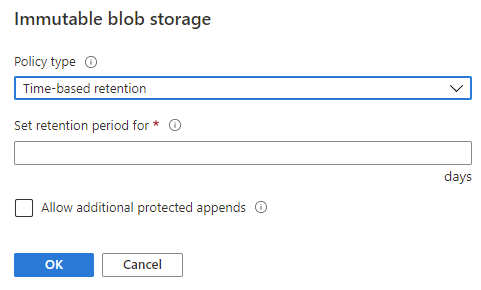
When a time-based policy is first created it starts in an unlocked state. In this state you can toggle the append protection and change the number of days of protection as needed. This state is for testing and ensuring all settings are set correctly, you can even delete the policy if it was created by mistake.
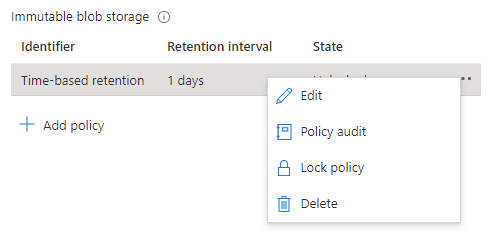
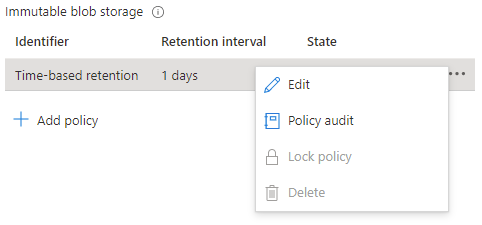
Once the policy settings are confirmed to be correct, it is then time to lock the policy.
Locking the policy is irreversible and after it cannot be deleted. You must delete the container completely, and this can only be done once there are no items that are protected from deletion by a policy. Once locked you can only increase the number of days in the retention setting (never decrease) five times.
Lifecycle management
While protecting the data from deletion or change is half of the problem, we must also consider enforcing removal of data in line with retention policies. We can also take additional actions to contain the costs of the storage account by altering the tiers of storage between Hot, Cool and Archive.
Lifecycle management rules of a storage account can automatically remove the storage objects we no longer need through a simple rule set.
Note: if you enable the Firewall on the storage account, you will need to allow “Trusted Microsoft Services”, otherwise the management rules will be blocked from executing. If your corporate security policy does not allow this exception, then you won’t be able to use the management rules outlined here, but you can implement a similar process though an alternate automation mechanism inside your network.
Lifecycle management rules are set at the Storage Account level and are simple enough to configure. For our logs we just want to set a rule to automatically delete the logs at the end of our retention period.
Again, we will be going through the creation using the portal, but these can be done through PowerShell or ARM template, instructions are here.
At the Storage account select Lifecycle management, and then Add a rule.

Give the rule a descriptive name and set the scope to capture all the appropriate objects that you need to manage.
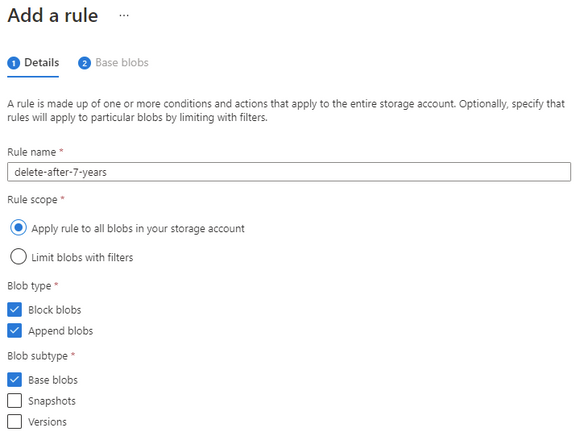
Set the number of days you want to keep the object and then set the delete action.
Make sure that the number of days is longer than the immutable time-based policy otherwise the rule will not be able to delete the object.

Finally complete your rule.
The rule will continuously evaluate the storage account cleaning up any files that have past their required date.
Note: if you needed to keep some specific files for a more extended period, you could consider a Legal Hold policy on those objects that would then stop the management rule from processing them.
Long Term Costs
Storing these items for such an extended period can often lead into larger costs.
We can also add some additional rules to help us control the costs of the storage.
An important consideration here is the fact that the immutable storage policies will continue to allow us to move the storage between tiers while keeping the data protected from change or deletion.
Note: Lifecycle management rules for changing the storage tier today only apply to Block Blob, not Append Blob.
Going thought the same process as above to create a rule, though this time we set the last accessed number of days and then select the “move to cool” action. This will enable the system to move unused Block Blobs to the cool tier.
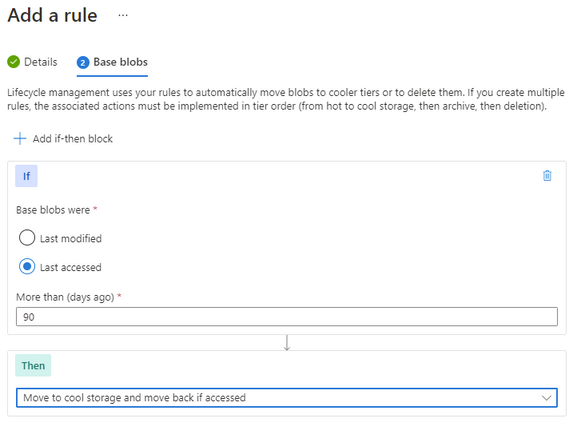
You can further enhance this with an additional rule to move the Block Blob to archive after a further date. There is no requirement to move to cold before moving to archive, so if that suits your business outcome you can move it directly to archive.

Keep in mind that analytical systems that leverage the storage system (such as Azure Data Explorer) won’t be able to interact with archived data and it must be rehydrated back to cool or hot to be used.
Timeline
With these two systems in place, we have set up our logs to be kept for our required period, manage out costs and then automatically removed at the end.

Summary
While in this article we have focused on applying the protection to the logs from the monitoring systems or SIEM, the process and protection applied here could suit any business data that needs long term retention and hold. This data could be in the form of log exports, call recordings or document images.
Published on:
Learn moreRelated posts
Update on classic storage account retirement and upcoming changes for classic storage customers
We previously announced that support would end for retired Azure classic storage accounts on 31 August 2024. Now that we are past the retireme...
Azure Elastic SAN for Azure VMware Solution: now Generally Available
Have you been looking to expand your storage on Azure VMware Solution (AVS), but do not need the extra compute performance and the associated ...
Accelerate metadata heavy workloads with Metadata Caching preview for Azure Premium Files SMB & REST
Azure Files previously announced the limited preview of Metadata caching highlighting improvements on the metadata latency (up to 55...
Announcing UNLIMITED Public Preview of Metadata Caching for Azure Premium SMB/REST File Shares
Azure Files is excited to announce the Unlimited public preview of Metadata Caching for the premium SMB/REST file share tier. Unlimited ...
Azure Backup-SAP HANA DB Backup Delivers More Value at Lower TCO with Reduced Protected Instance Fee
Azure Backup for SAP HANA Database Delivers More Value at Lower TCO with Reduced Protected Instance Fees starting 1st Sept’2024 At Azur...
Switch to Azure Business Continuity Center for your at scale BCDR management needs
In response to the evolving customer requirements and environments since COVID-19, including the shift towards hybrid work models and the incr...
The Azure Storage product group is heading to the SNIA Developer Conference 2024
The Azure Storage product group is heading to the SNIA Developer Conference (SDC) 2024 in Santa Clara, California, USA from September 16th thr...
Latest advancements in Premium SSD v2 and Ultra Azure Managed Disks
We are excited to share the latest advancements in Premium SSD v2 (Pv2) and Ultra disks, the next generation of Azure disk stor...
Unlocking the Potential of Unstructured Data with Microsoft Copilot and Azure Native Qumulo
It has been a true pleasure to see our friends at Qumulo constantly innovating and delivering a service that adds more value with every releas...
Public Preview: Customer Managed Planned Failover for Azure Storage
We are excited to announce customer managed Planned Failover for Azure Storage is now available in public preview. Over the past few ye...