
Reduce Support Costs with Business Assist Forecast Service Excel Add-in

Business Assist Forecast is a tool that enables quick and confident forecasting of future support volume based on historical data, which can save time compared to manually analyzing past trends and volume levels. By using this tool, customer service leaders, managers, and agents can reliably predict service-call volumes to manage staffing levels. Adopting this service can help reduce your organization's help desk costs and provide great customer experience, as it is powered by Microsoft Support.
Quickly find Business Assist Forecast Add-in
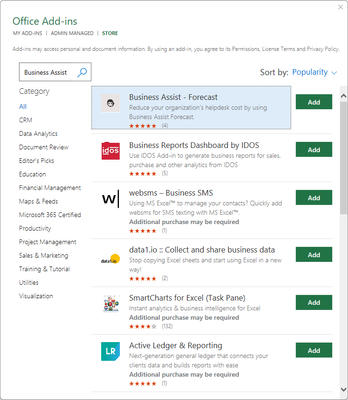
All add-ins, including the Business Assist Forecast Add-in, can now be found, and activated in two locations: the Home tab and the File tab. Users can select Add-ins" in the Home tab or "Get add-in" on the Find tab to access and use the Business Assist Forecast Add-in.
By selecting the Add button, you can quickly install and activate the Add-in for Business Assist Forecast in less than a minute.
How the add-in works and the benefits it provides
Our goal is to offer users the best possible forecasting experience, powered by our AI/ML (Artificial Intelligence/Machine Learning) models that operate in the background of this service.
- With this add-in, users can forecast upcoming cases and conversation volumes based on historical traffic data, which can help with staff management and reduce support costs.
- Additionally, users can visualize forecast volumes on a daily, weekly, and monthly basis for a time range of up to six months.
- The ML (machine learning) model behind this add-in can also automatically detect and adjust repeated seasonal events and holidays from historical traffic, with the option to import your service calendar. This helps the forecasting model to accurately predict volume during special or seasonal events, improving the overall accuracy of the forecasts.
How to use the add-in
To utilize the add-in, first make sure it is installed and activated. Then, input your data into Excel using the following two fields:
- Date (in one of the supported formats):
- yyyy-mm-dd
- mm/dd/yyyy
- yyyy-mm-dd hh:mm:ss
- yyyy-mm-dd hh:mm
- mm/dd/yyyy hh:mm:ss
- mm/dd/yyyy hh:mm
- Volume (ticket count)
Select the Business Assist Forecast Add-in and then, from the right flyout panel, select the forecast end date and seasonality from the drop-down menu. It is important to note that seasonality does not determine the output format, but rather shows the repeated cycle of the input file (for example, a daily input file has a daily pattern). After entering these details, click "Run Forecast."

Once the forecast is generated and the job has successfully completed, two sheets will appear:
Predictions: Contains the forecast, as well as low and high values. Forecast is the mean value and those low and high numbers they represent the 95th percentile of the mean value.
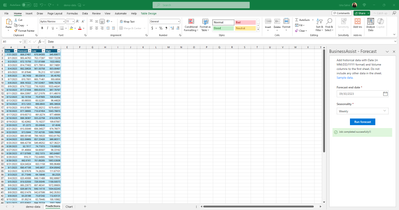
Chart: Displays the forecast value and prediction graphical chart.

The Business Assist Forecast Add-in for Excel is a powerful tool that can help businesses forecast customer support volume, manage staffing levels, and reduce support costs using the advanced statistical model that Microsoft uses to manage their own support forecasts. With its easy-to-use interface and AI/ML-powered forecasting models this add-in is a valuable addition to any customer service team's toolkit. We encourage you to try it out and see the benefits for yourself.
Published on:
Learn moreRelated posts
Announcing the General Availability of the Microsoft 365 Document Collaboration Partner Program
Empowering Seamless Collaboration for Modern Workforces We are thrilled to announce the general availability of the Microsoft 365 Docume...
Favorite Copilot Prompts
(Amber Plumb interviewing Michael Morales and Allison Sweet) The power of M365 Copilot is transforming the way our support team operates...
Favorite Microsoft 365 Copilot Prompts
(Amber Plumb interviewing Michael Morales and Allison Sweet) The power of M365 Copilot is transforming the way our support team operates...
Boost digital event engagement with Voting and Archiving in Teams Q&A
Managing and delivering effective town halls is key to enabling two-way dialogue with leaders in today’s hybrid world. Microsoft Teams Q&A...
Prepare now for key end of support moments in 2025
One year from today, on October 14, 2025, support will end for all Office 2016 and 2019 suites, standalone apps, and servers. This includes:&n...
Everything you should know about Visio 2016 and Visio 2019 end of support
On October 14, 2025, Visio 2016 and Visio 2019 will reach end of support. After this date, Visio 2016 and Visio 2019 will no longer receive se...
Limit frontline worker access to Teams when off shift
We’re excited to announce that the frontline working time feature is now generally available! This feature allows admins to block or warn acce...
We are removing Feed on Microsoft 365 (Office)
As part of our ongoing efforts to streamline and enhance user experiences, we will be retiring the Feed feature (shown in figure 1 below) on t...
Leveraging Partner Apps to Deliver on the Promise of AI-Led Productivity
The advent of generative AI is driving a rethink of what outcomes we deserve from our productivity software – from gains in efficiency to more...
What’s new in FLW shared devices
Discover the Latest Enhancements in Shared Device Mode (SDM) We are excited to announce a series of new features in Shared Device Mode ...