
Advanced Microsoft Authenticator security features are now generally available!

After announcing the public preview of critical Microsoft Authenticator security features, we’re thrilled today to share that these features are now Generally Available for you to further secure your organization:
- Admins can now prevent accidental approvals in Microsoft Authenticator with number matching, location context, and application context.
- Admins can now better manage the Microsoft Authenticator app with new Admin UX and Admin APIs.
For more details about these exciting features, please read below:
Last month, we talked about the increase in MFA fatigue attacks and recommended best practices organizations should adopt to increase their security. To protect you, we’ll automatically enable critical security features to tackle ever-changing threat vectors. At the end of February 2023, we’ll enable number matching for all Authenticator users. We highly recommend that you leverage the rollout controls and deploy these exciting security upgrades to Microsoft Authenticator.
Number matching in Microsoft Authenticator MFA experience
To prevent accidental approvals and defend against MFA attacks, admins can require users to enter the number displayed on the sign-in screen when approving an MFA request in Authenticator.

To learn how to enable number matching for your users, click here.
Additional context in Microsoft Authenticator approval requests
Another way to reduce accidental approvals is to show users additional context in Authenticator notifications. Admins can now selectively choose to enable the following:
- Application context: Show users which application they’re signing into.
- Location context: Show users their sign-in location based on the IP address of the device they’re signing into.
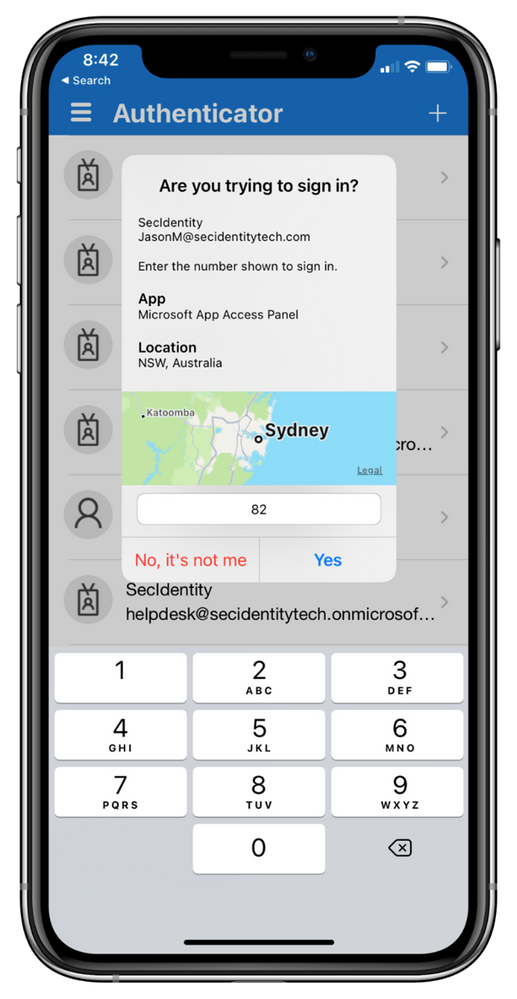
To learn how to enable additional context for your users, click here.
Refreshed Admin UX and APIs
Admins can now better manage their Microsoft Authenticator app features with our refreshed Admin UX and APIs. Use the new “Configure” tab in the Admin UX to enable/disable different features. It now also includes the highly requested capability to exclude groups from features to assist with smoother feature rollouts.
Note: These rollout controls will be removed for number matching once it has been enabled for all at the end of February 2023.

If you haven’t already, you can use Registration Campaigns to seamlessly deploy the Authenticator app within your organization with these security upgrades to better protect your organization.
Ongoing enhancements for security and usability
The Authenticator app is constantly innovating to include enhanced security and experience features. Authenticator on iOS now uses App Transport Security (ATS). This security feature improves the privacy and data integrity between Authenticator and web services. This improvement is now enabled for all and does not impact how you use your app. In addition, users on Android can now search their accounts, with search on iOS rolling out soon.
As always, we want to hear from you! Feel free to leave comments down below or reach out to us on aka.ms/AzureADFeedback.
Best regards,
Alex Weinert (@Alex_T_Weinert)
VP Director of Identity Security, Microsoft
Learn more about Microsoft identity:
- Related Article: Authentication strength – choose the right auth method for your scenario!
- Related Article: Defend your users from MFA fatigue attacks
- Get to know Microsoft Entra – a comprehensive identity and access product family
- Return to the Microsoft Entra (Azure AD) blog home
- Join the conversation on Twitter and LinkedIn
- Share product suggestions on the Entra (Azure AD) forum
Published on:
Learn moreWe can help you with Advanced Microsoft Authenticator security features are now generally available!
If you want help implementing, troubleshooting, or improving this product, contact us and we’ll point you in the right direction.
Related posts
Sync identities from Rippling to Microsoft Entra ID
Today, we’re thrilled to announce that customers using Rippling HCM can now automatically provision users to on-premises Active Directory and ...
Microsoft Entra ID Governance for government
I’m pleased to announce that as of November 1, 2024, Microsoft Entra ID Governance is available for federal agencies, state and local governme...
Update to security defaults
As part of the Secure Future Initiative, we’ve evolved our security approach to align with three security principles: secure by design, secure...
Meet Microsoft Entra at Ignite 2024: November 18-22
Microsoft Ignite is just around the corner, taking place from Monday, November 18, 2024 through Friday, November 22, 2024, in Chicago, Illinoi...
Manage Microsoft Entra ID role assignments with Microsoft Entra ID Governance
I’m excited to announce that we now support Microsoft Entra role assignments in Microsoft Entra ID Governance's Entitlement Management feature...
The latest enhancements in Microsoft Authenticator
Hi folks, I'm thrilled to announce three major Microsoft Entra ID advancements that will help you protect your users with phishing-resi...
Microsoft Security announcements and demos at Authenticate 2024
The Microsoft Security team is excited to connect with you next week at Authenticate 2024 Conference, taking place October 14 to 16 in Carlsba...
What's new in Microsoft Entra - September 2024
We’re excited to announce the general availability of Microsoft Entra Suite—one of the industry’s most comprehensive secure access solutions f...
Explore the key benefits of Microsoft Entra Private Access
The traditional network security models are becoming increasingly ineffective in a world where remote work and cloud services are the norm. Co...
Join us at the Microsoft Entra Suite Showcase!
This fall, we are bringing the Microsoft Entra Suite Showcase to cities worldwide. Join us to explore how our latest advancements in secure id...