
Introducing the Microsoft 365 Health dashboard: an easy way to view key health information

If you are responsible for IT in a small or medium-sized organization, you’re charged with keeping many apps and services running smoothly with limited time to spend on each one. Your feedback to us was that it’s difficult to understand the complete health of your Microsoft 365 environment because the information you need is spread out across many pages in the Microsoft 365 admin center. We heard you! So, we created a new dashboard that pulls this information together, giving you an at-a-glance view of key health information.
Starting today, this new dashboard is now available in public preview! You can access it by logging into the Microsoft 365 admin center and visiting https://admin.microsoft.com/AdminPortal/Home?#/healthoverview.
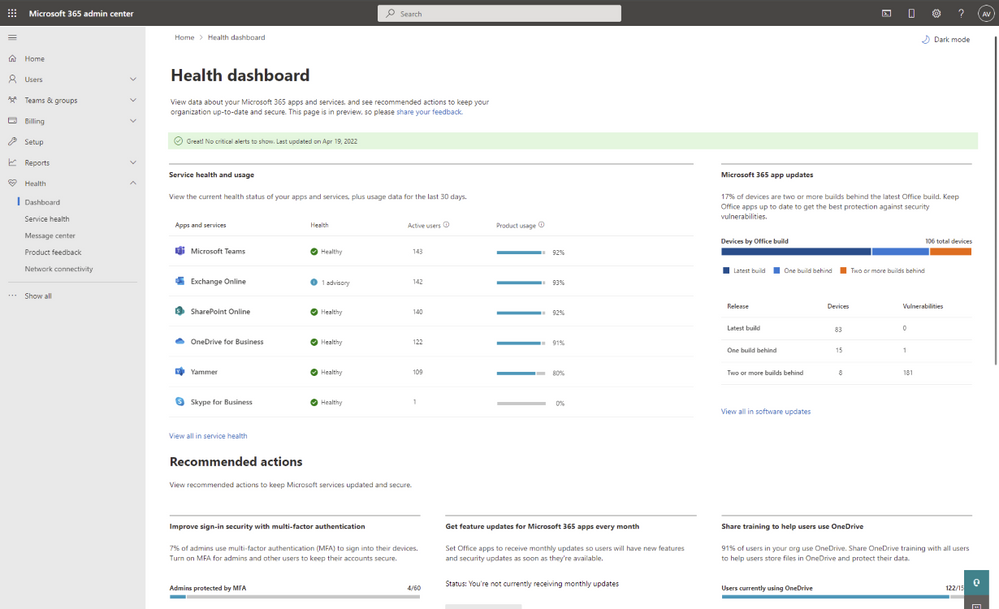
The dashboard is designed to do more than show the health status of cloud services—it gives you a full picture of the health of your environment. You can see how well your organization is keeping desktop software up to date, following best practices for security, and using the products you’ve paid for. Let’s take a closer look.
Critical alerts
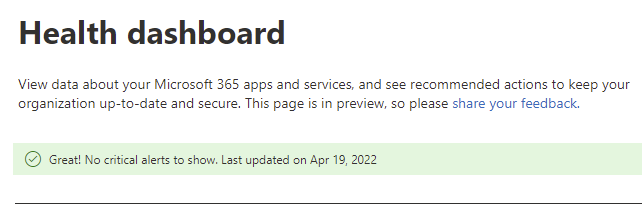
At the top of the dashboard, you’ll see critical alerts about any issues that need your attention. Two types of notifications will appear here:
- General service incidents
- Billing issues that may cause problems if not addressed, such as a credit card that is about to expire
If there are no alerts to show, a green banner is displayed to let you know that everything is in order.
Service health and usage
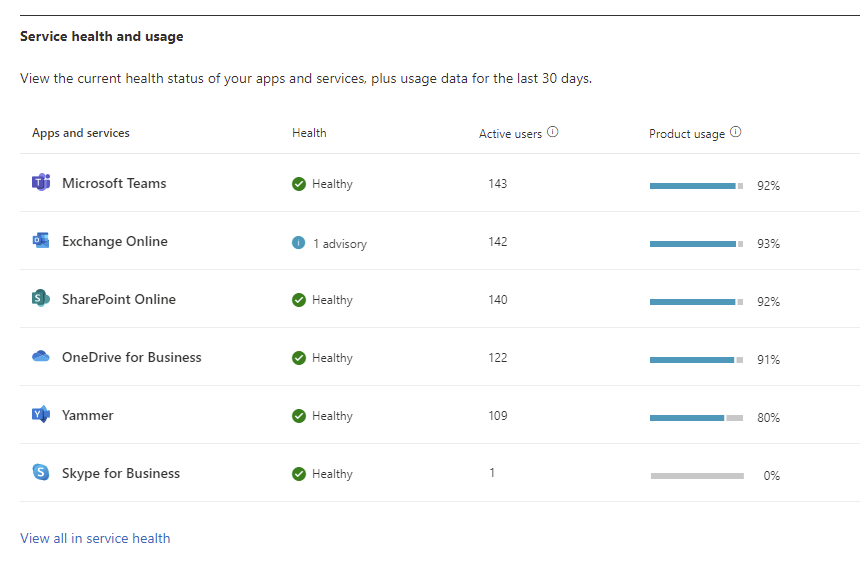
In the center of the page, you will see the current service health status of Microsoft 365 apps and services that you own. This is an abbreviated list; if you want to see the exhaustive list of all products you can click to visit the full-service health page. This section also shows the average daily usage for each product, and a view of license utilization to help you understand how extensively products are being used in your organization.
Microsoft 365 app updates
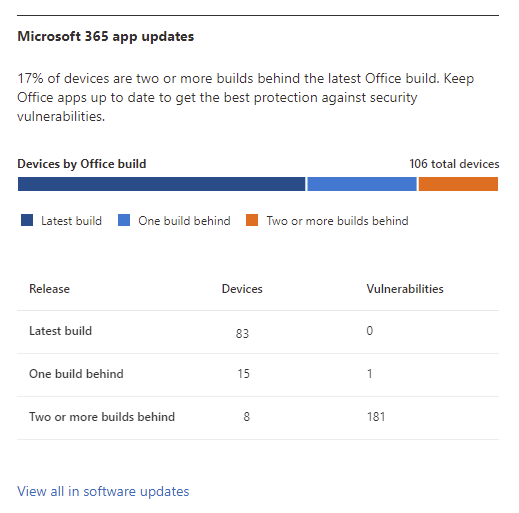
Next on the Health dashboard is a section covering Microsoft 365 app updates. In today’s IT landscape, keeping software up to date is vital to maintaining a strong security posture. To help you succeed in this ongoing effort, the Health dashboard provides an at-a-glance view of whether Microsoft 365 desktop apps like Word, Excel, and PowerPoint are up to date. If some devices have fallen behind, you will see how many devices and how many vulnerabilities there are. The information here is powered by the recently released Software Updates page, which we recently announced in this blog post. Check out the blog for more details.
Recommended actions
At the bottom of the dashboard, you’ll see recommendation cards with suggestions on what you can do to improve your organization’s health. Three recommendations are shown here:
- Activate multifactor authentication: You’ll see a summary of how many admin accounts are currently enabled for MFA, and a button that takes you to the setup wizard to enable MFA
- Enable monthly updates for Office: You’ll see whether your org’s Office update frequency is set to receive updates on our recommended cadence
- Share OneDrive training: To encourage users to store files in OneDrive and get better recovery against ransomware or device failure, you can send them a link to a video overview
Getting started with the dashboard
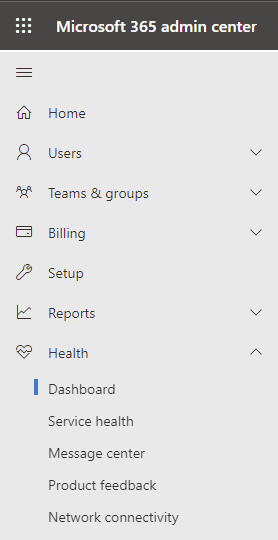
Over the next few weeks, we’ll update the Health section of Microsoft 365 admin center navigation menu to show a link to the new dashboard page. If you want to get your hands on the page sooner, you don’t need to wait! Access it today by logging into the Microsoft 365 admin center and going here: Health Overview. Note, the Global admin or Global reader role is required to access the page. We recommend you bookmark this page for easy access until it appears on the navigation menu.
Over time we will evolve the dashboard to address the needs of larger organizations and make it available to more admin roles. We’d love your input along that path. So, after you try the Health dashboard, please send us your thoughts from the Feedback link within the page.
We’re excited to bring this dashboard to you. We hope it will be a useful tool to help you keep tabs on the total health of your Microsoft 365 environment, so you can keep your organization up-to-date, secure, and productive.
Did you know? The Microsoft 365 Roadmap is where you can get the latest updates on productivity apps and intelligent cloud services. Check out what features are in development or coming soon on the Microsoft 365 Roadmap, or to view the roadmap item for Microsoft 365 admin center: Health Dashboard, click here.
Published on:
Learn moreRelated posts
Announcing the General Availability of the Microsoft 365 Document Collaboration Partner Program
Empowering Seamless Collaboration for Modern Workforces We are thrilled to announce the general availability of the Microsoft 365 Docume...
Favorite Copilot Prompts
(Amber Plumb interviewing Michael Morales and Allison Sweet) The power of M365 Copilot is transforming the way our support team operates...
Favorite Microsoft 365 Copilot Prompts
(Amber Plumb interviewing Michael Morales and Allison Sweet) The power of M365 Copilot is transforming the way our support team operates...
Boost digital event engagement with Voting and Archiving in Teams Q&A
Managing and delivering effective town halls is key to enabling two-way dialogue with leaders in today’s hybrid world. Microsoft Teams Q&A...
Prepare now for key end of support moments in 2025
One year from today, on October 14, 2025, support will end for all Office 2016 and 2019 suites, standalone apps, and servers. This includes:&n...
Everything you should know about Visio 2016 and Visio 2019 end of support
On October 14, 2025, Visio 2016 and Visio 2019 will reach end of support. After this date, Visio 2016 and Visio 2019 will no longer receive se...
Limit frontline worker access to Teams when off shift
We’re excited to announce that the frontline working time feature is now generally available! This feature allows admins to block or warn acce...
We are removing Feed on Microsoft 365 (Office)
As part of our ongoing efforts to streamline and enhance user experiences, we will be retiring the Feed feature (shown in figure 1 below) on t...
Leveraging Partner Apps to Deliver on the Promise of AI-Led Productivity
The advent of generative AI is driving a rethink of what outcomes we deserve from our productivity software – from gains in efficiency to more...
What’s new in FLW shared devices
Discover the Latest Enhancements in Shared Device Mode (SDM) We are excited to announce a series of new features in Shared Device Mode ...