
Announcing the availability of Quick Access filters in Office app for Android

The Office Mobile team is excited to announce the availability of Quick Access filters in Office Mobile on Android phones and tablets! This feature can help you increase your productivity while customizing Office on your Android mobile device, so it works best for you.
Locate your content easily with Quick Access filters
We heard you! We know that you would like to navigate your Office app more efficiently, especially when it comes to accessing your content. Quick Access filters provide you with easy navigation and personalization options, helping you locate your content more quickly.
With Quick Access, you can utilize multiple filters to view different content types. Content-usage filters, such as, “RECENT”, “SHARED”, and “OPENED” help users find their content based on interactions, while content-type filters, such as, “WORD”, “EXCEL”, and “PDF” make it easier to filter by file type. Users can personalize their home screen by adding, removing, or organizing these filters for quick access.
How to get Quick Access filters in Office app for Android
If you don’t have the Office app, you can download it from the Google Play store. If you already have the Office app on your Android device, download the latest version. The next time the app is launched, you will immediately see a guided experience introducing you to this new feature.
To start using the new Quick Access filters experience in the Office app for Android, follow these steps:
- Open the Office app on your Android device and locate the Quick Access options at the top of your home screen.
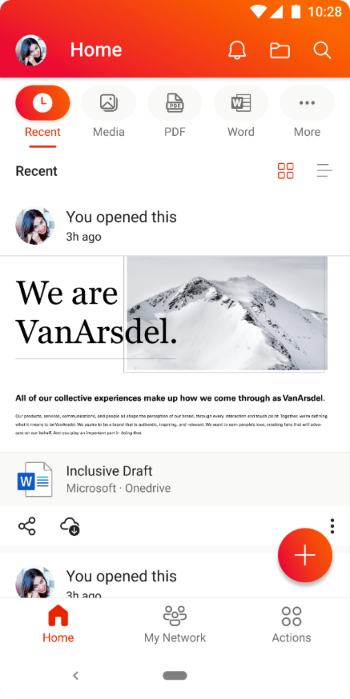
NOTE: These options have replaced the “Recent” and “Shared” options on the home screen.
- Tap on a Quick Access option to see filtered content based on the filter you choose. You can add or remove options on the Quick Access bar by tapping the [...] More option at the end.

Availability
Quick Access for the Office app for Android has been rolled out worldwide and is available on app versions 16.0.5102.20000 and later. To learn more about Office app for Android, check out this helpful Microsoft Support article.
Last but not the least, we are always listening to feedback from users. You can send us in-app feedback or leave us a comment below!
Continue the conversation by joining us in the Microsoft 365 Tech Community! Whether you have product questions or just want to stay informed with the latest updates on new releases, tools, and blogs, Microsoft 365 Tech Community is your go-to resource to stay connected!
Published on:
Learn moreRelated posts
Announcing the General Availability of the Microsoft 365 Document Collaboration Partner Program
Empowering Seamless Collaboration for Modern Workforces We are thrilled to announce the general availability of the Microsoft 365 Docume...
Favorite Copilot Prompts
(Amber Plumb interviewing Michael Morales and Allison Sweet) The power of M365 Copilot is transforming the way our support team operates...
Favorite Microsoft 365 Copilot Prompts
(Amber Plumb interviewing Michael Morales and Allison Sweet) The power of M365 Copilot is transforming the way our support team operates...
Boost digital event engagement with Voting and Archiving in Teams Q&A
Managing and delivering effective town halls is key to enabling two-way dialogue with leaders in today’s hybrid world. Microsoft Teams Q&A...
Prepare now for key end of support moments in 2025
One year from today, on October 14, 2025, support will end for all Office 2016 and 2019 suites, standalone apps, and servers. This includes:&n...
Everything you should know about Visio 2016 and Visio 2019 end of support
On October 14, 2025, Visio 2016 and Visio 2019 will reach end of support. After this date, Visio 2016 and Visio 2019 will no longer receive se...
Limit frontline worker access to Teams when off shift
We’re excited to announce that the frontline working time feature is now generally available! This feature allows admins to block or warn acce...
We are removing Feed on Microsoft 365 (Office)
As part of our ongoing efforts to streamline and enhance user experiences, we will be retiring the Feed feature (shown in figure 1 below) on t...
Leveraging Partner Apps to Deliver on the Promise of AI-Led Productivity
The advent of generative AI is driving a rethink of what outcomes we deserve from our productivity software – from gains in efficiency to more...
What’s new in FLW shared devices
Discover the Latest Enhancements in Shared Device Mode (SDM) We are excited to announce a series of new features in Shared Device Mode ...