
PowerShell script to get the total number of partitions in Event Hub Namespace

Scenario: PowerShell script to get the total number of partitions in Event Hub Namespace.
You must be wondering how to find out total number of partition count for any Event Hub namespace??
On the Azure portal you can only see partition count per Event Hub Entity level but not Namespace level. It’s tiresome job to manually sum up partition counts of all the entities especially when you have hundreds of event hub entities under the namespace.
Here is a simple way to find out total number of Partitions under Event Hub namespace using PowerShell script.
Solution:
Use below PowerShell script to see the total number of Partitions under your namespace.
Please find below steps on how to run the PowerShell script to see total number of partitions in an Event Hub namespace over Azure Portal:
Step 1: Login to Azure portal
Step 2: Open Azure PowerShell terminal and connect to your Azure account using any of options mentioned in Authentication Methods
Step 3: Run the above mentioned PowerShell script by replacing your Resource Group, Event Hub Namespace details accordingly.
Step 4: You will be seeing total number of partition count under Event Hub namespace in Result as below. (Highlighted in RED box)

This script allows you to quickly check the total number of partitions under Event Hub namespace and take necessary actions like increasing PU’s/ CU’s if it is reaching quota limit.
You can also create an Alert using this PowerShell script by putting a threshold value near to Quota limit & proactively act on increasing PU’s/ CU’s if it is reaching quota limit.
In Premium and Dedicated tiers of Event Hub, there is a limitation on partition count per PU/ CU at namespace level.
Below are the quotas and limits on Partitions and Event Hub entities per namespace level.
|
Limit |
Basic |
Standard |
Premium |
Dedicated |
|
Number of partitions per event hub |
32 |
32 |
100 per event hub, but there's a limit of 200 per PU at the namespace level.
|
1024 per event hub |
|
Number of event hubs per namespace |
10 |
10 |
100 per PU |
1000 |
When you try to create a new Event Hub exceeding partitions limit on Namespace level, it throws below error.
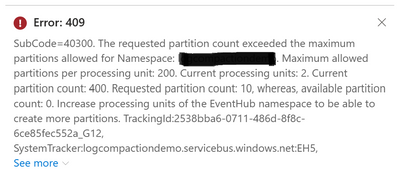
To avoid getting these errors especially when you are in PRODUCTION environment/ using automatic script to create Event Hub entities, this script helps to proactively check if current partition count nearing Quota limit.
Reference Links:
Quotas and limits - Azure Event Hubs - Azure Event Hubs | Microsoft Learn
Published on:
Learn moreWe can help you with PowerShell script to get the total number of partitions in Event Hub Namespace
If you want help implementing, troubleshooting, or improving this product, contact us and we’ll point you in the right direction.
Related posts
Azure Storage - TLS 1.0 and 1.1 retirement
Overview TLS 1.0 and 1.1 retirement on Azure Storage was previously announced for Nov 1st, 2024, and it was postponed recently to 1 year later...
Efficient Management of Append and Page Blobs Using Azure Storage Actions
Overview In Azure Storage, Blob Lifecycle Management (BLM) allows you to automate the management of your data based on rules defined by...
[Azure AI Search] Internal Server Error when creating CMK encrypted objects
Scenario Customers follow the Microsoft doc to create CMK encrypted objects (data source, index etc.), but get the 500 Internal Serv...
Optimizing Azure Table Storage: Automated Data Cleanup using a PowerShell script with Azure Automate
Scenario This blog’s aim is to manage Table Storage data efficiently. Imagine you have a large Azure Table Storage that accumulates logs from ...
Optimizing Azure Table Storage: Automated Data Clean-up using a PowerShell script with Azure Automat
Scenario This blog’s aim is to manage Table Storage data efficiently. Imagine you have a large Azure Table Storage that accumulates logs from ...
Restoring Soft-Deleted Blobs with multithreading in Azure Storage Using C#
Blob soft delete is an essential feature that safeguards your data against accidental deletions or overwrites. By retaining deleted data for a...
Performing simple Azure Table Storage REST API operations using curl command.
The blog provides guidance to perform simple Table Storage REST API operations such as Create table, Delete Table, Insert entity, Delete entit...
Bulk delete all the old jobs from the batch account
Deleting a Job also deletes all Tasks that are part of that Job, and all Job statistics. This also overrides the retention period for Task dat...
Utilizing Azure Storage and Runbooks for scheduled automated backups of Azure SQL Databases
In this article, we are going to provide detailed steps to create a scheduled Azure SQL Database backup to storage account using automation. T...
[Azure Service Bus] JMS messages getting dead-lettered
The article discusses a problem where numerous messages end up in the dead letter queue (DLQ) when the JMS service bus consumer connects to th...