
Reduce time to response with classification

Classifying an alert or incident means you tag it as representing true malicious activity or a false alarm as part of the initial triage process. This process lets your team know that a potential threat has been investigated and determined to be true or false. It’s also a feedback channel for Microsoft to learn about the quality of our detections and continuously improve them. With the new classification capabilities we introduce today, you can be more efficient in managing your incident and alert queues and reduce your overall mean time to resolution (MTTR).
The new classification experience provides insights on similar alerts observed in the past, and tailored recommendations with direct links to follow-up actions, making alert triage and handling process quick and easy.
How it works
Classifying incidents and alerts is easy!
First, determine whether the alerted activity is indeed malicious or not. Then, open the Manage incident or Manage alert pane, select Classification, and then select the option that best describes the incident or alert. To save time, when the classification is set on an incident, all the alerts in the incident will be classified with the same value. Here is an example.
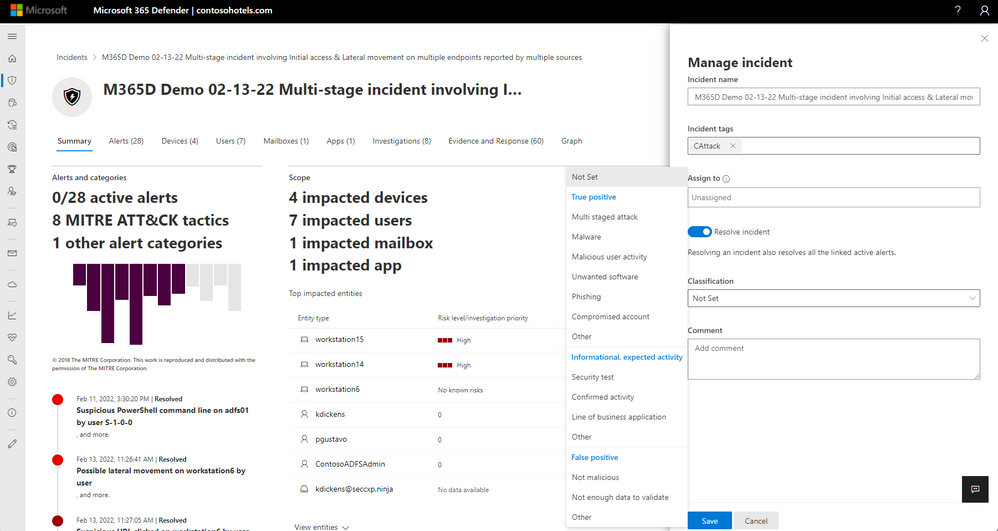
Options are divided into 3 categories:
- True positive – Alerts that you believe accurately indicate a real threat and for which you want to be alerted going forward.
- Informational, expected activity – Alerts that are technically accurate, but represent normal behavior or simulated threat activity. You generally want to ignore these alerts but expect them for similar activities in the future in case those future activities are triggered by actual attackers or malware. Use the options in this category to classify alerts for security tests, red team activity, as well as expected unusual behavior from trusted apps and users.
- False positive — Alerts that you believe are a false alarm and the activity alerted on is not malicious. Use the options in this category to classify alerts that mistakenly identified normal events or activities as malicious or suspicious. Unlike alerts for informational, expected activity, which can also be useful for catching real threats, you generally don’t want to see these alerts again.
NOTE: Around April 30, 2022, the previous determination values (‘APT’, ‘Security personnel’ and ‘Security testing’) will be deprecated and no longer available via the API.
How classifications save time
Often, your organization will see over time some alerts that are similar to previous ones, as attack patterns often repeat. When you save your classification, you and your team can track and respond to the alert in an informed manner . It’s an easy way to share knowledge, helping teammates to learn how others resolved similar incidents or alerts.
Classifying similar alerts
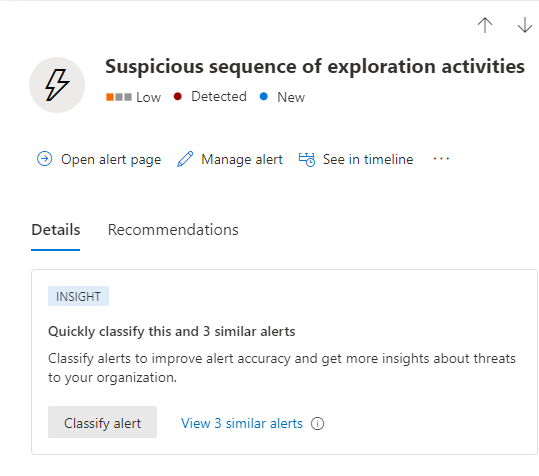
Microsoft 365 Defender now identifies similar alerts. Once you determine the nature of an alert, you can classify it and similar other alerts at the same time. Select Classify alert in the INSIGHT box as shown here.
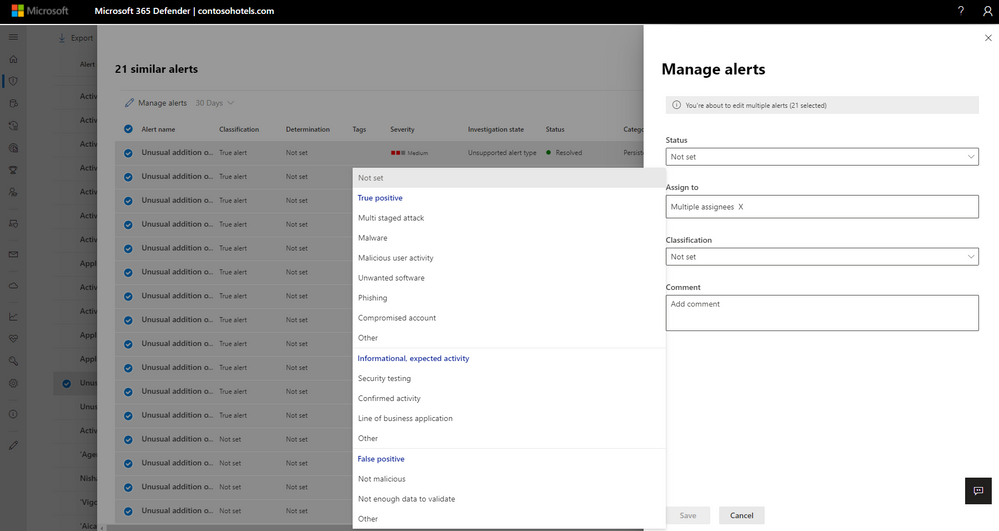
Microsoft 365 Defender displays the list of similar alerts and allows you classify all of them at once. Here’s an example.
Saving triage time
If similar alerts were already classified in the past, you can save time by using the classification history to learn how other alerts were resolved by your teammates or by you in the past. The insights will help you triage with more confidence using knowledge from past similar alerts.
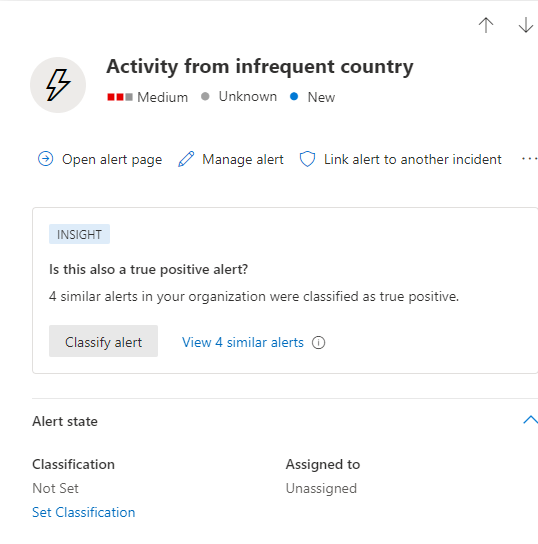
After triaging the alert and classifying it, use the Recommendations tab for the next steps of investigation, containment, remediation, and prevention provided by Microsoft research experts.

Your classifications help Microsoft create better alerts
Beyond assisting your SOC colleagues with faster classification of new similar alerts, classifications are also used to continuously assess and improve Microsoft’s detection quality.
Microsoft 365 Defender boasts a rich library of detection analytics. Our models are constantly evolving to address the ever-changing threat landscape. Your alert classifications help continuously tune this library to provide the highest quality detections and keep organizations safe and efficient.
To learn more how to manage and investigate alerts see Investigate alerts in Microsoft 365 Defender | Microsoft Docs
We hope you try out this new feature and use it to more quickly and effectively manage incidents and alerts in your environment. We would love to hear from you - do you find it useful or have suggestions for improvement? Send us feedback through the Microsoft 365 Defender portal.
Published on:
Learn moreRelated posts
Monthly news - November 2024
Microsoft Defender XDRMonthly newsNovember 2024 Edition This is our monthly "What's new" blog post, summarizing product updates and v...
Monthly news - August 2024
Microsoft Defender XDRMonthly newsAugust 2024 Edition This is our monthly "What's new" blog post, summarizing product updates and var...
Defender for Identity: the critical role of identities in automatic attack disruption
In today's digital landscape, cyber-threats are becoming increasingly sophisticated and frequent. Advanced attacks are often multi-workload an...
New Security Copilot skill: Identity Summary
“Can you summarize Defender insights about this user over the last two days?” Microsoft’s latest innovation for Copilot for Security, sim...
Demystify potential data leaks with Insider Risk Management insights in Defender XDR
In today's complex security landscape, understanding and mitigating data exfiltration risks is more critical than ever. Earlier this year, we ...
Monthly news - October 2024
Microsoft Defender XDRMonthly newsOctober 2024 Edition This is our monthly "What's new" blog post, summarizing product updates and va...
AI-Driven Guided Response for SOCs with Microsoft Copilot for Security
In today's evolving cybersecurity landscape, security operation centers (SOCs) are constantly bombarded with incidents ranging from minor aler...
Identity Summary: New Security Copilot skill within Defender XDR
“Can you summarize Defender insights about this user over the last two days?” Microsoft’s latest innovation for Copilot for Security, sim...
Detecting browser anomalies to disrupt attacks early
Detecting browser anomalies is crucial for early identification and prevention of cyber threats, preventing data breaches and attacks by monit...
Microsoft Defender for Identity: the critical role of identities in automatic attack disruption
In today's digital landscape, cyber-threats are becoming increasingly sophisticated and frequent. Advanced attacks are often multi-workload an...