
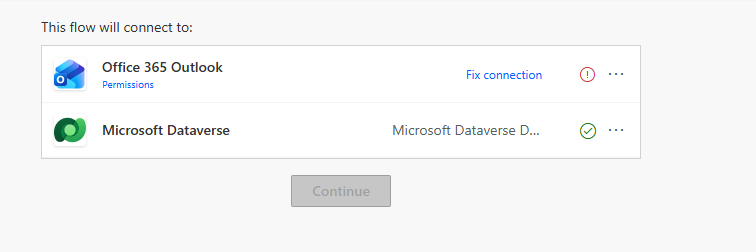
Open a Power Automate Flow for Edit Without Fixing Broken Connections First
Published on:
Learn moreWe can help you with Open a Power Automate Flow for Edit Without Fixing Broken Connections First
If you want help implementing, troubleshooting, or improving this product, contact us and we’ll point you in the right direction.
Related posts
Enhancing Dataverse Views with Custom Icons, Tooltips & Visualizations (Dynamics 365)
While working with Model-driven apps, sometimes a visual indicator can make a view much easier to scan. For example, instead of displaying sim...
Drawer Lookup Control in Dynamics 365 (A better lookup experience on mobile)
I recently came across a small but useful addition to the Dynamics 365 / Power Apps lookup experience: the Drawer Lookup Control. With the sta...
Export Bookable Resource Working Hours using ExpandCalendar (Dynamics 365 Field Service)
Recently we had a requirement to export the working hours of Bookable Resources from Dynamics 365 for a specified date range and make that inf...
Making a Field Read-Only in Business Process Flow (BPF) – Dataverse / Dynamics 365
A common requirement with Business Process Flows is this: the user must capture all the required details on the form before they are allowed t...
How to Enable Microsoft 365 Copilot in Model-Driven Apps
Microsoft 365 Copilot brings conversational AI directly into Model-Driven Apps, allowing users to ask natural language questions about Dataver...
AB-100 Last-Minute Revision Cheat Sheet (Microsoft Agentic AI Business Solutions Architect)
Recently, I cleared the Microsoft Certified: Architecting Agentic AI Business Solutions (AB-100) exam. While preparing, I ended up creating th...
Column Visualizations for Grids / Views (Preview) –Dataverse / Dynamics 365
Power Apps now lets us render a column’s data as a small graphic in the grid – a gauge, a sparkline, a colored bar, or stars – instead o...
Business Process Flow Error: “Participating entity record of stage: X is not valid” (0x80040216) (Dynamics 365 / Dataverse)
Scenario Working on a custom multi-entity Business Process Flow (Opportunity → Quote) recently, we ran into this error while trying to reactiv...
Comparing Web Resources (JavaScript) Across Multiple Dataverse Environments Using a Console App
We recently refactored a large JavaScript solution — replacing a number of deprecated methods with their supported equivalents, along with som...
Power Platform Environment Not Showing Up in Maker Portal & Power Platform Admin Center (Dataverse / Dynamics 365)
Recently, we ran into an interesting issue while working with a Dynamics 365 / Dataverse environment. Even though the user was assigned the Sy...