
Deepening Well-Architected guidance for workloads hosted on Azure

I am excited to announce a comprehensive refresh of the Well-Architected Framework for designing and running optimized workloads on Azure. Customers will not only get great, consistent guidance for making architectural trade-offs for their workloads, but they’ll also have much more precise instructions on how to implement this guidance within the context of their organization.
Background
Cloud services have become an essential part of the success of most companies today. The scale and flexibility of the cloud offer organizations the ability to optimize and innovate in ways not previously possible. As organizations continue to expand cloud services as part of their IT strategies, it is important to establish standards that create a culture of excellence that enables teams to fully realize the benefits of the modern technologies available in the cloud.
At Microsoft, we put huge importance on helping customers be successful and publish guidance that teaches every step of the journey and how to establish those standards. For Azure, that collection of adoption and architecture guidance is referred to as Azure Patterns and Practices.
The Patterns and Practices guidance has three main elements:
- organization-wide adoption guidance in the Cloud Adoption Framework (CAF)
- workload-focussed design and continuous improvement guidance in the Well-architected Framework (WAF)
- architecture patterns and reference architectures in the Azure Architecture Center (AAC)
Each element focuses on different parts of the overall adoption of Azure and speaks to specific audiences, such as WAF and workload teams.
What is a workload?
The term workload in the context of the Well-Architected Framework refers to a collection of application resources, data, and supporting infrastructure that function together towards a defined business goal.
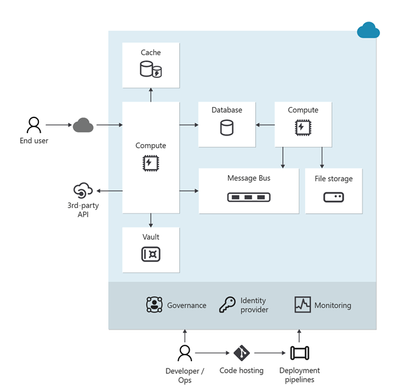
Well-architected is a state that is achieved and maintained through design and continuous improvement. You optimize through a design process that results in an architecture that delivers what the business needs while minimizing risk and expense.
For us, the workload standard of excellence is defined in the Well-architected Framework - a set of principles, considerations, and trade-offs that cover the core elements of workload architecture. As with all of the Well-architected Framework content, this guidance is based on proven experience from Microsoft’s customer-facing technical experts. The Well-architected Framework continues to receive updates from working with customers, partners, and our technical teams.
Today we have published updates across each of the core pillars of WAF which represent a huge amount of experience and learning from across Microsoft.
The refreshed and expanded Well-Architected Framework brings together guidance to help workload teams design, build, and optimize great workloads in the cloud. It is intended to shape discussions and decisions within workload teams and help create standards that should be applied continuously to all workloads.
Details of the refreshed Well-Architected Framework
Over the past six months, Microsoft’s cloud solution architects refreshed the Well-Architected Framework by compiling the learnings and experience of over 10,000 engagements that had leveraged the WAF and its assessment.
All five pillars of the Well-Architected Framework now follow a common structure that consists exclusively of design principles, design review checklists, trade-offs, recommendation guides, and cloud design patterns.
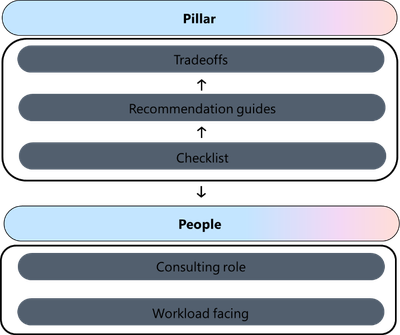
Design principles. Presents goal-oriented principles that build a foundation for the workload. Each principle includes a set of recommended approaches and the benefits of taking those approaches. The principles for each pillar have changed in terms of content and coverage.
- Reliability design principles
- Security design principles
- Cost Optimization design principles
- Operational Excellence design principles
- Performance Efficiency design principles
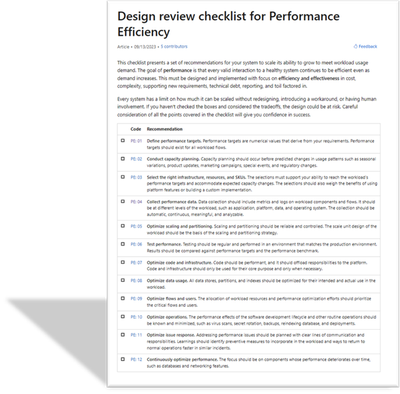
Design review checklists. Lists roughly codified recommendations that drive action. Use the checklists during the design phase of your new workload and to evaluate brownfield workloads.
- Design review checklist for Reliability
- Design review checklist for Security
- Design review checklist for Cost Optimization
- Design review checklist for Operational Excellence
- Design review checklist for Performance Efficiency
Trade-offs. Describes tradeoffs with other pillars. Many design decisions force a tradeoff. It's vital to understand how achieving the goals of one pillar might make achieving the goals of another pillar more challenging.
- Reliability tradeoffs
- Security tradeoffs
- Cost Optimization tradeoffs
- Operational Excellence tradeoffs
- Performance Efficiency tradeoffs
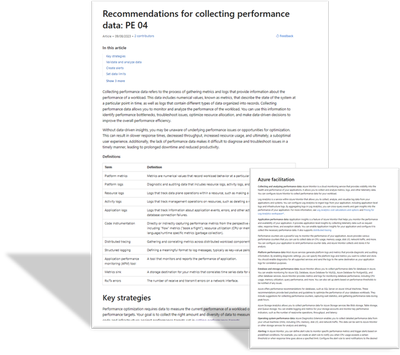
Recommendation guides. Every design review checklist recommendation is associated with one or more guides. They explain the key strategies to fulfill that recommendation. They also include how Azure can facilitate workload design to help achieve that recommendation. Some of these guides are new, and others are refreshed versions of guides that cover a similar concept.
The recommendation guides include trade-offs along with risks.
- This icon indicates a trade-off:
- This icon indicates a risk:


Cloud design patterns. Build your design on proven, common architecture patterns. The Azure Architecture Center maintains the Cloud Design Patterns catalog. Each pillar includes descriptions of the cloud design patterns that are relevant to the goals of the pillar and how they support the pillar.
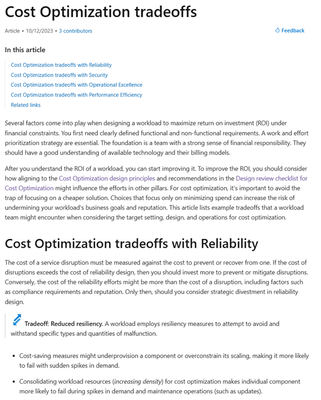
The Well-Architected Review assessment has also been refreshed. Specifically, the "Core Well-Architected Review" option now aligns to the new content structure in the Well-Architected Framework. Every question in every pillar maps to the design review checklist for that pillar. All choices for the questions correlate to the recommendation guides for the related checklist item.
Using the guidance
The Well-architected Framework is intended to help workload teams throughout the process of designing and running workloads in the cloud.
Here are three key ways in which the guidance can help your team be successful:
- Use the Well-architected Framework as the basis for your organization’s approach to designing and improving cloud workloads.
- Establish the concept of achieving and maintaining a state of well-architected as a best practice for all workload teams
- Regularly review each workload to find opportunities to optimize further – use learnings from operations and new technology capabilities to refine elements such as running costs, or attributes aligned to performance, reliability, or security
To learn more, see the new hub page for the Well-Architected Framework: aka.ms/waf
Dom Allen has also created a great, 6-minute video on the Azure Enablement Series.
Published on:
Learn moreRelated posts
End-to-End Full-Stack Web Application with Azure AD B2C Authentication: A Complete Guide
Application Overview The purpose of this sample application is to demonstrate the usage of Azure Active Directory B2C (Azure AD B2C) for authe...
Complex Data Extraction using Document Intelligence and RAG
Section 1: Introduction Historically, data extraction from unstructured documents was a manual and tedious process. It consisted of a c...
Harnessing Generative AI with Weaviate on Azure Kubernetes Service and Azure NetApp Files
Table of Contents Introduction Prerequisites Install Weaviate Approximate Nearest Neighbor (ANN) Benchmarks ANN Benchmarks Setup ANN Benchmark...
Securing Containerized Applications with SSH Tunneling
As cloud engineers and architects embrace containerization, ensuring secure communication becomes paramount. Data transmission and access cont...
Exploring AI Agent-Driven Auto Insurance Claims RAG Pipeline.
Introduction: In this post, I explore a recent experiment aimed at creating a RAG pipeline tailored for the insurance industry, specificall...
Azure NetApp Files now stores sensitive data DoD IL5 compliant in Azure US Government regions
Table of Contents Introduction Why Azure NetApp Files? DoD IL5 compliance in Azure Government Azure NetApp Files reaches feature parity betwee...
Data Intelligence End-to-End with Azure Databricks and Microsoft Fabric
This Azure Architecture Blog was written in conjunction with Isaac Gritz, Senior Solutions Architect, at Databricks. The Data Inte...
AI Studio End-to-End Baseline Reference Implementation
Azure AI Studio is designed to cater to the growing needs of developers seeking to integrate advanced AI capabilities into their appli...
Mastering AI adoption: Essentials to building, operating and optimizing genAI workloads on Azure
Mastering your AI adoption: Essentials to building, operating and optimizing genAI workloads on Azure As the demand for scalable, efficient AI...
Optimize Azure Stack HCI with the Well-Architected Framework
Azure Stack HCI is a hyperconverged infrastructure (HCI) solution that provides storage, network, and compute resources in on-premises...