
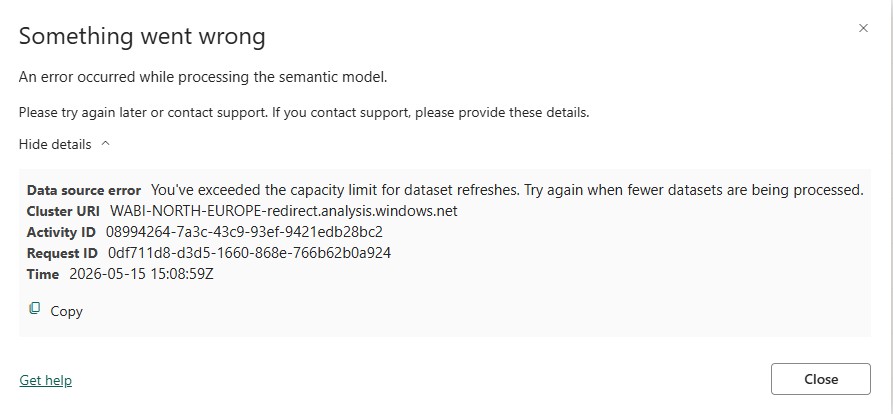
Understanding The “You’ve Exceeded The Capacity Limit For Dataset Refreshes” Error in Power BI
Published on:
Learn moreWe can help you with Understanding The “You’ve Exceeded The Capacity Limit For Dataset Refreshes” Error in Power BI
If you want help implementing, troubleshooting, or improving this product, contact us and we’ll point you in the right direction.
Related posts
Simple Report Bursting With Fabric Dataflows Gen2
When the new Send Email action was announced for Fabric Dataflows Gen2 – which allows you to send an email from a dataflow when it refre...
Monitoring The Impact Of Full-Text Indexing On Semantic Model Refresh In Power BI
The September release of Power BI saw the introduction of a powerful new feature: full text indexing, which makes searching and filtering on t...
ApproximateDistinctCount In Power BI Is Sometimes Slower Than DistinctCount
As a follow-on from last week’s post about the new ApproximateDistinctCount function in DAX, I want to share something I found out from ...
The Problem With Approximate Distinct Counts In Power BI – And How To Solve It
As you’ve probably seen in the blog post for the September 2026 release of Power BI, Import mode and Direct Lake mode semantic models no...
Improvements To Power Query Integration In Power BI Report Builder
There are some nice improvements to Power Query integration in the latest version of Power BI Report Builder that, while they are documented, ...
Find Unused Objects In Power BI Semantic Models With Semantic Link Labs
A few weeks ago I wrote about how Semantic Link Labs now has tools with interactive UIs and showed how you could use this to view lineage and ...
Find What Changed And When In Your Power BI Semantic Model
Here’s a situation I’ve found myself in many times. You’re called to help someone whose Power BI report is suddenly very slo...
Choosing A Power BI Storage Mode For Reporting On Data From Azure Databricks
In case you haven’t already seen the blog post on the Power BI blog or the discussion on LinkedIn, we at Microsoft published a new white...
Referencing Images And Other Files In Power BI Reports Using OneLake URLs
Several years ago I wrote a very popular blog post about how to store images for your reports inside your Power BI semantic model. It solved t...
Tools With Interactive UIs In Fabric Notebooks With Semantic Link Labs
There’s so much going on in the Fabric community that it can be hard to keep up with it all. Semantic Link Labs is a great example: in t...