
Optimize your hunting performance with the new query resources report

We’re thrilled to share the public preview of a new query resources report in Microsoft 365 Defender to help you optimize your hunting performance.
Visibility into how query resources are being used across the SOC team is critical to optimize performance, ensure queries are executed efficiently, and allow team to operate in the most effective way possible. The new query resources report now enables you to view how hunting resources are consumed in your organization and provides insights into your consumption of CPU resources for hunting activities. It provides data on queries that were run in the last 30 days using any of the hunting interfaces in Microsoft’s XDR. This report can help you identify the most resource-intensive queries and understand how to prevent throttling due to excessive use in the future.
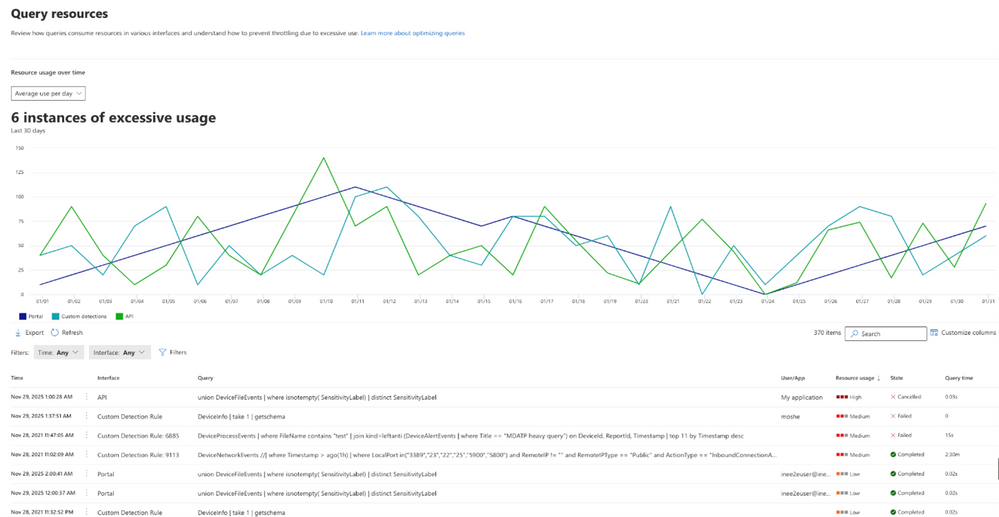
By default, the report table displays queries from the last day and is sorted by resource usage to help you easily identify which queries consumed the highest amount of CPU resources. Queries with high resource usage or a long query time can also be optimized to prevent throttling in this view.
The interactive graph in image 1 allows you to identify excessive usage and you can easily filter the table by clicking on any relevant spikes you want to understand further drill into. Once you select an entry along the graph, the table is filtered to that specific date. You can identify the queries that used the most resources on that day and take action to improve them. Use the Microsoft 365 Defender Advanced hunting query best practices to educate users who ran the query or created the rule to take query efficiency and resources into consideration.
The report can be accessed in two ways:
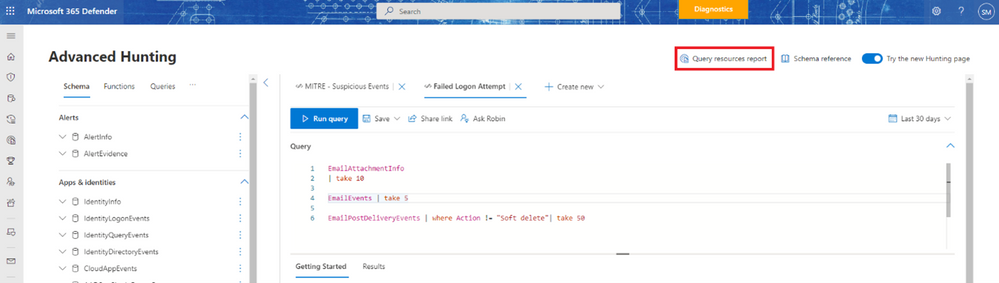
- In the advanced hunting page, select Query resources report
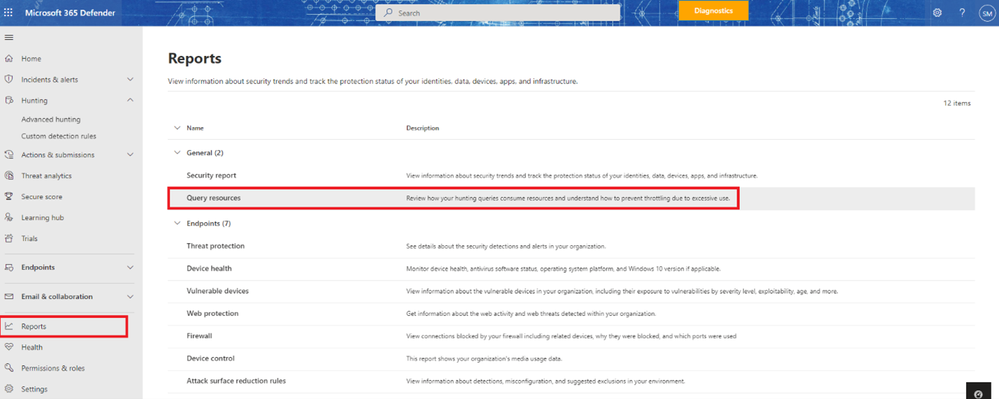
- Within the Reports page, find the new report entry in the General section:
More information
Check out our technical documentation to learn more about the new query resources report.
The new report is now in public preview. We would love to know what you think. Please share your feedback with us in the Microsoft 365 Defender portal or by emailing [email protected].
Published on:
Learn moreWe can help you with Optimize your hunting performance with the new query resources report
If you want help implementing, troubleshooting, or improving this product, contact us and we’ll point you in the right direction.
Related posts
Monthly news - November 2024
Microsoft Defender XDRMonthly newsNovember 2024 Edition This is our monthly "What's new" blog post, summarizing product updates and v...
Monthly news - August 2024
Microsoft Defender XDRMonthly newsAugust 2024 Edition This is our monthly "What's new" blog post, summarizing product updates and var...
Defender for Identity: the critical role of identities in automatic attack disruption
In today's digital landscape, cyber-threats are becoming increasingly sophisticated and frequent. Advanced attacks are often multi-workload an...
New Security Copilot skill: Identity Summary
“Can you summarize Defender insights about this user over the last two days?” Microsoft’s latest innovation for Copilot for Security, sim...
Demystify potential data leaks with Insider Risk Management insights in Defender XDR
In today's complex security landscape, understanding and mitigating data exfiltration risks is more critical than ever. Earlier this year, we ...
Monthly news - October 2024
Microsoft Defender XDRMonthly newsOctober 2024 Edition This is our monthly "What's new" blog post, summarizing product updates and va...
AI-Driven Guided Response for SOCs with Microsoft Copilot for Security
In today's evolving cybersecurity landscape, security operation centers (SOCs) are constantly bombarded with incidents ranging from minor aler...
Identity Summary: New Security Copilot skill within Defender XDR
“Can you summarize Defender insights about this user over the last two days?” Microsoft’s latest innovation for Copilot for Security, sim...
Detecting browser anomalies to disrupt attacks early
Detecting browser anomalies is crucial for early identification and prevention of cyber threats, preventing data breaches and attacks by monit...
Microsoft Defender for Identity: the critical role of identities in automatic attack disruption
In today's digital landscape, cyber-threats are becoming increasingly sophisticated and frequent. Advanced attacks are often multi-workload an...