
Episode 426: Claude Cowork vs Microsoft 365 Copilot Cowork
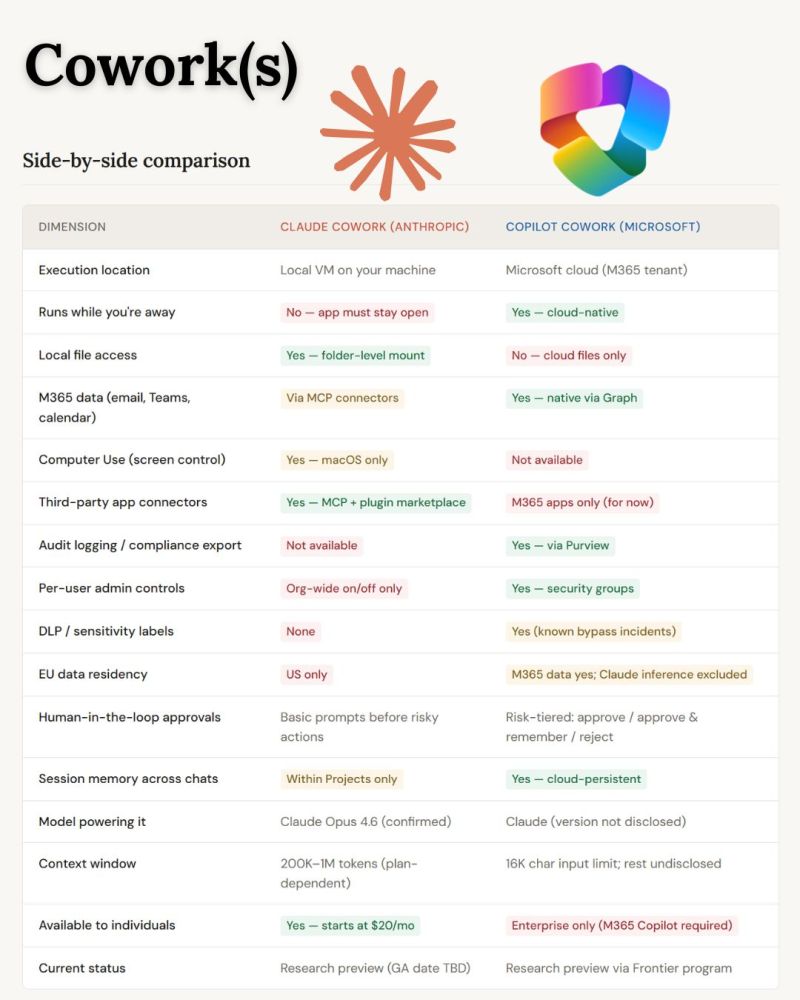
Welcome to Episode 426 of the Microsoft Cloud IT Pro Podcast.Ben and Scott are back together this week to talk through Microsoft 365 Copilot Cowork, including how it compares to Claude Cowork and where each one makes sense. The two products share a name but work pretty differently. Claude Cowork runs locally on your desktop and can access files on your machine, supports MCP server connections while M365 Copilot Cowork runs in the cloud, requires files to be in OneDrive, and does not support MCP connectors yet. On the flip side, the Microsoft version runs scheduled tasks without needing your machine to be on, has native access to all your M365 data through Graph, and fits inside your existing compliance and security controls through Purview, which matters a lot for regulated organizations.
Your support makes this show possible! Please consider becoming a premium member for access to live shows and more. Check out our membership options.
Show Notes
- Quentin Amaudry – As everyone knows, Cowork is coming within Copilot and it is extremely promising
- Copilot Cowork vs Claude Cowork: Same AI, Different Worlds
- Copilot Cowork: A new way of getting work done
- Cowork overview (Frontier)
About the sponsors
 |
TrustedTech is a leading Microsoft Cloud Solution Provider (CSP) specializing in Microsoft Cloud services, Microsoft perpetual licensing, and Microsoft Support Services for medium and enterprise-sized businesses. Our robust team of in-house, U.S-based Microsoft architects and engineers are certified in all 6/6 Microsoft Solutions Partner Designations in the Microsoft Cloud Partner Program. |
 |
Your migration and governance solution for Microsoft 365. ShareGate helps your teams simplify tenant migrations, get Copilot-ready, and take control of Microsoft 365 governance. |
 |
Nasuni is a leading unstructured data platform for enterprises where file data is mission-critical for both people and AI. We power the operational file layer where work happens — helping organizations manage, protect, and activate data so teams can work smarter, reduce costs, and operate securely without limits. Visit nasuni.com to learn more. |
 |
Would you like to become the irreplaceable Microsoft 365 resource for your organization? Let us know! |
Published on:
Learn moreWe can help you with Episode 426: Claude Cowork vs Microsoft 365 Copilot Cowork
If you want help implementing, troubleshooting, or improving this product, contact us and we’ll point you in the right direction.

Related posts
Episode 439: Azure SRE Agent vs. the Azure Copilot Troubleshooting Agent
Welcome to Episode 439 of the Microsoft Cloud IT Pro Podcast. In this episode, Ben and Scott dig into two Azure agents with confusingly differ...
Episode 438: Taking your WorkOS and LLM Wiki to the Next Level
Welcome to Episode 438 of the Microsoft Cloud IT Pro Podcast. Back in Episode 429, Ben and Scott introduced LLM wikis. In this episode, they c...
Episode 437: Nasuni and AI-Ready Unstructured Data with Nick Burling
Welcome to Episode 437 of the Microsoft Cloud IT Pro Podcast. In this episode, Nick Burling, Chief Product Officer at Nasuni, joins Ben and Sc...
Episode 436: Finding the Entra Tenants You Didn’t Know You Had
Welcome to Episode 436 of the Microsoft Cloud IT Pro Podcast. In this episode, Ben and Scott dive into Microsoft Entra Tenant Governance. Almo...
Episode 435: Power BI Meets Git and MCP
Welcome to Episode 435 of the Microsoft Cloud IT Pro Podcast. In this episode, Ben and Scott take a lap around what’s new in Power BI, s...
Episode 434: Reading the Spec Sheet on Microsoft’s Agentic SOC
Welcome to Episode 434 of the Microsoft Cloud IT Pro Podcast. Microsoft announced Project Perception on 2026-07-27 with a lot of “workfo...
Episode 433: Passkeys, Passwords, and the End of SMS MFA
Welcome to Episode 433 of the Microsoft Cloud IT Pro Podcast. In this episode, Ben and Scott discuss how Microsoft 365 authentication is movin...
Episode 432: AI-Era Consulting Billing for Microsoft Cloud Delivery
Welcome to Episode 432 of the Microsoft Cloud IT Pro Podcast. In this episode, Ben and Scott discuss how AI is not eliminating Microsoft 365 a...
Episode 431: Agent Governance Is the New App Governance
Welcome to Episode 431 of the Microsoft Cloud IT Pro Podcast. In this episode, Ben and Scott get into why agent governance is quickly becoming...
Episode 430: Scouting out Microsoft Scout
Welcome to Episode 430 of the Microsoft Cloud IT Pro Podcast, where Scott and Ben dig into Microsoft Scout, the new desktop AI application ann...