
Microsoft Editor using Context IQ in Outlook on the web and Word for the web coming soon!

One of the magical experiences with Microsoft 365 is seen with Microsoft Editor leveraging Context IQ. It connects you with the information you need, when and where you need it, so you can stay in the flow of your work.
We all know the feeling. You’re in the middle of responding to an email or working on a Word document and while in the flow of work, you need to share a file, a contact, or a piece of information – or perhaps a team member, partner, or customer sends you a request for information.
Unfortunately, information you need isn’t always right at hand when we need it. Having to pause the flow of your work to locate it can stall collaboration and decrease productivity. In fact, it takes 23 minutes or more to refocus after an interruption, according to research from the University of California, Irvine. Context switching and manually finding and attaching files or people across multiple apps can be frustrating and counterproductive.
For many, experiencing this cognitive overload and overwhelming feeling when multi-tasking is our norm. Microsoft’s solution to some of these stressors is Editor leveraging Context IQ!
What is Context IQ?
At Ignite last year, we pre-announced Context IQ - Context IQ is a new set of capabilities from Microsoft that intelligently connects you with the information you need, where and when you need it. By working in the background to connect your content across various Microsoft apps and services, Context IQ’s in-context suggestions save you time and let you stay in the flow as you work.
We’re excited to announce today that we have started rolling out the preview of Editor leveraging Context IQ in Outlook on the Web and Word for the Web.
Let’s take a look at how you’ll soon be able to take advantage of the benefits of Editor using Context IQ...
Stay in the flow with in-content suggestions
Outlook on the web
In Outlook on the web, simply type the “@” symbol, and based on the context of what you’ve typed, Editor using Context IQ surfaces the most relevant suggestion. To begin with, Editor using Context IQ will surface relevant people and files, and over time this will expand to include other useful content, such as: suggesting adding rich content like maps, places on the web, membership numbers, phone numbers, addresses, Viva Topics, message extensions, and more - based on your needs and context.

Word for the web
This same experience is also rolling out in Word for the Web. Editor using Context IQ will be able to pull in relevant people and files directly to your documents, so you can avoid context-switching or trying to find the correct links to files. Based on what you type in your document, Editor leveraging Context IQ will suggest the information you need, when and where you need it – so you can stay in the flow of your work.
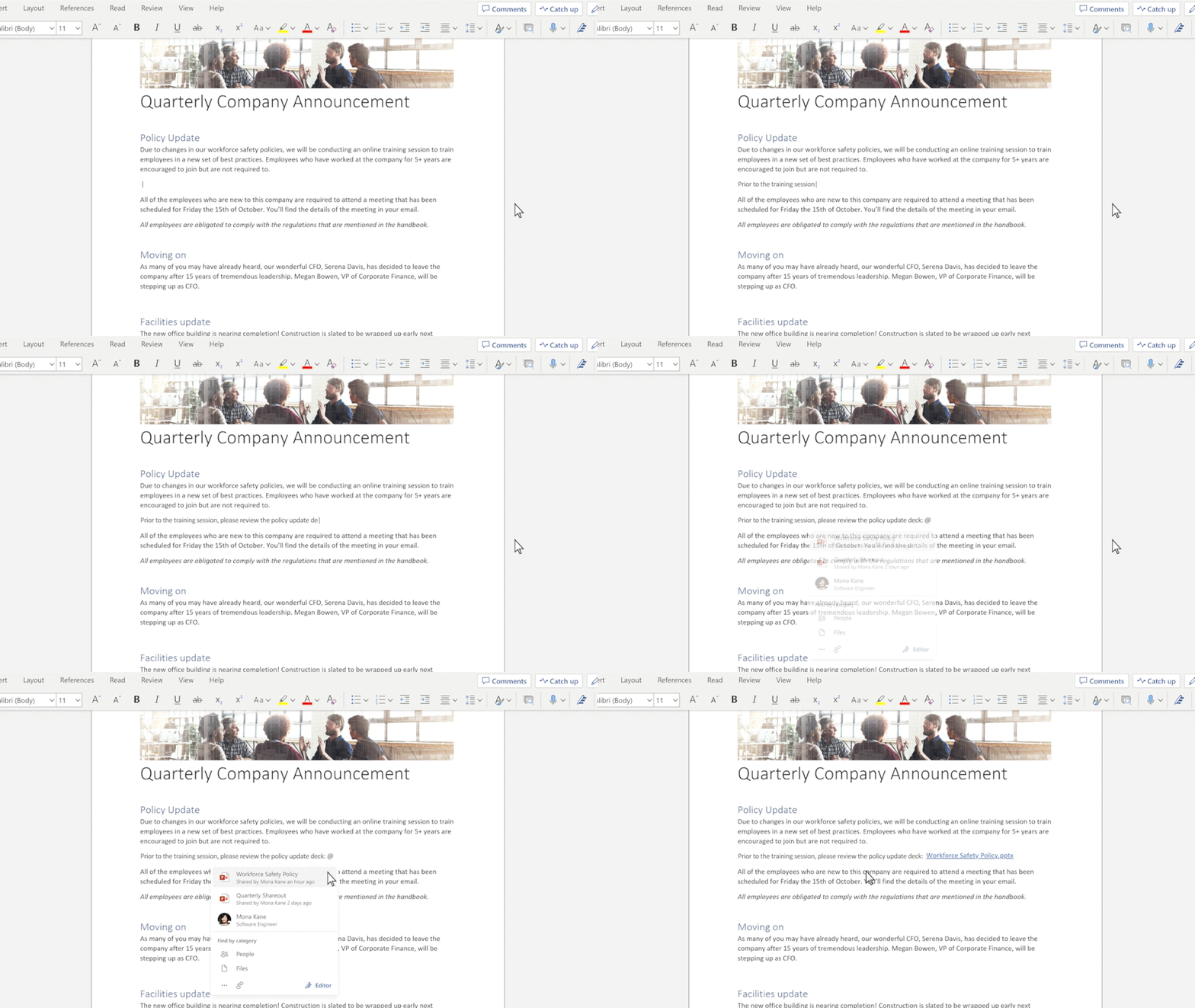
Future of Context IQ
We’ll continue to bring the power of Context IQ to other areas throughout Microsoft apps and services in the near future. Take a look…
In summary - Microsoft Editor leveraging Context IQ will help you stay in the flow and be more productive
Research shows that context-switching – when we must spread our attention among tasks, apps, or projects – can destroy productivity by as much as 80% depending on how many tasks you’re switching between.
When Microsoft apps and services use Context IQ, you’re able to stay in the flow and avoid distractions. Information is readily at hand and can be recalled in the moment; reducing the need to stop and context-switch.
The preview of Context IQ is included with your Microsoft 365 subscription and available in multiple apps and services. You don’t need to turn on anything to use it. Try Context IQ for yourself to explore all these useful capabilities. As always, we appreciate your feedback and use it as a guide when developing features and capabilities.
Continue the conversation by joining us in the Microsoft 365 community! Want to share best practices or join community events? Become a member by "Joining" the Microsoft 365 community. For tips & tricks or to stay up to date on the latest news and announcements directly from the product teams, make sure to Follow or Subscribe to the Microsoft 365 Blog space!
Published on:
Learn moreWe can help you with Microsoft Editor using Context IQ in Outlook on the web and Word for the web coming soon!
If you want help implementing, troubleshooting, or improving this product, contact us and we’ll point you in the right direction.
Related posts
Announcing the General Availability of the Microsoft 365 Document Collaboration Partner Program
Empowering Seamless Collaboration for Modern Workforces We are thrilled to announce the general availability of the Microsoft 365 Docume...
Favorite Copilot Prompts
(Amber Plumb interviewing Michael Morales and Allison Sweet) The power of M365 Copilot is transforming the way our support team operates...
Favorite Microsoft 365 Copilot Prompts
(Amber Plumb interviewing Michael Morales and Allison Sweet) The power of M365 Copilot is transforming the way our support team operates...
Boost digital event engagement with Voting and Archiving in Teams Q&A
Managing and delivering effective town halls is key to enabling two-way dialogue with leaders in today’s hybrid world. Microsoft Teams Q&A...
Prepare now for key end of support moments in 2025
One year from today, on October 14, 2025, support will end for all Office 2016 and 2019 suites, standalone apps, and servers. This includes:&n...
Everything you should know about Visio 2016 and Visio 2019 end of support
On October 14, 2025, Visio 2016 and Visio 2019 will reach end of support. After this date, Visio 2016 and Visio 2019 will no longer receive se...
Limit frontline worker access to Teams when off shift
We’re excited to announce that the frontline working time feature is now generally available! This feature allows admins to block or warn acce...
We are removing Feed on Microsoft 365 (Office)
As part of our ongoing efforts to streamline and enhance user experiences, we will be retiring the Feed feature (shown in figure 1 below) on t...
Leveraging Partner Apps to Deliver on the Promise of AI-Led Productivity
The advent of generative AI is driving a rethink of what outcomes we deserve from our productivity software – from gains in efficiency to more...
What’s new in FLW shared devices
Discover the Latest Enhancements in Shared Device Mode (SDM) We are excited to announce a series of new features in Shared Device Mode ...