
Introducing BlindAI: An Open-Source and privacy-friendly AI deployment solution
BlindAI is an AI deployment solution, leveraging secure enclaves, to make remotely hosted AI models privacy friendly, by leveraging Azure Computing with Intel SGX.
Introduction
Today, most AI tools are designed so when data is sent to be analyzed by third parties, the data is processed in clear, and thus potentially exposed to malicious usage or leakage.
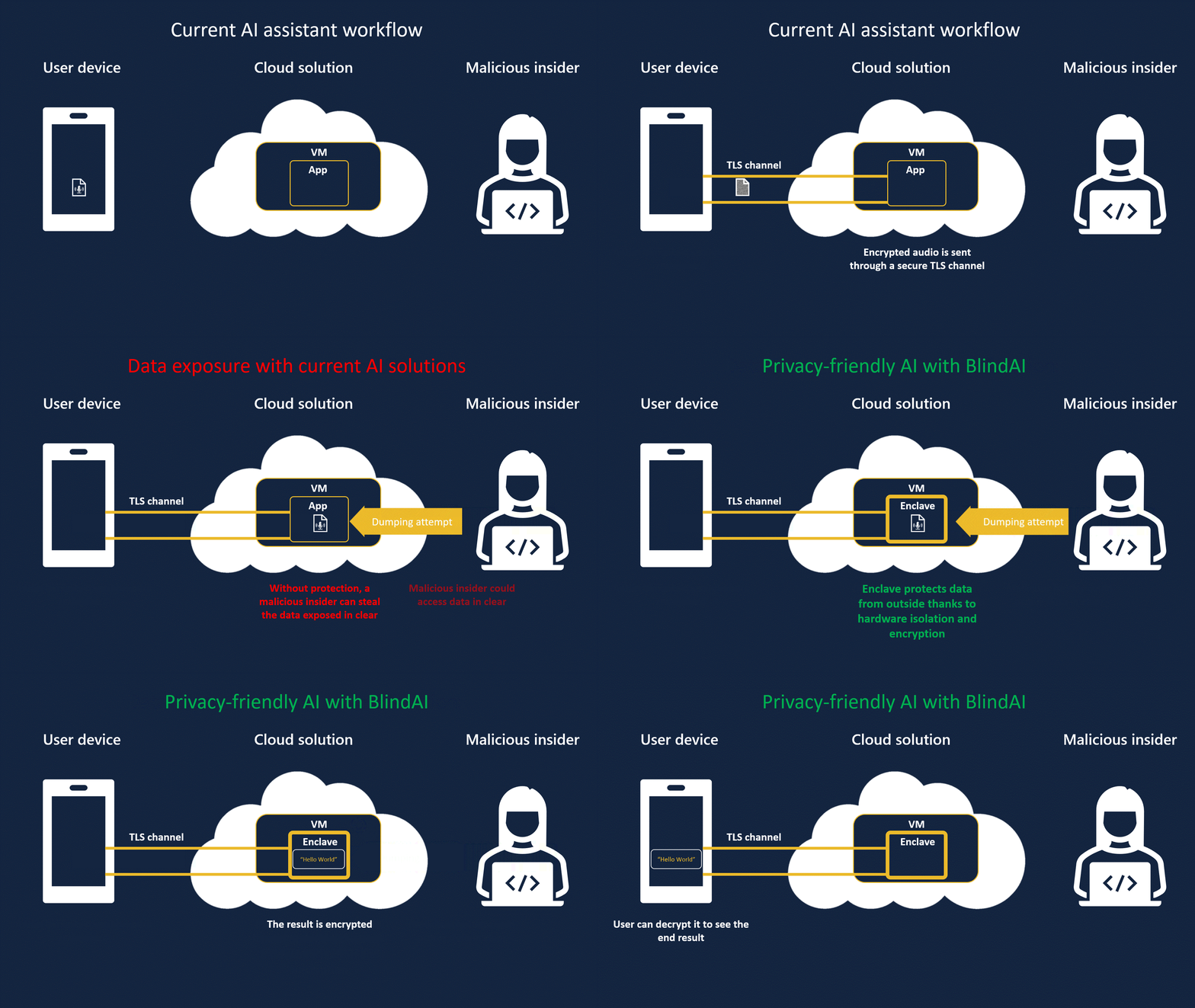
We illustrate it below with the use of AI for voice assistants. Audio recordings are often sent to the Cloud to be analyzed, leaving conversations exposed to leaks and uncontrolled usage without users’ knowledge or consent.
Currently, even though data can be sent securely with TLS, some stakeholders in the loop can see and expose data: the AI company renting the machine, the Cloud provider or a malicious insider.

By using BlindAI, data remains protected as it is only decrypted inside a Trusted Execution Environment (TEE), called an enclave, whose contents are protected by hardware. While data is in clear inside the enclave, thanks to isolation and memory encryption. This way, data can be processed, enriched, and analyzed by AI, without exposing it to external parties.
In this article, we will show you how you can deploy BlindAI on Azure DCsv3 VMs, and how you can run a state of the art model like Wav2vec2 for speech recognition with added privacy for users’ data.
This will act as a “Hello world” to introduce you to Confidential AI. We will literally use an AI inside an enclave to transcribe an “Hello world” audio file, to show how we can make Speech-To-Text privacy friendly.
For this use case where we want to perform Speech-To-Text, we will use Wav2vec2. Wav2Vec2 is a state-of-the-art Transformers model for speech. You can learn more about it on FAIR blog's post.
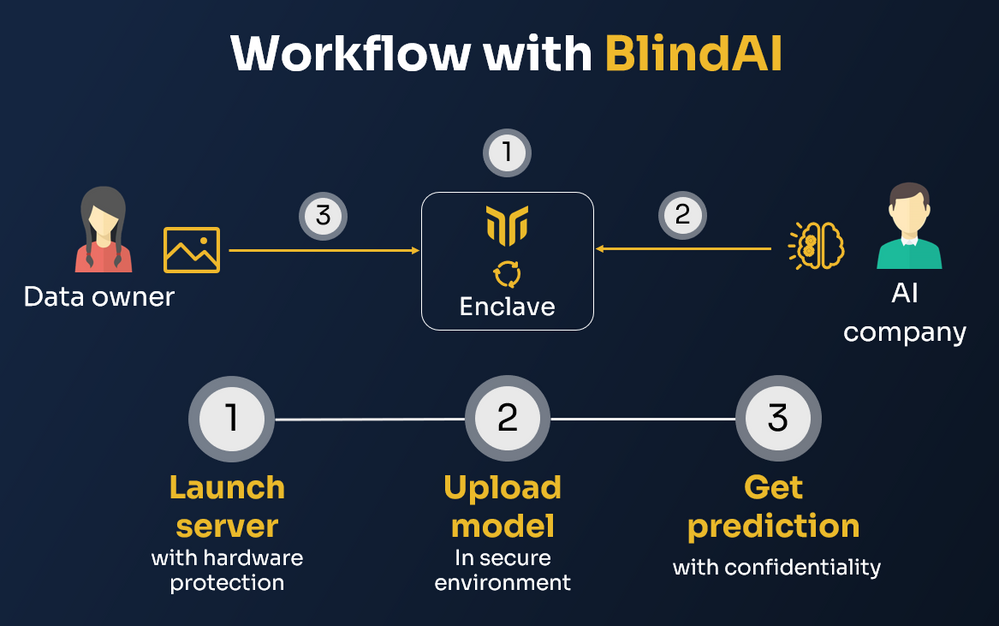
To leverage BlindAI, we will follow these steps:
- Run our inference server, for instance using Docker, on an Azure Confidential VM with Application Enclave.
- Upload the AI model in ONNX format inside the inference server using our SDK. By leveraging our SDK, we make sure the IP of the model is protected as well in this Cloud scenario.
- Send data securely to be analyzed by the AI model with the client SDK.
1 - Launch the BlindAI server
To launch the BlindAI server, we first need to have a Confidential VM with Application Enclave available. Here we will create an Azure DCsv3 VM for BlindAI.
You can check our step-by-step tutorial here to learn how to set up BlindAI on this VM.
Once you have followed the step-by-step tutorial, we will simply need to run our Docker image of the BlindAI inference server:
docker run -d \
    -v $(pwd)/bin/tls:/root/tls \
    -p 50051:50051 \
    -p 50052:50052 \
    --device /dev/sgx/enclave \
    --device /dev/sgx/provision \
    mithrilsecuritysas/blindai-server-dcsv3:latest
Now that the server is running, we will upload the model and the data to it. A notebook is available with all the instructions. If you want to run it, you should run it on the VM not to have to handle all the connections and forwarding needed if you run it on your local machine.
2 - Upload the AI model
Because BlindAI only accepts AI models exported in ONNX format, we will first need to convert the Wav2vec2 model into ONNX. ONNX is a standard format to represent AI models before shipping them into production. PyTorch and TensorFlow models can easily be converted into ONNX.
Step 1: Prepare the Wav2vec2 model
We will load the Wav2vec2 model using the Hugging Face transformers library.
from transformers import Wav2Vec2Processor, Wav2Vec2ForCTC
import torch

# load model and processor
processor = Wav2Vec2Processor.from_pretrained("facebook/wav2vec2-base-960h")
model = Wav2Vec2ForCTC.from_pretrained("facebook/wav2vec2-base-960h")
To facilitate the deployment, we will add the post processing directly to the full model. This way the client will not have to do the post processing.
import torch.nn as nn

# Let's embed the post-processing phase with argmax inside our model
class ArgmaxLayer(nn.Module):
      def __init__(self):
      super(ArgmaxLayer, self).__init__()
      def forward(self, outputs):
      return torch.argmax(outputs.logits, dim = -1)

 final_layer = ArgmaxLayer()

# Finally we concatenate everything
full_model = nn.Sequential(model, final_layer)
We can download a hello world audio file to be used as an example.
wget https://github.com/mithril-security/blindai/raw/master/examples/wav2vec2/hello_world.wav
We will need the librosa library to load the wav hello world file before tokenizing it.
import librosa

audio, rate = librosa.load("hello_world.wav", sr = 16000)

# Tokenize sampled audio to input into model
input_values = processor(audio, sampling_rate=rate, return_tensors="pt", padding="longest").input_values
We can then see the Wav2vec2 model in action:
>>> predicted_ids = full_model(input_values)
>>> transcription = processor.batch_decode(predicted_ids)
>>> transcription
['HELLO WORLD']
Step 2: Export the model
Now we can export the model in ONNX format, so that we can feed later the ONNX to our BlindAI server.
torch.onnx.export(
      full_model,
      input_values,
      'wav2vec2_hello_world.onnx',
      export_params=True,
      opset_version = 11)
Step 3: Upload the model
Now we can simply upload to our backend in simulation mode. Here we need to precise that inputs are floats and outputs are integers.
from blindai.client import BlindAiClient, ModelDatumType

# Launch client
client = BlindAiClient()

client.connect_server(addr="localhost", simulation=True)

client.upload_model(model="./wav2vec2_hello_world.onnx",
      shape=input_values.shape,
      dtype=ModelDatumType.F32,
      dtype_out=ModelDatumType.I64)
3 - Get prediction securely
Now it's time to check it's working live!
As previously, we will need to preprocess the hello world audio, before sending it for analysis by the Wav2vec2 model inside the enclave.
First, we prepare our input data, the hello world audio file.
from transformers import Wav2Vec2Processor, Wav2Vec2ForCTC
import torch
import librosa

# load model and processor
processor = Wav2Vec2Processor.from_pretrained("facebook/wav2vec2-base-960h")

audio, rate = librosa.load("hello_world.wav", sr = 16000)

# Tokenize sampled audio to input into model
input_values = processor(audio, sampling_rate=rate, return_tensors="pt", padding="longest").input_values
Now we can send it to the enclave.
from blindai.client import BlindAiClient

# Load the client
client = BlindAiClient()
client.connect_server("localhost", simulation=True)

# Get prediction
response = client.run_model(input_values.flatten().tolist())
We can reconstruct the output now:
>>> processor.batch_decode(torch.tensor(response.output).unsqueeze(0))
['HELLO WORLD']
Conclusion
We have seen in this article how you can run Wav2vec2 on BlindAI for confidential Speech-to-Text. BlindAI enables much more than that: it can run most of the widely used ONNX models, like BERT/DistillBERT, 2D CNNs, ResNet, YoloV5, and more.
You can check the list of models that we officially support in this table, their performance, as well as some illustrated examples and real world use cases.
If you have liked this example, do not hesitate to drop a :star: on our GitHub!
Published on:
Learn moreWe can help you with Introducing BlindAI: An Open-Source and privacy-friendly AI deployment solution
If you want help implementing, troubleshooting, or improving this product, contact us and we’ll point you in the right direction.
Related posts
Adams Bridge: An Accelerator for Post-Quantum Resilient
The name Adams Bridge is inspired by the mythological structure which was said to span a vast gulf between two landmasses. In the realm of cry...
General Availability: Azure confidential VMs with NVIDIA H100 Tensor Core GPUs
Today, we are announcing the general availability of Azure confidential virtual machines (VMs) with NVIDIA H100 Tensor core GPUs. These VMs co...
Azure AI Confidential Inferencing: Technical Deep-Dive
Generative AI powered by Large Language Models (LLMs) has revolutionized the way we interact with technology. Through chatbots, co-pilots, and...
Verify the integrity of Azure Confidential Ledger transactions with receipts and application claims
In today's digital landscape, the integrity and confidentiality of transactional data are paramount. Microsoft’s Azure Confidential Ledger off...
Memory Protection for AI ML Model Inferencing
This article was originally posted on Confidential Container Project's blog by Suraj Deshmukh & Pradipta Banerjee. Read the original artic...
General Availability: Azure Managed HSM Backup/Restore when Storage is Behind a Private Endpoint
We are excited to announce the General Availability of support for Azure Key Vault Managed HSM backup/restore when the sto...
Public Preview: Azure Managed HSM Backup/Restore when Storage Account is Behind a Private Endpoint
We are excited to announce the Public Preview of support for Azure Key Vault Managed HSM backup/restore when the storage accoun...
General Availability: Managed HSM Networking Settings in Azure Portal
We are excited to announce the General Availability of networking settings for Azure Key Vault Managed HSM on the Azure po...
New innovations in confidential computing from Azure at Ignite 2023
Azure has been a pioneer and leader in the field of confidential computing, offering the most comprehensive portfolio of products and services...
Announcing Azure confidential VMs with NVIDIA H100 Tensor Core GPUs in Preview
Today, we are excited to announce the preview of Azure confidential VMs with NVIDIA H100 Tensor core GPUs. These VMs are ideal for ...