
New improved contacts on Outlook Web App

In the digital era, contacts have become increasingly important. They help users to create new relationships and nurture existing ones, which form building blocks to lasting relationships that enable users to do more.
We often hear from our users that their contacts get stale over time, and they would like them to update automatically. Our users also find organizing contacts challenging. They want an easy way of organizing contacts into relevant categories of people from mail, calendar, and People hub.
You asked and we delivered
We understand and appreciate this need and have some exciting news to share with you! Today, we’re pleased to announce that we’ve introduced a new set of intelligent experiences to help you better access and manage your contacts:
- Self-updating contacts (for enterprise users only) to always keep contacts up to date.
- Contact categories to easily organize, find, and connect with contacts.
- New contact editor to add, update, and manage contacts.
- Upgraded People hub to view, manage, and collaborate with contacts.
Self-updating contacts (for enterprise users only)
All the new contacts you add from the people card of a person belonging to your organization will be self-updating contacts. These contacts automatically stay up to date based on the organization directory. Any modifications made to contact details, such as phone number, department designation, etc., will automatically be updated in the contact.
We also ensure that users can choose what information to persist in their contacts without losing any data. Users can choose whether they wish to keep their personal edits or override their edits with the suggested update. No more stale contacts!

Organize contacts using Categories
Moving away from the traditional way of organizing contacts, we’re introducing Categories—a new, easy, modern, and flexible way of managing contacts replacing the existing folders. Categories are just like tags; you can apply these tags to contacts to group contacts into desired categories.
Categorizing helps selectively view contacts associated with that category for faster retrieval and collaboration. You can add categories to a contact from their people card in mail, calendar, or in the People hub.
Your existing folders are migrated to categories, and you'll see them as categories in the left navigation pane. Contacts that were in a particular folder(s) are stamped with categories that share the same name as the folder. These can be accessed by clicking on the category in the left navigation pane.
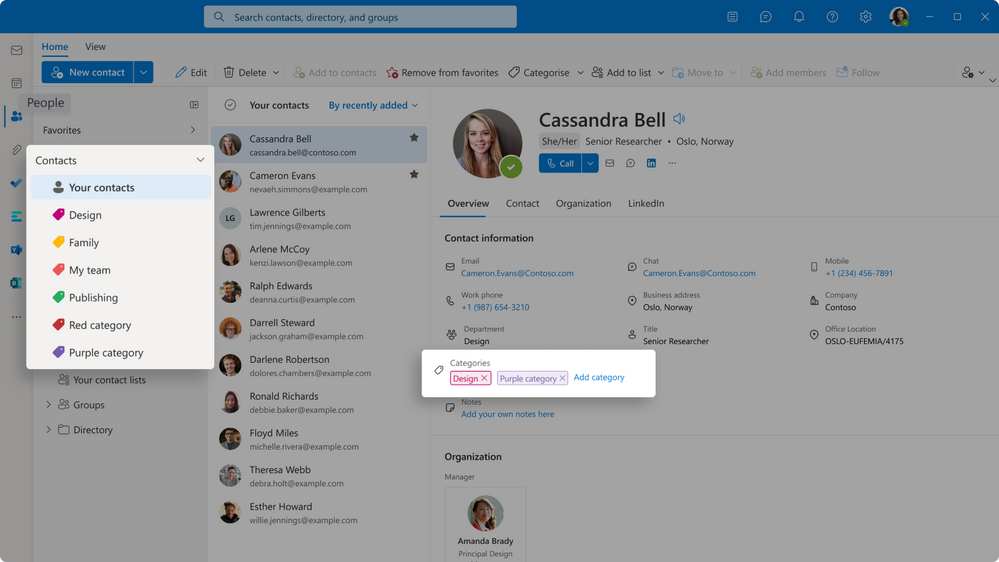 An image of a screenshot demonstrating how contacts are migrated to Categories in the People hub.
New contact editor
Introducing our new contact editor, which brings a new and better visual experience. The new contact editor allows you to create, update, and categorize contacts, and manage them from the email, calendar, and People hub so you can focus on your core job while simultaneously managing your contacts.
 An image of a screenshot demonstrating how contacts are migrated to Categories in the People hub.
People hub
The abovementioned new experiences and the Outlook Web App (OWA) People hub are powered by the new, rich, and intelligent contacts schema.
What can you do in People hub?
- View, manage, and organize your contacts
- Create and manage personal contact lists
- Access important contacts by favoriting them
- Quickly call, message, and email contacts/contact lists
- All of this and more!
How can you access the new contacts features?
Sign into OWA and select the People icon 

We’re listening!
Our goal is to make it easier for you to manage contacts with our latest technology in the People hub. With this latest update, we hope you'll find it easier to access and manage your contacts.
Let us know how you feel about these features. If you have any questions, feedback, suggestions, or any issues to report, please post it in the blog's comment section below, or email us at: [email protected].
We'll use this feedback to improve our offerings.
Gargy Shekhar
Senior Product Manager
Published on:
Learn moreWe can help you with New improved contacts on Outlook Web App
If you want help implementing, troubleshooting, or improving this product, contact us and we’ll point you in the right direction.
Related posts
Announcing the General Availability of the Microsoft 365 Document Collaboration Partner Program
Empowering Seamless Collaboration for Modern Workforces We are thrilled to announce the general availability of the Microsoft 365 Docume...
Favorite Copilot Prompts
(Amber Plumb interviewing Michael Morales and Allison Sweet) The power of M365 Copilot is transforming the way our support team operates...
Favorite Microsoft 365 Copilot Prompts
(Amber Plumb interviewing Michael Morales and Allison Sweet) The power of M365 Copilot is transforming the way our support team operates...
Boost digital event engagement with Voting and Archiving in Teams Q&A
Managing and delivering effective town halls is key to enabling two-way dialogue with leaders in today’s hybrid world. Microsoft Teams Q&A...
Prepare now for key end of support moments in 2025
One year from today, on October 14, 2025, support will end for all Office 2016 and 2019 suites, standalone apps, and servers. This includes:&n...
Everything you should know about Visio 2016 and Visio 2019 end of support
On October 14, 2025, Visio 2016 and Visio 2019 will reach end of support. After this date, Visio 2016 and Visio 2019 will no longer receive se...
Limit frontline worker access to Teams when off shift
We’re excited to announce that the frontline working time feature is now generally available! This feature allows admins to block or warn acce...
We are removing Feed on Microsoft 365 (Office)
As part of our ongoing efforts to streamline and enhance user experiences, we will be retiring the Feed feature (shown in figure 1 below) on t...
Leveraging Partner Apps to Deliver on the Promise of AI-Led Productivity
The advent of generative AI is driving a rethink of what outcomes we deserve from our productivity software – from gains in efficiency to more...
What’s new in FLW shared devices
Discover the Latest Enhancements in Shared Device Mode (SDM) We are excited to announce a series of new features in Shared Device Mode ...