
What’s new with Adoption Score and Experience insights in the Microsoft 365 admin center
As your organization continues to invest in Microsoft 365, we recognize the emphasis you place on driving and improving usage, adoption, and user satisfaction. The function of enterprise IT is expanding with new roles, often called Adoption Specialists, Digital Product Managers, or Workplace Technology Experience Managers, strategically focused on the need to improve your users’ digital experiences and realize maximum value from your digital investments. To support these new roles, we continue investing in such product experiences as Usage Reports, Adoption Score and Experience insights in the Microsoft 365 admin center to help our customers decide how to get the most out of their Microsoft investment.
Today, all commercial customers will have access to Adoption Score by default, available within the Microsoft 365 admin center under Reports. Now generally available, Group Level Aggregates in Adoption Score offers data segmentation by Azure Active Directory (Azure AD) attributes to help you better assess your adoption data by different areas within the organization. With Organizational Messages, now in Preview for all organizations using Adoption Score, you can use these insights to send relevant tips and guidance on usage best practices directly to your users. Additionally, Experience insights, now in Preview to customers with 2000+ licenses, can help you better support users and increase satisfaction.
As a foundation for Microsoft 365 metrics and actionable insights, Microsoft remains devoted to helping IT professionals empower employees with user-level privacy in place, and we are deeply committed to the privacy of everyone who uses our products. Within the People Experiences area of Adoption Score, metrics are available at the aggregated, organizational level only.
What’s new with Adoption Score
Adoption Score is now available for all commercial customers
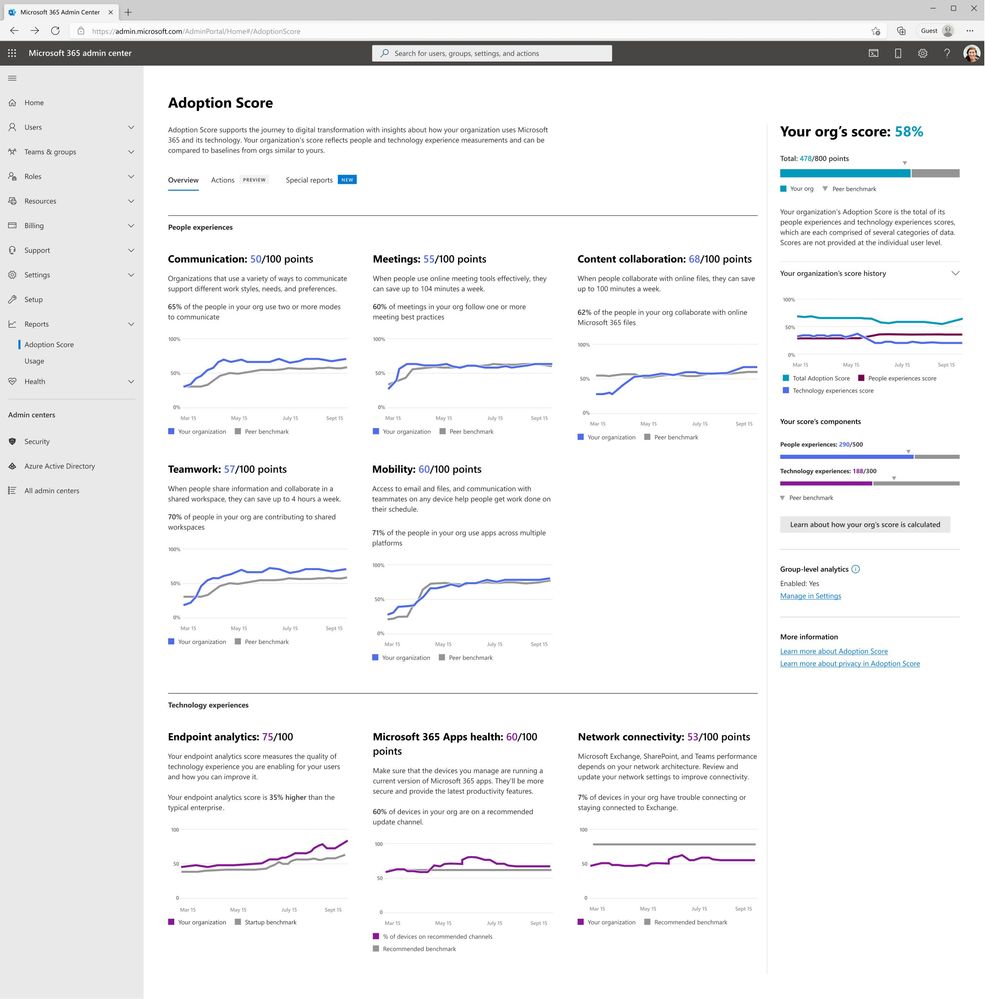
Adoption Score is a set of metrics and tools offering you visibility into how your organization works with Microsoft 365, surfaces insights into where you can improve user experiences, and helps you act on these insights by delivering messages to users with tips and best practices. We're excited to share that Adoption Score is now available to all commercial customers and is enabled by default. To access Adoption Score, visit the Microsoft 365 admin center > Reports > Adoption Score to start using it today. To learn how to manage the experience, visit Privacy Controls for Adoption Score.
Assessing adoption by user segments with Group Level Aggregates
While Adoption Score offers metrics and insights across the entire organization, Adoption Specialists often need to segment this data by Azure AD attributes like Company or Department, or by geo regions like Country, State and City. This is especially true for large, distributed, and hybrid workforces. Now, with Group Level Aggregates in Adoption Score, IT Adoption Specialists can assess Microsoft 365 adoption insights by different areas of the organization and give more customized and relevant guidance to improve effectiveness. Group Level Aggregates is now generally available and can be enabled in just a few simple steps.

Empower users with usage best practices using Organizational Messages (Preview)
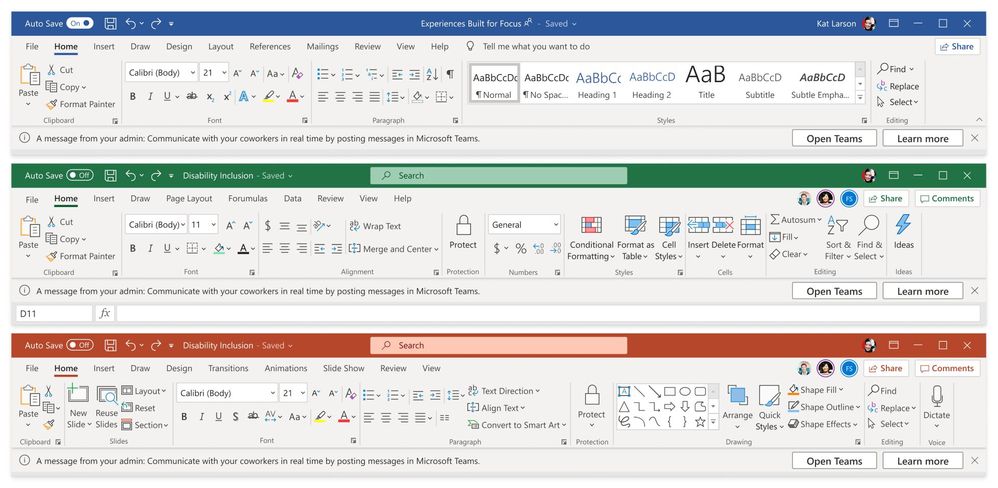
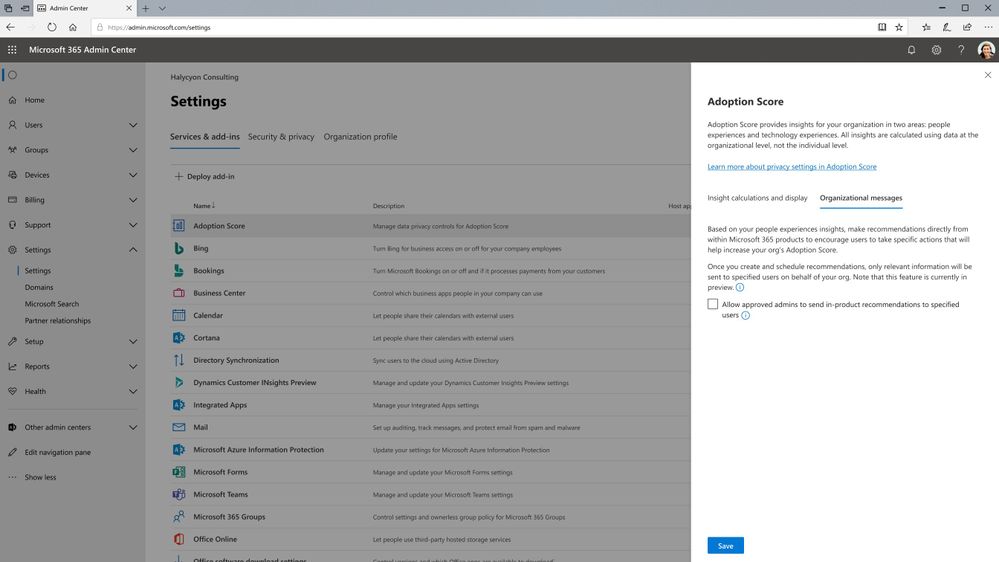
Organizational Messages in Adoption Score, currently in Preview, enables IT Adoption Specialists to deliver clear, actionable, and targeted messages in the flow of work.
Based on your adoption data within the People Experiences categories of Adoption Score, you will find suggested actions to help Microsoft 365 users in your organization improve their experience and maximize their productivity through usage best practices. These include reminders to use products or features that have recently been made available, reminders to use products on multiple surfaces, or recommended ways of working like using @mentions to improve message visibility to relevant colleagues.

Updates to Experience insights Preview
Gain visibility into Microsoft 365 user sentiment with Experience insights (Preview)
Commercial customers with 2000+ licenses* now can also access Experience insights in Preview. With Experience insights, organizations gain visibility into sentiment, help article consumption, and usage of Microsoft 365 applications such as Outlook, Teams, SharePoint and more. This data is curated in a single view to help you identify and address issues that may hinder productivity or cause frustration for users. By understanding usage and sentiment of Microsoft 365 products, IT Adoption Specialists can make data-driven decisions to improve the overall user experience for Microsoft 365 users.
Experience insights offers several key features including the ability to measure and report app usage, understand sentiment from user-submitted comments across your organization, most viewed help articles by users within your organization, and training suggestions. These features empower IT administrators to proactively address issues and provide targeted training and support to users.
To ensure data privacy and compliance, Experience insights leverages the Microsoft 365 compliance framework and adheres to strict security standards. All data is aggregated and anonymized to protect individual user information.
By leveraging Experience insights, organizations can enhance the productivity and satisfaction of Microsoft 365 users, leading to better outcomes for the organization as a whole. Try Experience insights for Microsoft 365 today and unlock valuable insights to optimize your digital workplace.
Have questions about Adoption Score & Experience insights? Join our experts for a Microsoft 365 admin center Adoption Score & Experience insights AMA (Ask Microsoft Anything) on Monday, July 12th at 9:00 AM Pacific time. RSVP at the event link and start posting your questions today!
Continue the conversation by joining us in the Microsoft 365 community! Want to share best practices or join community events? Become a member by "Joining" the Microsoft 365 community. For tips & tricks or to stay up to date on the latest news and announcements directly from the product teams, make sure to Follow or Subscribe to the Microsoft 365 Blog space!
Footnotes:
*Office 365 and Microsoft 365 E3 and E5
Published on:
Learn moreRelated posts
Announcing the General Availability of the Microsoft 365 Document Collaboration Partner Program
Empowering Seamless Collaboration for Modern Workforces We are thrilled to announce the general availability of the Microsoft 365 Docume...
Favorite Microsoft 365 Copilot Prompts
(Amber Plumb interviewing Michael Morales and Allison Sweet) The power of M365 Copilot is transforming the way our support team operates...
Favorite Copilot Prompts
(Amber Plumb interviewing Michael Morales and Allison Sweet) The power of M365 Copilot is transforming the way our support team operates...
Boost digital event engagement with Voting and Archiving in Teams Q&A
Managing and delivering effective town halls is key to enabling two-way dialogue with leaders in today’s hybrid world. Microsoft Teams Q&A...
Prepare now for key end of support moments in 2025
One year from today, on October 14, 2025, support will end for all Office 2016 and 2019 suites, standalone apps, and servers. This includes:&n...
Everything you should know about Visio 2016 and Visio 2019 end of support
On October 14, 2025, Visio 2016 and Visio 2019 will reach end of support. After this date, Visio 2016 and Visio 2019 will no longer receive se...
Limit frontline worker access to Teams when off shift
We’re excited to announce that the frontline working time feature is now generally available! This feature allows admins to block or warn acce...
We are removing Feed on Microsoft 365 (Office)
As part of our ongoing efforts to streamline and enhance user experiences, we will be retiring the Feed feature (shown in figure 1 below) on t...
NOW ON DEMAND | Microsoft Loop Learning Series [Six webinars]
UPDATE | All parts of the Loop Learning Series have aired and are now available to watch on demand, playable below in this blog post. Ar...
Leveraging Partner Apps to Deliver on the Promise of AI-Led Productivity
The advent of generative AI is driving a rethink of what outcomes we deserve from our productivity software – from gains in efficiency to more...