
Microsoft Graph Activity Log is Now Available in Public Preview

Hi friends,
Today we’re excited to announce the public preview of Microsoft Graph Activity Logs. Have you wondered what applications are doing with the access you've granted them? Have you discovered a compromised user and hoped to find out what operations they have performed? If so, you can now gain full visibility into all HTTP requests accessing your tenant’s resources through the Microsoft Graph API.
*Note: We're enabling the feature starting today. Public preview will be available in all public cloud regions within two weeks.
You’re currently able to collect SignIn logs to analyze authentication activity and Audit logs to see changes to important resources. With Microsoft Graph Activity Logs, you can now investigate the complete picture of activity in your tenant – from token request in SignIn logs, to API request activity (reads, writes, and deletes) in Microsoft Graph Activity Logs, to ultimate resource changes in Audit logs.
The Microsoft Graph Activity Logs include information about the request and client application. Some common use cases include:
- Identifying the activities that a compromised user account conducted in your tenant.
- Building detections and behavioral analysis to identify suspicious or anomalous use of Microsoft Graph APIs – such as an application enumerating all users; or making probing requests with many 403 errors.
- Investigating unexpected or unnecessarily privileged assignments of application permissions.
- Identifying problematic or unexpected behaviors for client applications – such as extreme call volumes that exhaust rate-limits for the tenant.
To illustrate working with these logs, we can look at some basic LogAnalytics queries:
Summarize applications and principals that have made requests to change or delete groups in the past day:
|
MicrosoftGraphActivityLogs | where TimeGenerated > ago(1d) | where RequestUri contains '/group' | where RequestMethod != "GET" | summarize UriCount=dcount(RequestUri) by AppId, UserId, ServicePrincipalId, ResponseStatusCode |
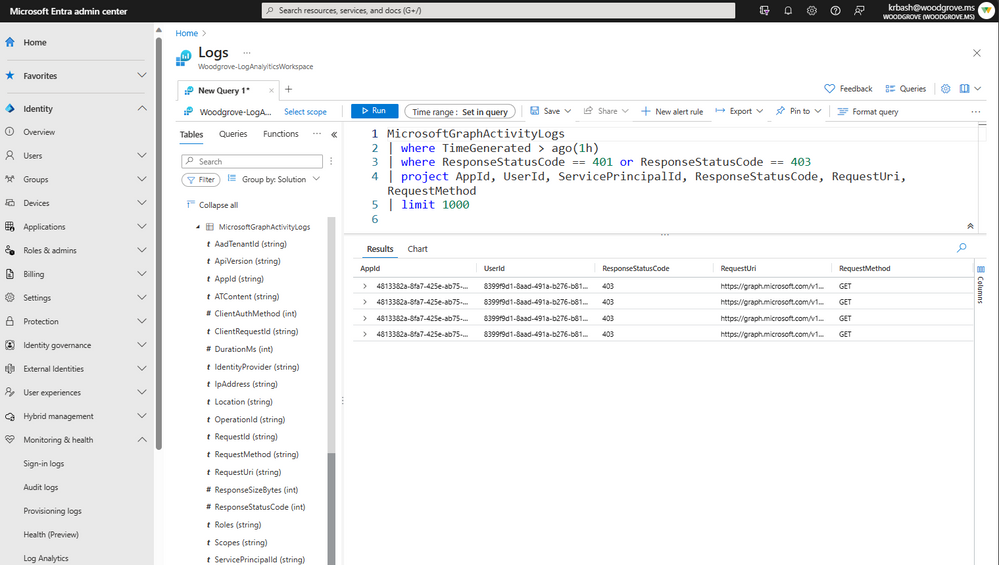
To see recent requests that failed due to authorization:
|
MicrosoftGraphActivityLogs | where TimeGenerated > ago(1h) | where ResponseStatusCode == 401 or ResponseStatusCode == 403 | project AppId, UserId, ServicePrincipalId, ResponseStatusCode, RequestUri, RequestMethod | limit 1000 |
Get top 20 app instances by request count:
|
MicrosoftGraphActivityLogs | where TimeGenerated > ago(1d) | summarize RequestCount=count() by AppId, IpAddress, UserAgent | sort by RequestCount | limit 20 |
Microsoft Graph Activity Logs are available through the Azure Monitor Logs integration of Entra. Administrators can configure the collection and storage destinations of Microsoft Graph Activity Logs through Diagnostic Setting in the Entra Portal. These settings allow you to configure the collection of the logs to a storage destination of your choice. The logs can be stored and queried in an Azure Log Analytics Workspace, archived in Azure Storage Accounts, or exported to other SIEM tools through Azure Event Hubs.
For logs collected to a Log Analytics Workspace, you can use the full set of Azure Monitor Logs features, such as a portal query experience, alerting, saved queries, and workbooks.

Find out about how to enable Microsoft Graph Activity Logs, sample queries, estimated costs, and more in our documentation.
Learn more about Microsoft Entra:
- See recent Microsoft Entra blogs
- Dive into Microsoft Entra technical documentation
- Join the conversation on the Microsoft Entra discussion space and Twitter
- Learn more about Microsoft Security
Published on:
Learn moreRelated posts
Sync identities from Rippling to Microsoft Entra ID
Today, we’re thrilled to announce that customers using Rippling HCM can now automatically provision users to on-premises Active Directory and ...
Microsoft Entra ID Governance for government
I’m pleased to announce that as of November 1, 2024, Microsoft Entra ID Governance is available for federal agencies, state and local governme...
Update to security defaults
As part of the Secure Future Initiative, we’ve evolved our security approach to align with three security principles: secure by design, secure...
Meet Microsoft Entra at Ignite 2024: November 18-22
Microsoft Ignite is just around the corner, taking place from Monday, November 18, 2024 through Friday, November 22, 2024, in Chicago, Illinoi...
Manage Microsoft Entra ID role assignments with Microsoft Entra ID Governance
I’m excited to announce that we now support Microsoft Entra role assignments in Microsoft Entra ID Governance's Entitlement Management feature...
The latest enhancements in Microsoft Authenticator
Hi folks, I'm thrilled to announce three major Microsoft Entra ID advancements that will help you protect your users with phishing-resi...
Microsoft Security announcements and demos at Authenticate 2024
The Microsoft Security team is excited to connect with you next week at Authenticate 2024 Conference, taking place October 14 to 16 in Carlsba...
What's new in Microsoft Entra - September 2024
We’re excited to announce the general availability of Microsoft Entra Suite—one of the industry’s most comprehensive secure access solutions f...
Explore the key benefits of Microsoft Entra Private Access
The traditional network security models are becoming increasingly ineffective in a world where remote work and cloud services are the norm. Co...
Join us at the Microsoft Entra Suite Showcase!
This fall, we are bringing the Microsoft Entra Suite Showcase to cities worldwide. Join us to explore how our latest advancements in secure id...