
Azure Maps Weather Services adds three new services
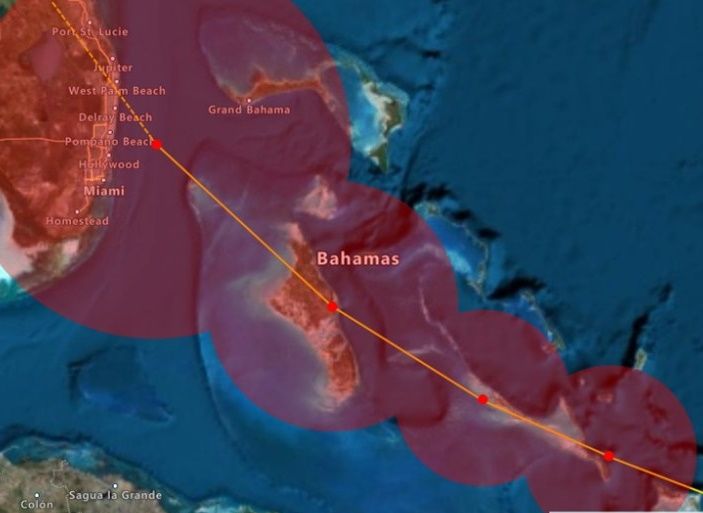
Azure Maps Weather Services, which became generally available in April 2021, has added three new services, Historical Weather, Air Quality, and Tropical Storms. The Azure Maps Weather Services data comes from our leading worldwide weather service provider AccuWeather. The addition of these three new services will empower developers and companies to expand capabilities even further when it comes to weather data.
Historical Weather
The Historical Weather API provides actuals, normals, and records climatology data by day, for a specified date range, up to 31 days in a single API request. Historical data may be available as far back as 5 to 40+ years and includes temperatures, precipitation, snowfall, snow depth, and cooling/heating degree day information, depending on the location and feature.
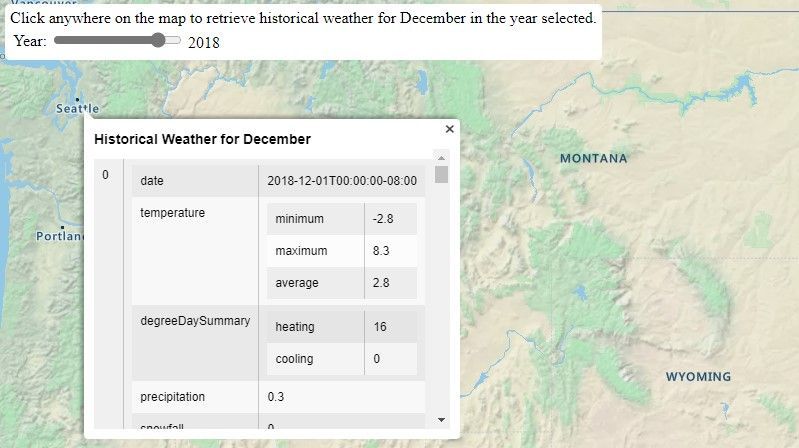
Historical Weather data enables customers to get past climatology information to analyze and helps to make predictions on future weather conditions and support making informed business decisions. Historical Weather data can be used for many use cases such as forensics, weather studies, and most commonly for business analytics to determine how past weather impacted logistics, sales, and other business scenarios. For example, you can predict what products will sell better by specific weather conditions by adding weather data to your sales records or predicting the best time to change to winter tires for your location.
Air Quality
The Air Quality API provides detailed information about the current and forecasted air pollutants and air quality concentration. Forecasted information is available by the hour (upcoming 1, 12, 24, 48, 72, and 96 hours) and by day (upcoming 1 to 7 days). Information includes pollution levels, air quality index values, dominant pollutants, and a brief statement summarizing risk levels and suggested precautions.
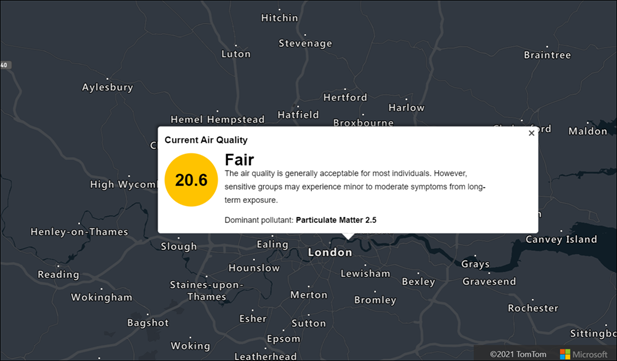
If you are building an outdoor running/cycling app, you can warn your users if the air quality conditions are better in one hour or analyze the impact on your health by tracking what kind of air you breathe. Air Quality info can be used on everything from outdoor sensors, devices used by people while commuting, working, exercising, and other outside activities to indoor use with HVAC and air purifiers or general monitoring of an area.
Tropical Storms
The Tropical Storms API provides information on government-issued active and forecasted tropical storms, the locations (path), and the ability to search government-issued tropical storms by year. Information includes; location coordinates, forecast, creation date, status, geometry, basin ID, window, wind speed, and wind radii. Tropical storms are also known as hurricanes, cyclones, and typhoons, depending on the region of the world.
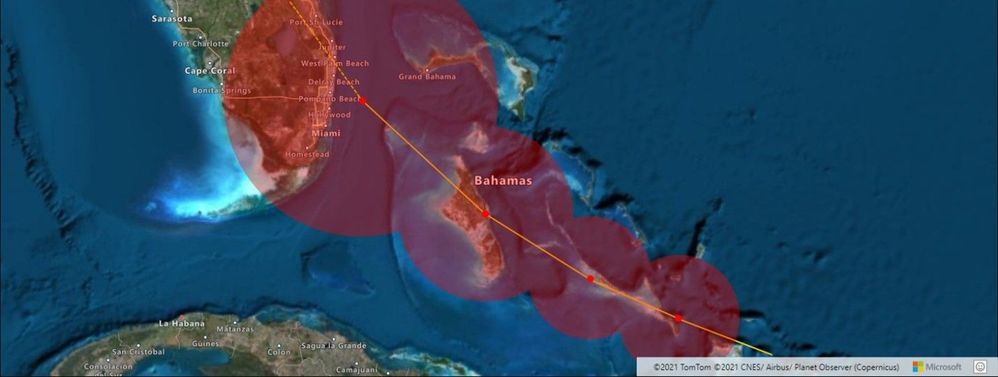
Tropical Storms info can be used to get useful observational and forecast data on current storms or to research details from previous tropical storm events for business intelligence and public safety purposes.
- Get Tropical Storm Active
- Get Tropical Storm Forecast
- Get Tropical Storm Locations
- Get Tropical Storm Search
Feedback
Visit the Azure Maps portal today to get started, and as always, we look forward to your feedback on our Tech Community site.
Published on:
Learn moreWe can help you with Azure Maps Weather Services adds three new services
If you want help implementing, troubleshooting, or improving this product, contact us and we’ll point you in the right direction.
Related posts
Introducing the Data-Bound Reference Layer in Azure Maps Visual for Power BI
Imagine managing a nationwide sales team and needing to understand how your sales align with factors like population density, competitor locat...
Enhance Azure Maps with Overture Maps Data using PMTiles!
Supercharge Azure Maps with Overture Maps Data using PMTiles! We’ve got some exciting news. Azure Maps now supports PMTiles! This me...
Where do I go if I have questions about Azure Maps?
As you might expect, just looking around on your own, or asking Co-pilot, you can find comprehensive help like Samples.AzureMaps.com, wit...
Tailor your Reference Layers in Azure Maps Visual for Power BI
We’re excited to share the latest enhancements to the Azure Maps visual in Power BI, designed to make your data visualization even mor...
Enhancing Logistics with Azure Maps and NVIDIA cuOpt for Multi-Itinerary Optimization
The logistics industry is always finding ways to optimize vehicle routing to enhance efficiency. The Vehicle Routing Problem (VRP) and Pickup ...
Introducing the Unified Azure Maps Experience
Microsoft has recently announced the unification of Bing Maps for Enterprise (BME) with Azure Maps, marking a remarkable advancement in their ...
Power BI Azure Maps Visual: Enhanced Reference Layer & Embedded Support
The Power BI Azure Maps visual has received a major update which includes an expansion of the reference layer and the addition of Power BI Emb...
Enhance your indoor maps with real-time map feature styling
The ability to dynamically update and visualize the state of rooms or areas within a building is critical to understanding the status of any b...
Dynamic Clustering Aggregation with Custom Styling in Bubble Layer
The Power BI Azure Maps visual allows you to create stunning geospatial visualizations with your data. Today, we are excited to announce a new...
HO HO HO Two Point OH!
You might notice some big changes have come to the North Pole experience at NORADSanta.ORG this year. Developer elves have implemented a...