
GetClientContext Is Not Defined When Navigating Back To WebResource Html File
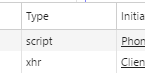
If you are experiencing "GetClientContext is not defined" error when navigating back to a custom WebResource in CRM Entity, then this tutorial is for you. The root cause of this issue is Chrome caching the ClientGlobalContext.js.aspx file and not providing an Xrm context to the JavaScript when returning to the WebResource. It is essential to have the proper Xrm context to efficiently highlight the insights of the dashboard. To troubleshoot, you can open the Developer Tools / Network tab on both good and bad loads to understand the issue and the solution.
One solution to this problem is appending a query string to the end of the aspx page with something like "type=script" to prevent the xhr from getting cached over the top of the script version. This way, both files can get cached separately.
This tutorial provides detailed steps to prevent this error for a smooth process while navigating back to a custom WebResource. Whether you are a seasoned CRM professional or new to this CRM Entity, this tutorial provides the solution to this unique issue.
The post GetClientContext Is Not Defined When Navigating Back To WebResource Html File originally appeared on DotNetDust.
Published on:
Learn more
Related posts
Macro Templates solution: can’t do it without a javascript web resource
Unfortunately, there is no content available for this post at the moment. Please check back later for updates. ...
Using Context Navigation and User Settings in PCF Controls
This post explores how to effectively use context in PCF (Power Apps Component Framework) controls. PCF controls offer many features, includin...
Affected Teams behavior in Chrome due to privacy sandboxing
In January 2024, Chrome will be rolling out privacy sandboxing in the web to 1% of their users, and by the late 2024 general rollout is expect...
Enhanced User Request Management and Navigation in Teams Admin Center
If you use Teams Admin Center and manage user app requests, then you're in for a treat. The center is introducing a set of enhancements aimed ...
{Dynamics CRM Error} The formatter threw an exception while trying to deserialize the message
If you're working with Dynamics CRM, you might encounter the following error: "The formatter threw an exception while trying to deserialize th...
How to Develop and Host a Google Chrome Extension?
If you're interested in developing and hosting your own Google Chrome extension, this article is a great place to start. First, the article ex...
Azure Synapse Resultset caching – how it works?
Azure Synapse's Dedicated SQL Pool comes with a unique feature known as result set caching that can work wonders in enhancing query performanc...
Get form context in HTML web resource using JavaScript– Dynamics 365 (UCI version)
Getting execution context is much easier in JavaScript (by passing execution context as first parameter) but in case of HTML web resource it i...
DYNAMICS 365 LEVEL UP BROWSER EXTENSION - PART 2 - NAVIGATION
If you're looking to maximize your productivity with Dynamics 365, the Level Up Browser Extension is an excellent tool to explore. In this pos...