
Introducing – and Managing – Microsoft Search in Bing through Office 365 ProPlus

Important!
Based on customer feedback, we’re making a few changes to the plan to roll out the extension for Microsoft Search in Bing. Based on these changes, the rollout will not start with Version 2002. For more information about these changes, read this announcement.
Customers tell us they want easier ways to manage their environments while delivering more productivity value to their employees. This includes helping people quickly find the information they need, a potentially frustrating prospect given the sheer and constantly growing volume of content within an organization. To help IT solve this -- and to do so in a way that is easy for you to manage -- we are offering the Microsoft Search in Bing extension to Office 365 ProPlus customers starting at the end of February.1,2 To help you prepare, we want to share guidance on how you can configure Office 365 ProPlus updates to best meet your organization’s search needs.
Microsoft Search in Bing
Bing is a gateway to Microsoft Search, a unified enterprise search solution that provides contextual work-related information using data sources in Office 365 including SharePoint, Microsoft OneDrive for Business, and Exchange. Microsoft Search delivers personalized results surfaced by the Microsoft Graph to make search in your organization more effective, increase productivity, and save everyone time.
Employees can search for colleagues by typing the title, team name, or even office location into the address bar. They can also search for office location and get answers that show floor plans for directions. They can even get definitions for company acronyms.
As part of Microsoft 365, Microsoft Search is on by default for all Microsoft apps that support it. This update is designed to enable an accessible and familiar entry point for your users: a search engine.
Deploy Microsoft Search through Office 365 ProPlus
You have told us that you want a single tool to deploy all desktop components of Office 365. To simplify the process of deploying Microsoft Search, we’re making the Microsoft Search in Bing extension available through Office 365 ProPlus with version 2002, alongside Word, Excel, PowerPoint, Outlook, OneDrive, and Teams. This extension will be installed with new installations of Office 365 ProPlus and when existing installations are updated. If Bing is already the default search engine, the extension will not get installed.
Honor your users’ search preferences
If you don’t want to deploy the extension to your users, you can exclude it by using the Office Deployment Tool or Group Policy. There are also ways to exclude it if you’re using Microsoft Endpoint Configuration Manager (current branch) or Microsoft Intune. For more information about how to manage the extension, read this article.
Even if you deploy the Microsoft Search in Bing extension with Office 365 ProPlus, users will still have an opportunity to choose their search engine. The first time your users open Google Chrome after the extension for Microsoft Search in Bing is installed, they will have an option to change back their search preferences by taking a few simple steps.
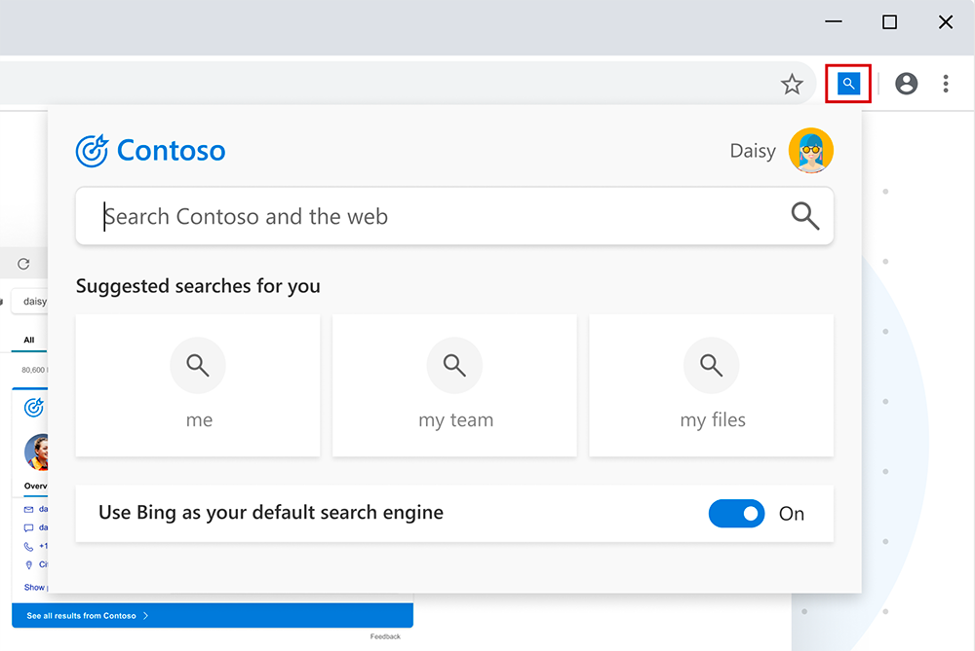
Learn more about the user benefits of this change by downloading the Microsoft Search in Bing Adoption Kit (zip file) and this user adoption guide. As always, please visit our Tech Community page to learn more about Office 365 ProPlus, and share your feedback and insights.
Footnotes
- This change is enabled for new and existing Office 365 ProPlus installations in Australia, Canada, France, Germany, India, the United Kingdom, and the United States. As we add locations, we will notify admins through the Message Center.
- The extension will be released to the Monthly Channel in late February 2020. Release for the Semi-Annual Channel (Targeted) and Semi-Annual Channel are coming soon.
Published on:
Learn moreRelated posts
Troubleshooting Office Cloud Policy Service (OCPS)
The Office cloud policy service (OCPS) is a cloud-based service that enables you to apply policy settings for Office 365 ProPlus on a user’s d...
Security Baseline recommendations now available in Office Cloud Policy Service
We are pleased to announce a new feature in the Office Cloud Policy Service that will allow you to easily find and configure policies that are...
Streamline deployment and management of Microsoft Teams with Office 365 ProPlus
As more and more Office 365 customers adopt Microsoft Teams, we’ve heard from many of you that you want to deploy and manage Teams the same wa...
Office Cloud Policy Service integrated with the Microsoft Endpoint Manager portal
The latest update to Microsoft Endpoint Manager includes integration with the Office Cloud Policy Service, giving admins the ability to create...
Updates to Office.com and the Office 365 app launcher
Office.com is the URL for an experience that we’ve been building for a couple of years. We designed it to be your work hub experience and help...
Update to Microsoft Search in Bing through Office 365 ProPlus
On January 22, 2020 we announced in advance that the Microsoft Search in Bing browser extension would be made availab...
Calendaring is Tricky and That Might be Why You Were An Hour Late to that Meeting
Writing code for calendaring features is hard. Some of you might say writing any kind of code is hard, and you might have a point, but cale...
We <3 OneNote for Android
Last November, we talked about how you should be able to take your notes, your way and that’s no different for o...
Update to the background image of the Office 365 sign-in screens
I’d like to give you an early heads up on a visual design update that is coming to the Office 365 sign-in experience. These are the screens us...
How to quickly optimize Office 365 traffic for remote staff & reduce the load on your infrastructure
Update 02 April 2020. A genuine thank you all for your feedback around this article. Given the enormous popularity of this subject in t...