
Getting started with REST APIs for Azure Synapse Analytics - Apache Spark Pool

Author: Abid Nazir Guroo is a Program Manager in Azure Synapse Customer Success Engineering (CSE) team.
Introduction
Azure Synapse Analytics Representational State Transfer (REST) APIs are secure HTTP service endpoints that support creating and managing Azure Synapse resources using Azure Resource Manager and Azure Synapse web endpoints. This article provides instructions on how to setup and use Synapse REST endpoints and describe the Apache Spark Pool operations supported by REST APIs.
Authentication
In order to perform any operation using Azure REST APIs you need to authenticate the request using an azure active directory authentication token. This token can be generated by various interactive and non-interactive methods. In this tutorial we will use a azure active directory service principal for generating a token with below steps:
- Register an application with Azure AD and create a service principal. You can create a new service principal using Azure Portal by following the steps outlined in Create an Azure AD app and service principal
- Create a secret for the registered service principal and save it securely for usage. Instructions for creating a secret are documented at - Create a secret for an application
- Assign an appropriate role to the registered service principal on the Synapse Workspace based on the operations you want to perform using the REST APIs. You can find detailed information on all available Azure Synapse Analytics roles and corresponding permissions at - Azure Synapse RBAC roles
REST API Client
You can use various command line utilities like CURL or Powershell, programming languages or GUI clients to interact with REST API endpoints. In this article we will leverage a widely used GUI application - Postman for its simplicity and ease of setup. Postman can be downloaded with this link.
Example: How to get an Azure AD Access Token
The following parameters are needed to successfully get an Azure AD access token:
|
Parameter |
Description |
|
Tenant ID |
The Azure Active Directory (tenant) ID where the application is registered. |
|
Client ID |
The Application (client) ID for the application registered in Azure AD. |
|
Client secret |
The Value of the client secret for the application registered in Azure AD. |
On the Postman UI
- Create a new HTTP request (File > New > HTTP Request or using the new tab (+) icon).
- In the HTTP verb drop-down list, select POST.
- For Enter request URL, enter https://login.microsoftonline.com/<tenant_id>/oauth2/token, where <tenant_id> is your Active Directory (tenant) ID.
- On the headers tab enter a new key Content-Type with value application/x-www-form-urlencoded.
- On the Body tab, select x-www-form-urlencoded and enter below key value pairs.
grant_type:client_credentials client_id:<client_id> client_secret:<Client_secret> resource:https://management.azure.com/ - Click send. You will receive the bearer token in the json response to the request. Below is an example of the response.

Note: The "resource" parameter value should be "https://management.azure.com/" or ""https://management.core.windows.net/" for control plane operations and "https://{workspace name}.dev.azuresynapse.net" for data plane operations.
Azure Synapse Analytics Apache Spark REST APIs
Apache Spark Pools in Azure Synapse Analytics supports the following REST API operations that can be invoked using a HTTP endpoint:
|
Operation |
Description |
Method |
API Docs |
|
Create Or Update |
Create a new Apache Spark Pool or modify the properties of an existing pool. |
PUT |
|
|
Delete |
Delete a Apache Spark Pool pool. |
DELETE |
|
|
Get |
Get the properties of a Apache Spark Pool. |
GET |
|
|
List By Workspace |
List all provisioned Apache Spark Pools in a workspace. |
GET |
|
|
Update |
Update the properties of an existing Apache Spark pool. |
PATCH |
Detailed documentation of all the REST API operations supported overall by Azure Synapse Analytics can be found with this link.
Example: How to invoke an Apache Spark REST endpoint to create or update a spark pool
The Create Or Update REST API can be used to create a new Apache Spark Pool or change configurations of an existing pool, including the ability to upgrade/downgrade the Spark runtime version of a pool. For example, an existing Apache Spark pool with spark runtime version 3.1 can be upgraded to Spark version 3.2 without the need of deletion of the existing pool.
On the Postman UI
- Create a new HTTP request (File > New > HTTP Request or using the new tab(+) icon).
- In the HTTP verb drop-down list, select PUT.
- For Enter request URL, enter https://management.azure.com/subscriptions/{subscriptionId}/resourceGroups/{resourceGroupName}/providers/Microsoft.Synapse/workspaces/{workspaceName}/bigDataPools/{bigDataPoolName}?api-version=2021-06-01-preview where {subscriptionId} is the subscription Id of where the Azure Synapse workspace has been provisioned, {resourceGroupName} is the resource group of the workspace, {workspaceName} is name of the Synapse workspace and {bigDataPoolName} is the name of the Apache spark pool.
- On the headers tab enter a new key Content-Type with value application/json.
- Click on the Authorization tab, select Bearer Token in the Type dropdown menu and enter the AAD Token generated in the previous example.
- On the Body tab, select raw and select json on the dropdown menu and enter target Spark Pool JSON definition in the body.
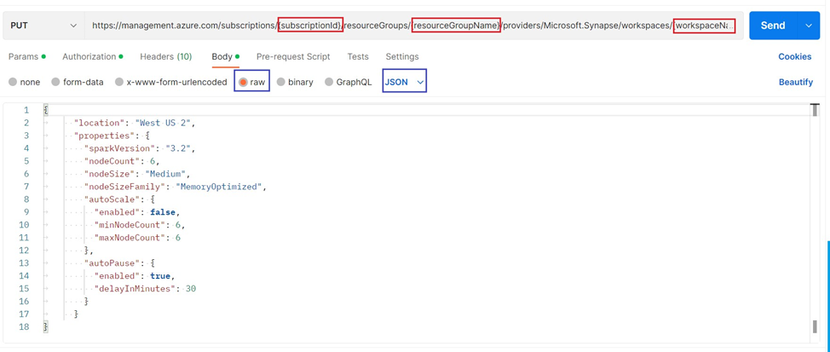
Example:
Detailed list of configuration properties supported by Apache Spark Pools are documented in this link.
7. Click the send button. A successful creation or modification REST API operation will return a detailed provisioning JSON response like the below sample:
Note: You can include an optional Boolean(true/false) parameter in the request URL to stop all currently running sessions/job on the target Spark pool.
The new request URL with forced termination of sessions: https://management.azure.com/subscriptions/{subscriptionId}/resourceGroups/{resourceGroupName}/providers/Microsoft.Synapse/workspaces/{workspaceName}/bigDataPools/{bigDataPoolName}?api-version=2021-06-01-preview&force={true}
Summary
Azure Synapse Analytics REST APIs REST APIs can be used for operation of various Synapse services. The REST APIs can be used to upgrade/downgrade Spark runtime version, auto-scale configuration, library management and more.
Our team publishes blog(s) regularly and you can find all these blogs here: https://aka.ms/synapsecseblog
For deeper level understanding of Synapse implementation best practices, please refer our Success By Design (SBD) site: https://aka.ms/Synapse-Success-By-Design
Published on:
Learn moreWe can help you with Getting started with REST APIs for Azure Synapse Analytics - Apache Spark Pool
If you want help implementing, troubleshooting, or improving this product, contact us and we’ll point you in the right direction.
Related posts
We're moving!
We’re moving to the Analytics on Azure Tech Community! All new Azure Synapse Analytics content will be published there. In the next few days a...
Upgrade to Azure Synapse runtimes for Apache Spark 3.4 & previous runtimes deprecation
It is important to stay ahead of the curve and keep services up to date. That's why we encourage all Azure Synapse customers with Apache ...
ADF\Synapse Analytics - Replace Columns names using Rule based mapping in Mapping data flows
In real time, the column names from source might not be uniform, some columns will have a space in it, some other columns will not. For exampl...
Interpreting Script activity output json with Azure Data Factory\Synapse analytics
Script activity in Azure Data Factory\ Synapse analytics is very helpful to run queries against data sources mentioned here in this document.&...
Synapse Connectivity Series Part #4 - Advanced network troubleshooting and network trace analysis
Continuing the series of this blog posts I would like to go more advanced on troubleshooting connectivity issues. I would like to thank also&n...
Boost your CICD automation for Synapse SQL Serverless by taking advantage of SSDT and SqlPackage CLI
Introduction Azure Synapse Analytics Serverless SQL is a query service mostly used over the data in your data lake, for data discovery,...
Metadata-Based Ingestion in Synapse with Delta Lake
Overview The crucial first step in any ETL (extract, transform, load) process or data engineering program is ingestion, w...
Missing Fields Added to Dedicated SQL pool Diagnostic Settings Logs
Over the past year, customers have informed the team there were a set of key columns missing in the standalone Dedicated SQL pools (formerly S...
Using Azure DevOps with Synapse Workspaces to create hot fixes in production environments
Have you ever deployed a release to production only to find out a bug has escaped your testing process and now users are being severely impact...
Azure Synapse MVP Corner - March 2023
About this blog series Microsoft Most Valuable Professionals, or MVPs, are technology experts who passionately share their knowledge with the ...