
Privacy changes and API support for Microsoft 365 usage reports – Rolling out starting June 23

At Microsoft, we are committed to both data-driven insights and user privacy. As part of that commitment, we made a change in September 2021 to Microsoft 365 usage analytics to conceal user group and site names by default. Starting on June 23rd, we will conceal the GroupID variable in the Groups Activity section of the Microsoft 365 Active Users report and Microsoft 365 Apps usage report. At the same time, we will be introducing an API to assist global admins to manage data privacy controls for Microsoft 365 Reports. These changes will gradually roll out to all environments through the end of July and will help companies fulfill their local privacy requirements. The following products and APIs are affected:
- Microsoft 365 Reports in the Microsoft 365 admin center
- Microsoft 365 usage reports in Microsoft Graph
- Microsoft Teams analytics and reporting in the Microsoft Teams admin center
- The reportRoot: getSharePointSiteUsageDetail API (1.0 and beta) for SharePoint site detail
Global admins can revert this change for their tenants and show identifiable information if their organization’s privacy practices allow it. This can be achieved in the Microsoft 365 admin center by going to Settings > Org Settings > Services, selecting Reports and unchecking, "Display concealed user group and site names in all reports."
The API to change this setting without needing to visit the Microsoft 365 admin center is below:
URL is https://graph.microsoft.com/beta/admin/reportSettings
Two methods have been provided for this API:
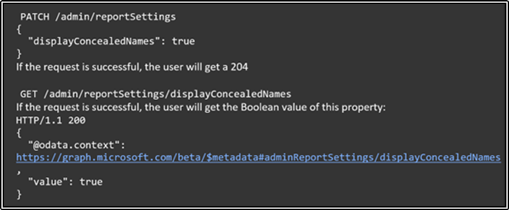
The report will only contain a Privacy Setting property. For more information on Graph API, check out Use the Microsoft Graph API - Microsoft Docs. Global admins can use the Software Development Kit (SDK) or directly call the API using any program language with network ability. We recommend using Graph Explorer.
When user group and site names are concealed, the report will show de-identified information in the username information as demonstrated in the example below:
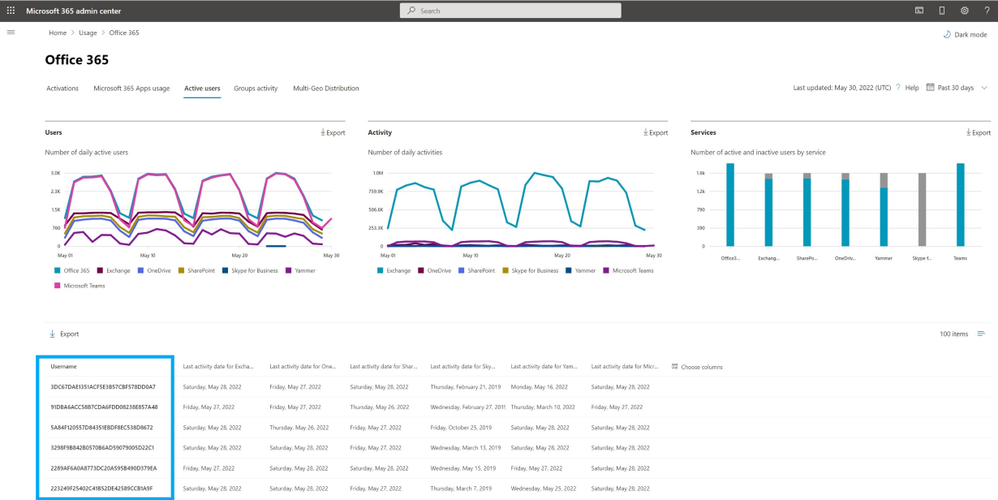
When a global admin unchecks the ‘‘Display concealed user group and site names in all reports" box or makes a change to remove concealment using the API, the report will show identifiable information, such as usernames, as demonstrated in the example below:

Showing identifiable information is a logged event in the Microsoft Purview compliance portal (formerly known as the Microsoft 365 compliance center) audit log. When concealing user group and site names are disabled, admin roles and Reports reader roles will be able to see identifiable user-level information. Global Reader and Reader roles will not have access to identifiable user information regardless of the setting chosen.
These changes to the product will bolster privacy for users while still enabling IT admins to measure adoption trends, track license allocation, and determine license renewal in Microsoft 365.
Did you know? The Microsoft 365 Roadmap is where you can get the latest updates on productivity apps and intelligent cloud services. Check out what features are in development or coming soon on the Microsoft 365 Roadmap. To learn more about the features discussed in this blog, check out the links for the roadmap items below:
Published on:
Learn moreRelated posts
Announcing the General Availability of the Microsoft 365 Document Collaboration Partner Program
Empowering Seamless Collaboration for Modern Workforces We are thrilled to announce the general availability of the Microsoft 365 Docume...
Favorite Microsoft 365 Copilot Prompts
(Amber Plumb interviewing Michael Morales and Allison Sweet) The power of M365 Copilot is transforming the way our support team operates...
Favorite Copilot Prompts
(Amber Plumb interviewing Michael Morales and Allison Sweet) The power of M365 Copilot is transforming the way our support team operates...
Boost digital event engagement with Voting and Archiving in Teams Q&A
Managing and delivering effective town halls is key to enabling two-way dialogue with leaders in today’s hybrid world. Microsoft Teams Q&A...
Prepare now for key end of support moments in 2025
One year from today, on October 14, 2025, support will end for all Office 2016 and 2019 suites, standalone apps, and servers. This includes:&n...
Everything you should know about Visio 2016 and Visio 2019 end of support
On October 14, 2025, Visio 2016 and Visio 2019 will reach end of support. After this date, Visio 2016 and Visio 2019 will no longer receive se...
Limit frontline worker access to Teams when off shift
We’re excited to announce that the frontline working time feature is now generally available! This feature allows admins to block or warn acce...
We are removing Feed on Microsoft 365 (Office)
As part of our ongoing efforts to streamline and enhance user experiences, we will be retiring the Feed feature (shown in figure 1 below) on t...
NOW ON DEMAND | Microsoft Loop Learning Series [Six webinars]
UPDATE | All parts of the Loop Learning Series have aired and are now available to watch on demand, playable below in this blog post. Ar...
Leveraging Partner Apps to Deliver on the Promise of AI-Led Productivity
The advent of generative AI is driving a rethink of what outcomes we deserve from our productivity software – from gains in efficiency to more...