
Improve cost-effectiveness by utilizing forecasting service in Dynamics 365 Customer Service.
Predict and manage support needs with forecasting in Dynamics 365 Customer Service
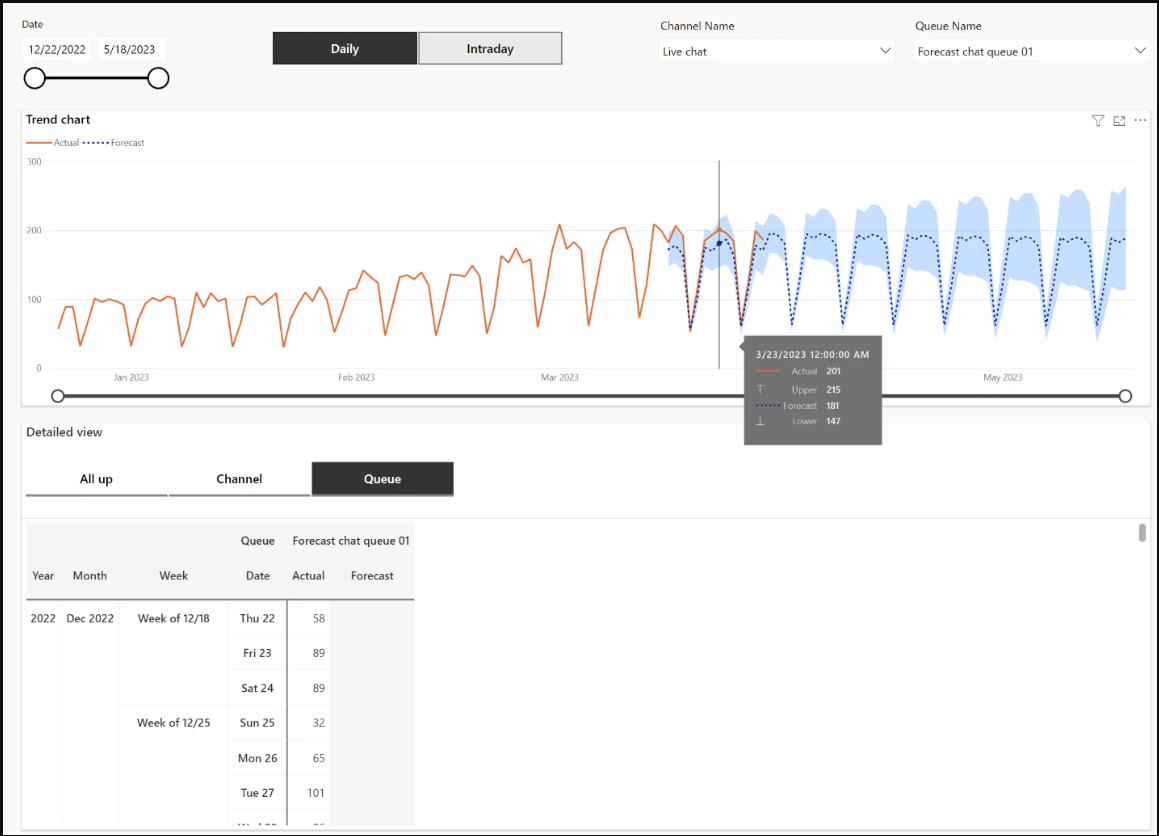
Forecast reports offer a structured way to predict support needs for your organization, using historical data as a basis. They'll help streamline your operations, boosting efficiency and lowering costs while preserving a positive customer experience.
You can use forecast reports to plan staffing levels and other resource allocation based on predicted case and conversation volumes, as well as predicted agent demand for conversations.
Learn more: Maximize efficiency with forecasting in Dynamics 365 Customer Service - Microsoft Dynamics 365 Blog
Key feature functionalities
Incorporating Service-Level Metrics
The feature considers operational metrics such as service level, shrinkage, and concurrency when forecasting agent demand. By considering these factors, organizations can ensure that the agent ability forecast aligns with service level agreements and operational constraints, maximizing efficiency and customer satisfaction.
Auto-Detection of Holidays
Our forecasting model uses historical traffic patterns to automatically find holidays, resulting in more precise predictions. This functionality helps organizations adjust their operations according to holiday-related changes in service demand across various regions, guaranteeing the best service levels despite fluctuations in customer activity during holidays.
- Compare your service volume and agent demand forecasts against actual performance data. This can help you evaluate the accuracy of your forecasts and show areas for improvement.
How it works
- Open the Customer Service admin center and select Insights > Report settings.
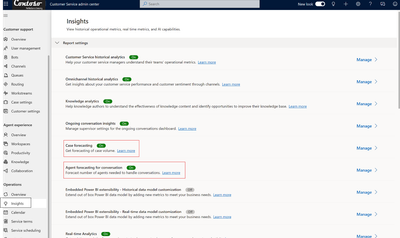
- To enable the case forecasting report, find the Case forecasting row, select Manage, and then toggle Enable case forecasting.
- To enable the agent forecasting for conversation report, find the Agent forecasting for conversation row, select Manage, and then toggle Enable agent ability forecasting.
- Customize your reports by setting a refresh schedule, changing the time zone, specifying a start date for historical data, or choosing seasonality options.
Tips and tricks
- Larger historical data sets, especially those that include data for every day in the set, can result in more correct forecasts.
- Extending the historical range of your data set may also increase prediction accuracy, as it allows the forecast model to capture more patterns and variations over time.
- Forecast accuracy tends to be higher for the near future than for distant dates.
Requirements: You need customer service license in Dynamics 365 Customer Service to access Forecast Service functionality.
Availability
This feature is available now to all Microsoft Dynamics 365 Customer Service users.
Feedback
We want to hear from you! Please feel free to share your feedback with Dynamics customer support https://successhub.crm.dynamics.com. You can access the feedback link only if you meet the above requirements mentioned in the Requirements section.
Published on:
Learn moreRelated posts
Announcing the General Availability of the Microsoft 365 Document Collaboration Partner Program
Empowering Seamless Collaboration for Modern Workforces We are thrilled to announce the general availability of the Microsoft 365 Docume...
Favorite Copilot Prompts
(Amber Plumb interviewing Michael Morales and Allison Sweet) The power of M365 Copilot is transforming the way our support team operates...
Favorite Microsoft 365 Copilot Prompts
(Amber Plumb interviewing Michael Morales and Allison Sweet) The power of M365 Copilot is transforming the way our support team operates...
Boost digital event engagement with Voting and Archiving in Teams Q&A
Managing and delivering effective town halls is key to enabling two-way dialogue with leaders in today’s hybrid world. Microsoft Teams Q&A...
Prepare now for key end of support moments in 2025
One year from today, on October 14, 2025, support will end for all Office 2016 and 2019 suites, standalone apps, and servers. This includes:&n...
Everything you should know about Visio 2016 and Visio 2019 end of support
On October 14, 2025, Visio 2016 and Visio 2019 will reach end of support. After this date, Visio 2016 and Visio 2019 will no longer receive se...
Limit frontline worker access to Teams when off shift
We’re excited to announce that the frontline working time feature is now generally available! This feature allows admins to block or warn acce...
We are removing Feed on Microsoft 365 (Office)
As part of our ongoing efforts to streamline and enhance user experiences, we will be retiring the Feed feature (shown in figure 1 below) on t...
Leveraging Partner Apps to Deliver on the Promise of AI-Led Productivity
The advent of generative AI is driving a rethink of what outcomes we deserve from our productivity software – from gains in efficiency to more...
What’s new in FLW shared devices
Discover the Latest Enhancements in Shared Device Mode (SDM) We are excited to announce a series of new features in Shared Device Mode ...