
Accelerate customer outcomes with Azure AI Services and Azure Communication Services
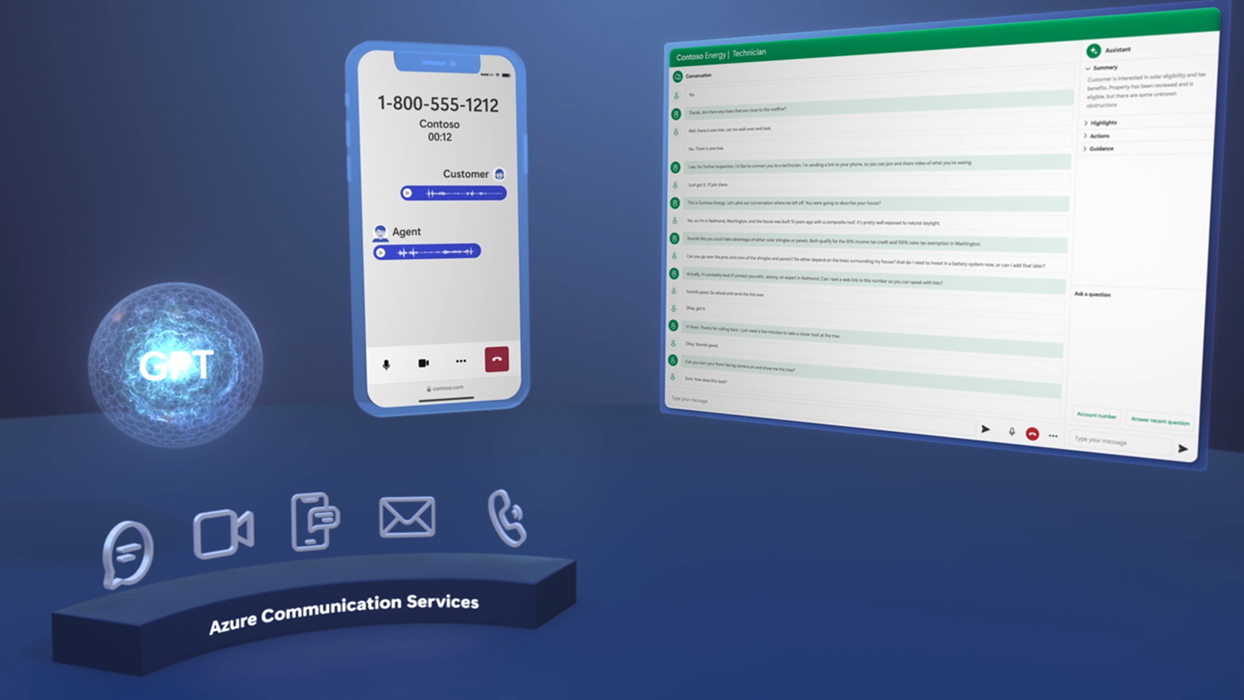
I’m excited to share the release of the latest installment of Microsoft Mechanics, showcasing how businesses can achieve more across every customer interaction by integrating intelligence into their communications with Azure AI Service and Azure Communication Services.
Watch the video here and read on to learn more.
Using generative AI to create more human-centric experiences
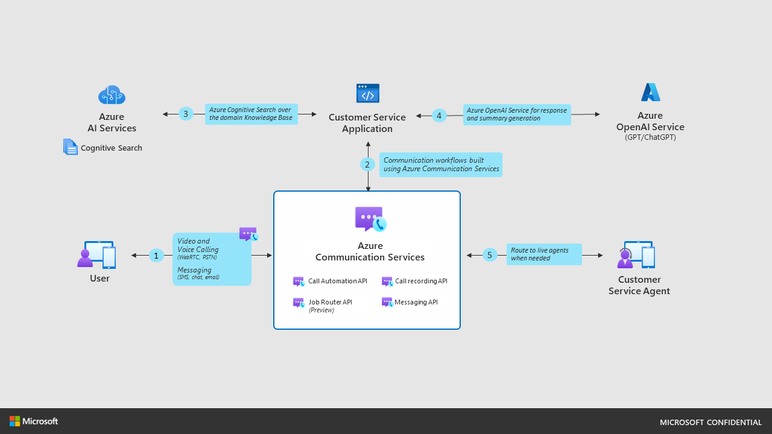
Large-language models like ChatGPT on Azure OpenAI allow you to build applications with natural and life-like conversations, but most solutions use only simple text-based interactions and don’t have a path to bring a human into the loop. Azure Communication Services and Azure AI, and Azure Cognitive Search can be used to automate and transform your customer interactions with faster and informed human-centric responses across any communication channel– whether through text-based bots, voice channels or even email and SMS, all while empowering your teams at every customer touchpoint from intake to resolution. Agents can use artificial intelligence (AI) with context to respond to escalations rapidly and effectively.
Communication and AI services designed to work together
Azure Communication Services is the same underlying platform and infrastructure that powers Microsoft Teams and more the 300 million active users per day. Developers can use Azure Communication Services to get API level access to the same rich set of capabilities: voice, video or text-based chat as well as SMS-based mobile messaging and email. These core capabilities can be integrated into customer application experiences that use your brand’s identity and distinctiveness.
Azure AI is a set of cloud services that provide artificial intelligence (AI) and machine learning (ML) capabilities to your applications, such as natural language processing, computer vision, speech, and decision making. You can use Azure AI to add intelligence and automation to your communication scenarios, such as understanding customer intents, analyzing customer emotions, transcribing, and translating speech, and synthesizing natural-sounding voices.
Build a robust B2C solution tailored to your specific operations
In order to help our customers and partners understand and explore what’s possible with Azure Communication Services and Azure AI, the Azure Communication Services team recorded an episode with MS Mechanics that takes you through a ‘hero’ scenario for customer intake. We also have all the code from the video available on Github for you to try.
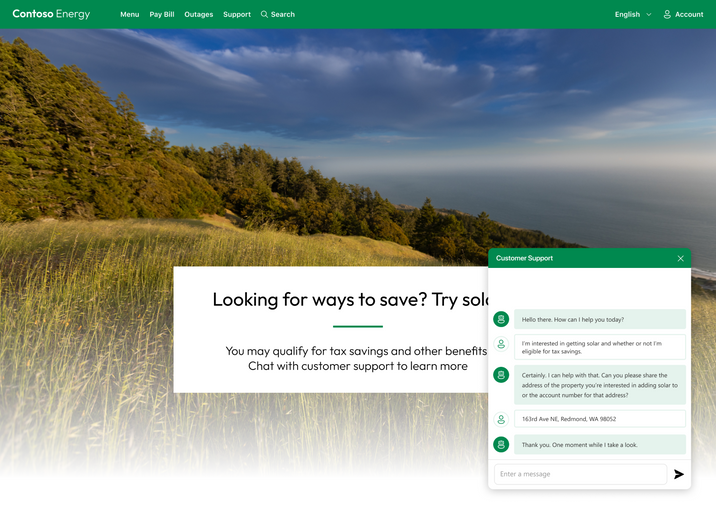
Imagine this scenario: you want to install solar panels on your roof, but you want to know more about rebates and offers that are available. You start a chat conversation on a website with a bot who tells you all the latest information, and even allows you to move the conversation from your browser to a live voice conversation on the phone. When you need more detailed assistance, that only a human technician can provide, your chat conversation is seamlessly handed-off to a live agent who has all the AI-assisted context and information that they need to help you. Finally, the agent uses AI to generate follow up emails and SMS summaries. This solution is powered by Azure Communication Services and Azure AI Service, and shows how to:
- Connect Azure Communication Services Chat to Azure Cognitive Search using Azure OpenAI and ChatGPT to build a bot that can answer questions specific to a product domain. The solution uses some of the techniques described in ChatGPT + Enterprise data with Azure OpenAI and Cognitive Search such as Retrieval Augmented Generation (RAG) to create a ChatGPT-like experience using your own data knowledge base.
- Use Azure Communication Services Call Automation and Azure Cognitive Speech services to create a bot that talks to a customer over phone using natural language. This is a step forward from traditional Interactive-Voice-Response (IVR) system.
- Transcribe conversations directly to an Azure Communication Services Chat thread using Azure Communication Services Call Recording.
- Upgrade an automated bot conversation to a live agent using Azure Communication Services Job Router to intelligently connect to the best available agent based on the conversation’s context.
- Use Azure OpenAI Service with ChatGPT to summarize a conversation and to generate action items in real-time.
- Generate and send conversation summaries via SMS or Email. Each summary is tuned to the specific communication channel. For example, SMS summaries are shortened to fit within SMS message length of 140 characters.
You can see the solution in action by watching the Microsoft Mechanics session: Build GPT-automated customer support with Azure Communication Services
Getting started
We are very excited for you to try out the solution. Head over to our GitHub repo to play around with the code and modify it for your scenarios.
You can learn more about Azure Communications Services here - https://learn.microsoft.com/en-us/azure/communication-services/
Published on:
Learn moreWe can help you with Accelerate customer outcomes with Azure AI Services and Azure Communication Services
If you want help implementing, troubleshooting, or improving this product, contact us and we’ll point you in the right direction.
Related posts
Azure Communication Services Ideas Board: Share your feedback with the product team
Innovation is not a solitary pursuit, and we recognize that some of the best ideas come from you, our Azure Communication Services community. ...
Engage with the Azure Community Services Ideas Board: Your Voice Matters
Innovation is not a solitary pursuit, and we recognize that some of the best ideas come from you, our Azure Communication Services community. ...
Part 2 - Multichannel notification system using Azure Communication Services and Azure Functions
In the first part of this topic, we setup all the Azure resources like the Azure Communication Services for Email, SMS, WhatsApp for...
Part 1 - Multichannel Notification System with Azure Communication Services and Azure Functions
In the interconnected digital era, it's crucial for businesses and services to communicate effectively with their audience. A robust notificat...
Building a WhatsApp AI bot for customer support
Building a WhatsApp AI Bot for customer support In this blog post, we’ll explore how to build a customer support application that integ...
Azure Communication Services September 2024 Feature Updates
The Azure Communication Services team is excited to share several new product and feature updates released in August 2024. (You can view previ...
Azure Communication Services at the DEVIntersection Conference
Join us for the DEVintersection Conference from September 10 to 12, 2024, in Las Vegas, Nevada. This event gathers technology enthusiasts from...
Azure Communication Services June 2024 Feature Updates
Data Retention with Chat threads Developers can now create chat threads with a retention policy between 30 and 90 days. This feat...
Azure Communication Services August 2024 Feature Updates
The Azure Communication Services team is excited to share several new product and feature updates released in July 2024. (You can view previou...
Anywhere365 integrates Azure Communication Services into their Dialogue Cloud Platform
Every day, companies aim to help their customers realize the most value from their products and services. They do this by providing ef...