
Powering application migration and modernization with Azure Migrate and CAST
Guest authors:
Emmanuelle Castaings, CAST Solution Design Specialist
Damien Santé, CAST Partner Business Development SVP
In the past decade, organizations have been engaged in migrating their applications to clouds. Some of the in-house custom applications have been moved through simple “Lift & Shift” motions (Rehost) to quickly reach cloud and leverage some of its benefits, mostly at infrastructure level, example, in performance or resilience.
While shifted to cloud, these applications may not make best use from all cloud services – example, cope with sporadic workloads using containerization-as-a-service, observability at application level to give precise usage feedback to the business, re-architect into micro-services for more agile improvements or use more advanced PaaS services.
Furthermore, a substantial number of custom applications running on premises remain there because they cannot be migrated without some Refactoring or Rearchitecting, and knowledge of what’s in the applications may not be handy.
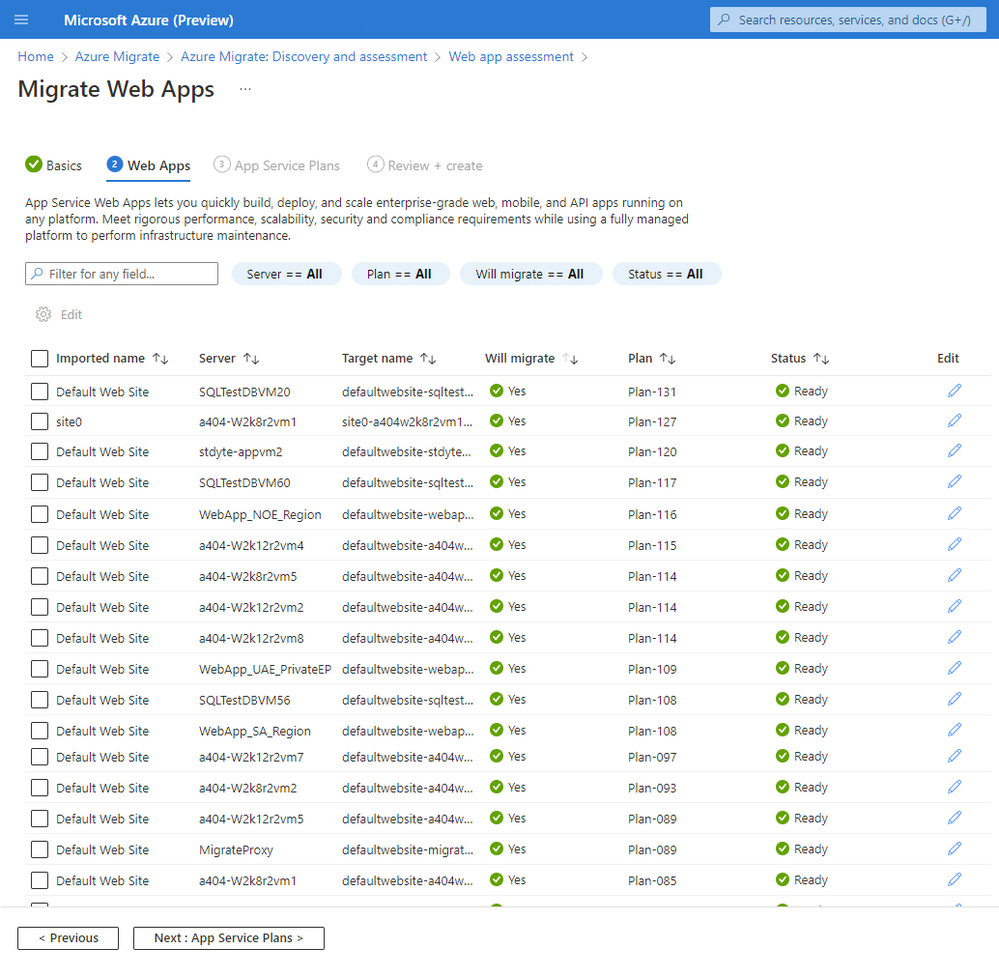
We recently announced how to migrate ASP.NET web apps to Azure App Service with Azure Migrate, with this, customers can bulk Discover web applications running in their existing infrastructure, Assess the readiness of discovered web applications for migration into Azure App Service, and then Migrate multiple web applications into Azure App Service, all from within the guided Azure Migrate experience. With the upcoming releases of Azure Migrate, customers will have the option to containerize ASP.NET and Java web apps to App Service custom containers and Azure Kubernetes Service (AKS).

Azure Migrate and CAST
The solution allows enterprises to accelerate Refactoring and modernization of custom-built applications developed over the years and leverage the full benefits of Azure services.
Typically, the solution involves the use of Azure Migrate, CAST Highlight then CAST Imaging through the following steps:
- Scan all applications on Azure Migrate to discover the state of the infrastructure.
- Scan source code of custom applications using CAST Highlight to automatically categorize them according to 5R-approach (Rehost, Refactor, Rearchitect, Rebuild and Retire), get a list of cloud blockers, recommended Azure services, opensource risks and remediation effort estimates. See it live in 1 min in this CAST Highlight teaser video.
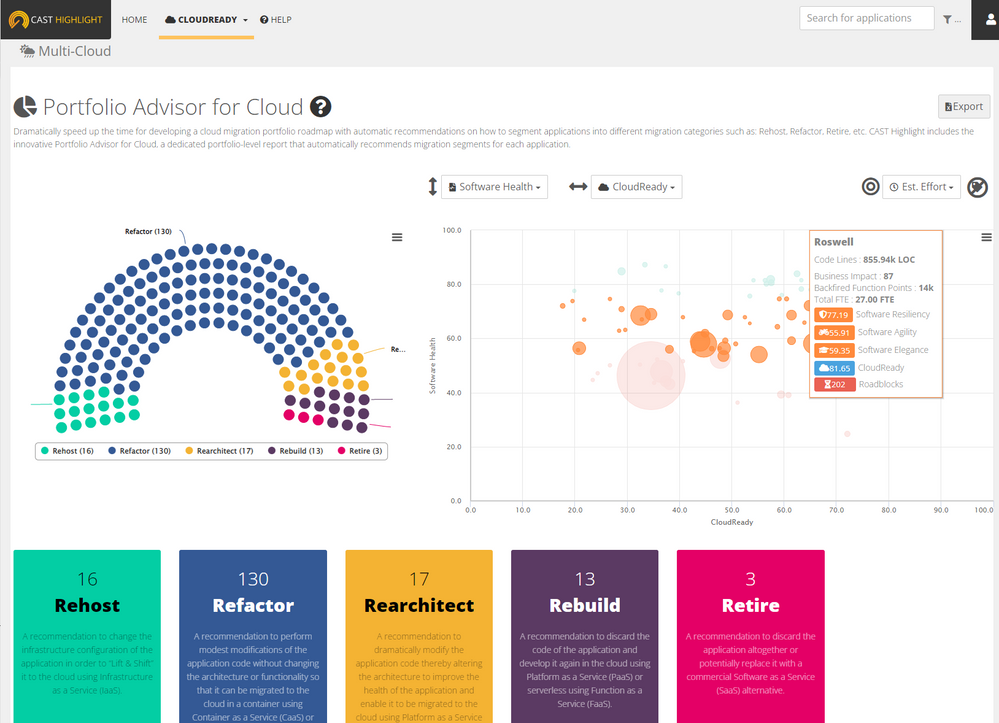
- For each application, the user can apply the following steps depending on its categorization proposed by CAST Highlight and validated by the development team:
- Rehost: use Azure Migrate and its automated migration patterns.
- Refactor: remediate source code based on CAST Highlight insights.
- Replatform: once the app is refactored using CAST it can be migrated to Azure using Azure Migrate

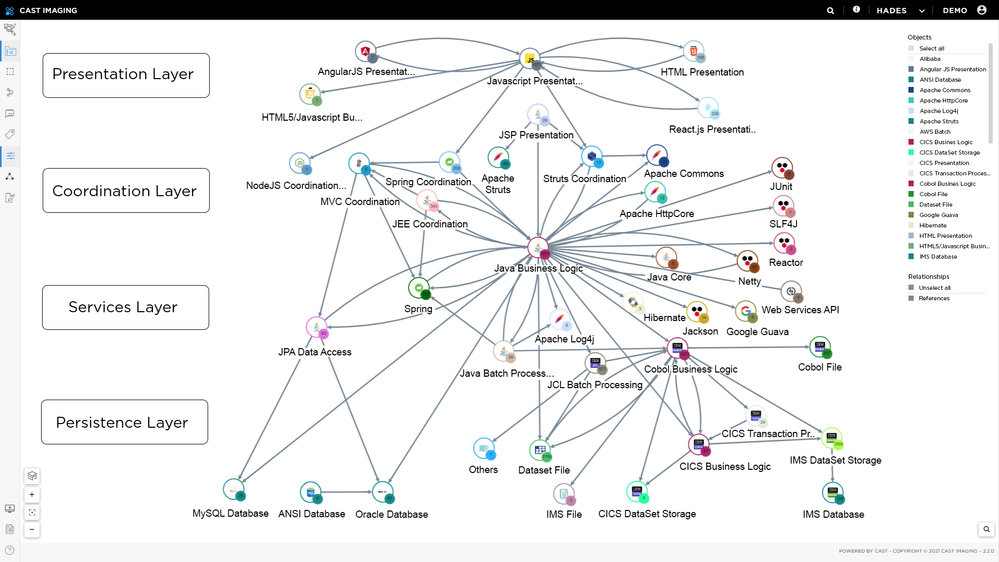
- Rearchitect or heavy Refactoring: scan them on CAST Imaging to automatically produce the AS-IS architecture that will guide architects and development teams to make modernization decisions (e.g., segment a monolith into microservices): they can navigate in the automatically generated architecture of the application, down to the tiniest details, to understand its architecture, data graphs, dependencies, and more. Check out the 2 min CAST Imaging demo.
- For applications where CAST Highlight detected open-source risks, i.e. vulnerabilities (critical CVEs) or IP risks (strong copyleft licenses), leverage findings from CAST Highlight including the Bill of Material to best mitigate these risks.

Through the combination of CAST and Azure Migrate, organizations will benefit from automation of migration and modernization capabilities with a rapid and accurate initial assessment. CAST solutions are non-intrusive in production and cover 50+ programming languages, 12+ database types and hundreds of frameworks (links below).
This solution can also be extended into a steady state for continuous progress monitoring of the journey-to-cloud program, trending views and to serve as application knowledge based throughout the lifecycle of the applications.
Enabling success through Azure Migrate and CAST

More about CAST
CAST is part of the Microsoft Azure Migrate & Modernize Program and can be mobilized for clients and SI partners through the Solution Assessment Program.
- CAST Highlight and CAST Imaging demo video (13 min)
- CAST Product documentation
- Request a free trial for CAST on the Azure Marketplace here
Learn more
Attend this Microsoft Inspire on-demand session to learn more about cloud migration and modernization. Check out this FastTrack link for moving to Azure efficiently and get best practice guidance from the Azure migration and modernization center (AMMP). AMMP is now a comprehensive program for all migration and modernization needs of our customers. Learn more and join AMMP today.
Published on:
Learn moreWe can help you with Powering application migration and modernization with Azure Migrate and CAST
If you want help implementing, troubleshooting, or improving this product, contact us and we’ll point you in the right direction.
Related posts
VMware HCX Design with Azure VMware Solution
Overview VMware HCX is one of the Azure VMware Solution components that generates a large number of service requests from our customers. The A...
Azure Backup and DR: Cross-Region Restore - Exploring Solutions
Azure Backup and DR: Cross-Region Restore - Exploring Solutions When building a Disaster Recovery (DR) plan, customers often face chall...
Microsoft is headed to VMware Explore 2024 in Barcelona!
Microsoft is headed to VMware Explore 2024 in Barcelona! If you want to know about running VCF Private Clouds in Azure, the work we ar...
IBM Power Virtual Server and Microsoft Azure Multi-cloud Integration Patterns
IBM Power Virtual Server and Microsoft Azure Multi-cloud Integration Patterns &nbs...
Enhancing Disaster Recovery and Ransomware Protection with Azure VMware Solution and JetStream
Enhancing Disaster Recovery and Ransomware Protection with Azure VMware Solution and JetStream Software Disaster Recovery (DR) ...
Microsoft is headed to VMware Explore 2024 in Las Vegas
If you want to know about Azure, the work we are doing in partnership with VMware by Broadcom, or have a conversation about your VMwar...
Azure VMware Solution using a public IP down to the NSX-T Edge; configure SNAT, No-SNAT & DNAT
Azure VMware Solution How To Series: Configuring NSX-T SNAT, No-SNAT & DNAT rules Overview Requirements Lab Environment NAT Rules K...
Azure VMware Solution now available in India Central
Azure VMware Solution has expanded its reach and is now available in India Central, marking it as the 33rd Azure region where this particular ...
Azure Migrate - Build 2024 Announcements
Microsoft Build introduced exciting new announcements for Azure Migrate. Cost optimization remains a top priority for customers when selecting...
Azure VMware Solution - Using Log Analytics With NSX-T Firewall Logs
Azure VMware Solution How To Series: Monitoring Azure VMware Solution Overview Requirements Lab Environment Tagging & Groups Kusto ...