
Retrieve more than 100,000 Dataverse Rows with List Records Action in Cloud Flow Using Skip Token

Have you ever wondered what the Skip Token parameter in the List Records action of Microsoft Dataverse connector is for? In this post, I will explain how you can retrieve any number of rows, even more than 100,000 rows, by handling paging manually with the Skip Token parameter.
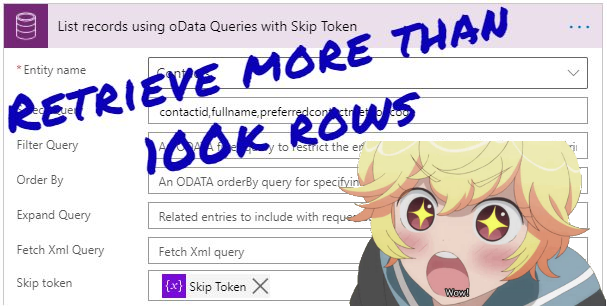
By default, the List Records action in Power Automate can retrieve up to 5,000 rows only from the Microsoft Dataverse environment. If you want to retrieve more than 5k rows, you can enable Pagination in the Settings and set the Threshold setting with a value up to 100,000 as mentioned in David Yack's blog post. 100k is quite a lot of rows and in most cloud flows, it is hard to hit that maximum limit. The best approach is to use the Filter Query to filter out to the point that the data is manageable. But there are some exceptional cases where you might have to retrieve more than 100k rows (e.g. export the data out of the system as a file which needs to be imported into another system).
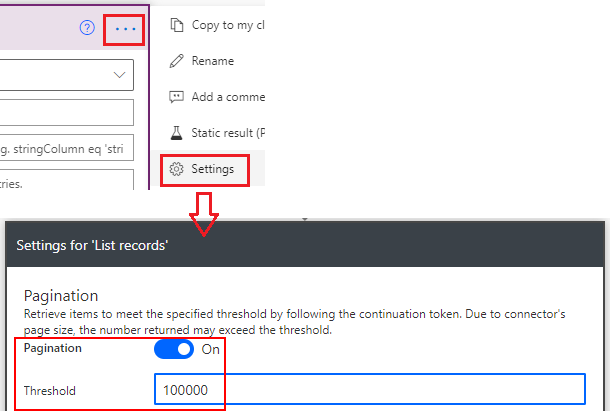
There are also some caveats to enabling the Pagination in Settings and increasing the Threshold setting to retrieve more than the default 5k rows.
- The data of the 5001st row onwards of the output does not contain the value for @OData.Community.Display.V1.FormattedValue
- @odata.nextLink property returns empty which means you cannot use the Skip Token parameter to retrieve the data with a batch of 100k rows
To overcome those problems or retrieve more than 100k rows, we can use the Skip Token parameter as below. Thanks to Nuri Usta for blogging about it one of his blog posts.
There are two ways we can do the retrieving:
🔗 List Records using oData Queries with Skip Token Parameter
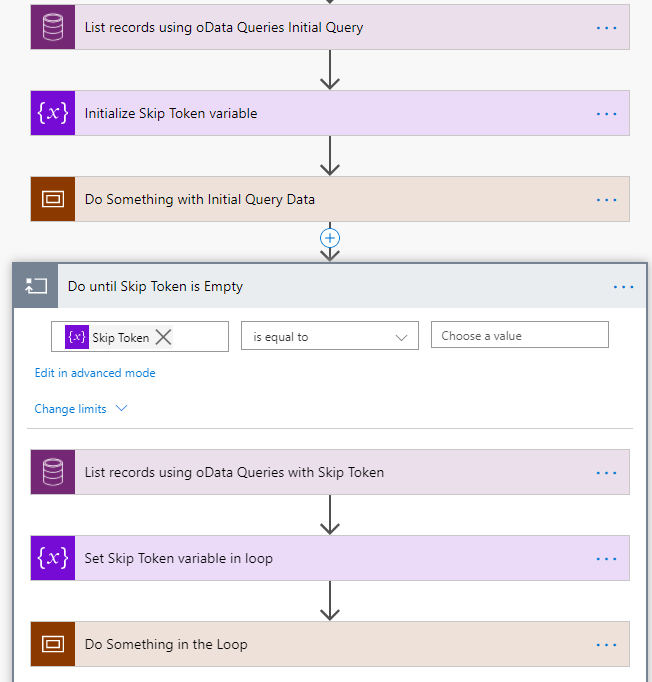
1. Initial Query and Set Skip Token
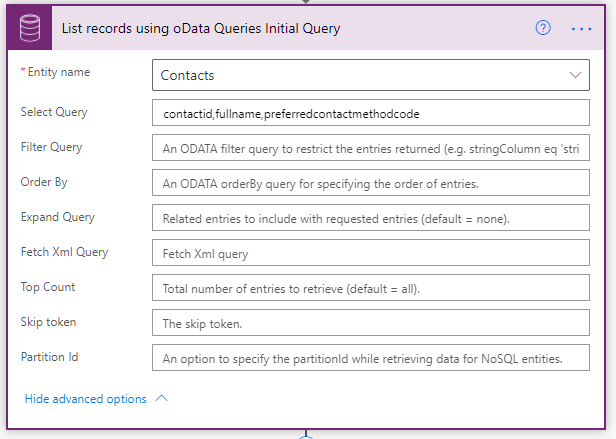
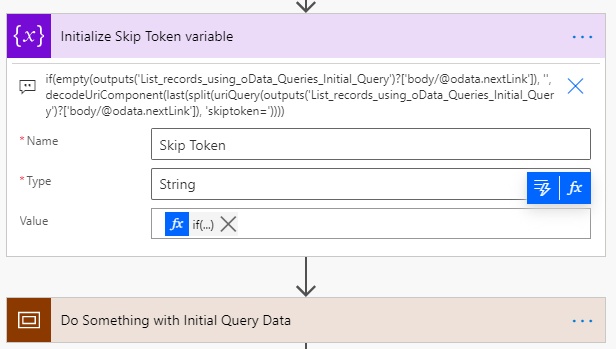
Next, initialise the skip token variable and extract the value from @odata.nextLink using the following expression.
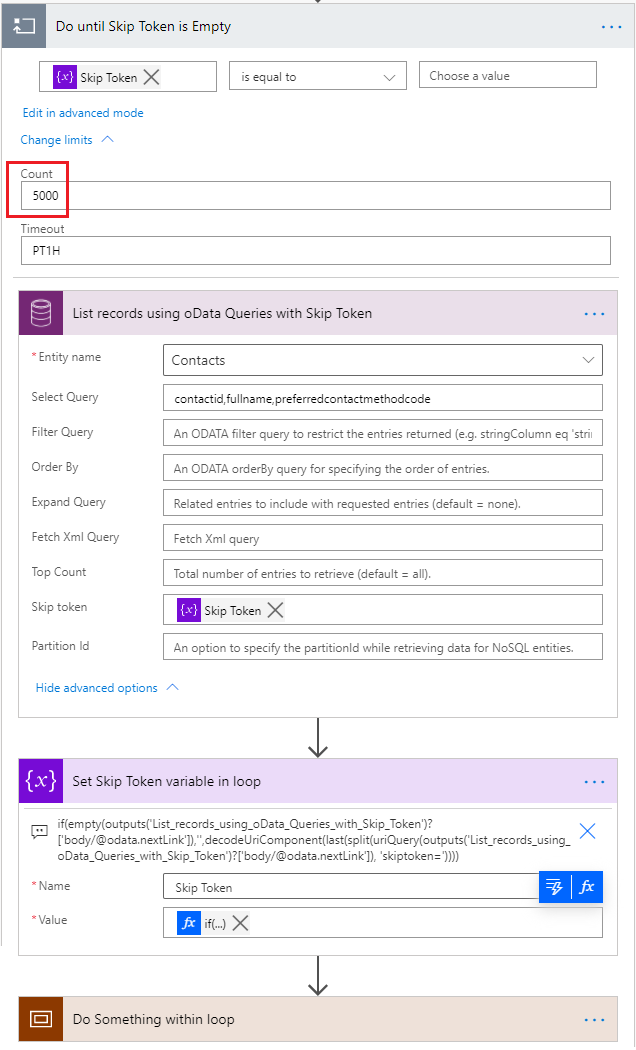 If there is next page data after the initial query, the Skip Token variable will not be an empty string and the steps in the loop will be processed. The default limit of Until iteration is 60 (5k x 60 = 300k rows) and for larger result sets, you can increase up to 5,000. The List Records step within the loop will be the same as the initial query except populating the Skip Token parameter with the variable.
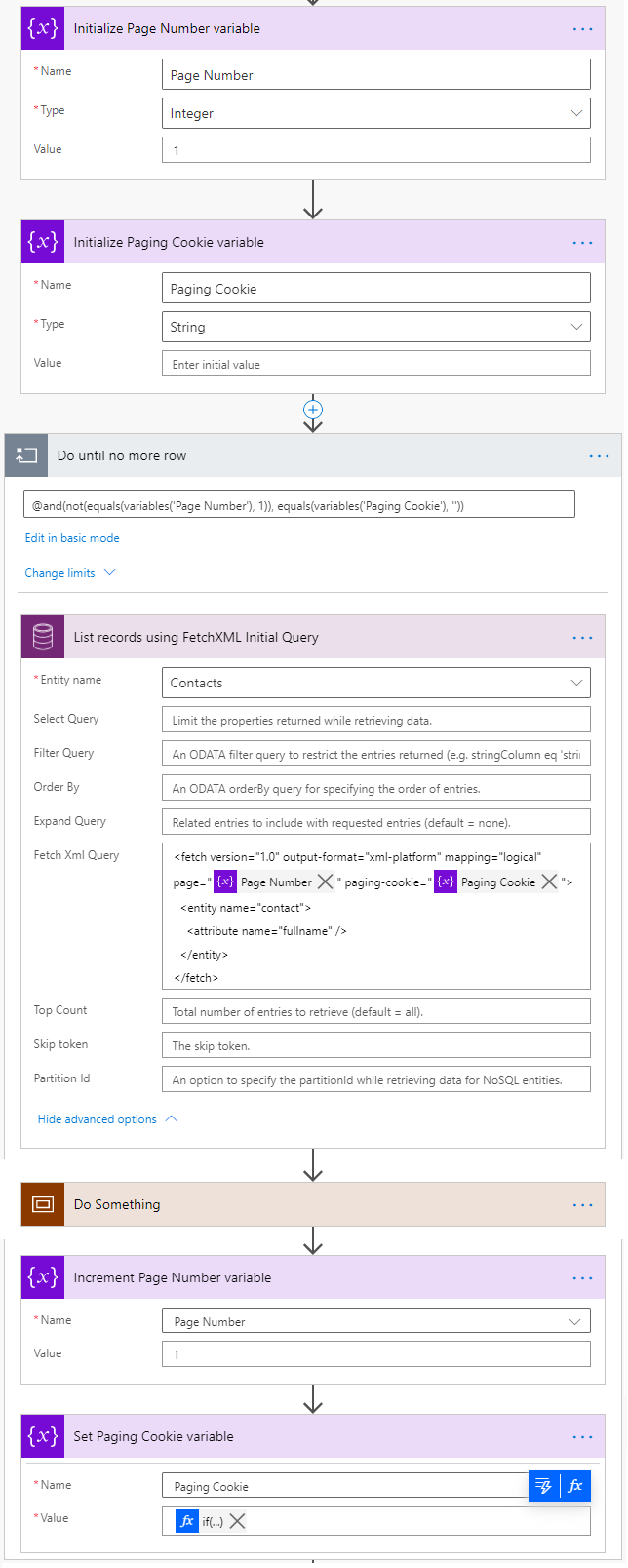 The flow would be similar to the previous one but one more Paging Cookie string variable is required. In this flow, you don't have to reset the page number to exit the Do Until loop because you can use Paging Cookie which will be empty when there is no more data. The flow will loop until the Page Number variable NOT equal to 1 and the Paging Cookie variable is empty. The List Records step is also the same except the fetch element contains the page-cookie attribute with the Paging Cookie variable. After processing the retrieved data, increment the Page Number variable and set the Paging Cookie variable.
if
(
	empty
	(
		outputs('List_records_using_oData_Queries_Initial_Query')?['body/@odata.nextLink']
	),
	'',
	decodeUriComponent
	(
		last
		(
			split
			(
				uriQuery(outputs('List_records_using_oData_Queries_Initial_Query')?['body/@odata.nextLink']),
				'skiptoken='
			)
		)
	)
)
What the expression does is getting the annotation value of @odata.nextLink, split it to take the value after skiptoken query parameter and decoding the URI component of it. If the @odata.nextLink is empty (when the total result set is less than 5k rows), set it with the empty string.
Then, process this first page of data from the initial query before moving into the loop.
2. Do Until Skip Token is Empty
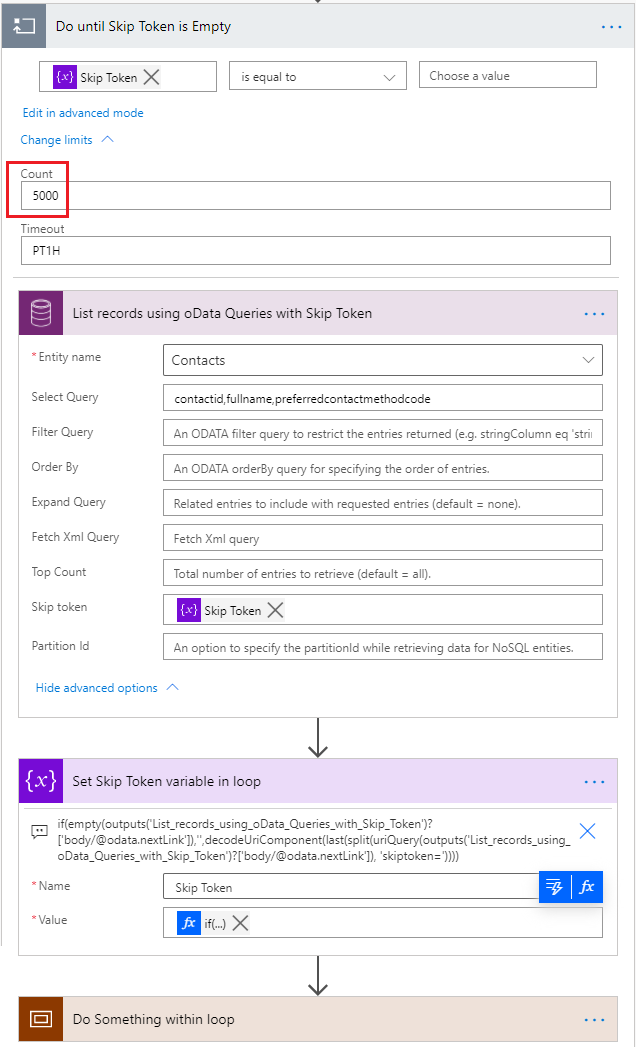
If there is more data after the List Records step within the loop, @odata.nextLink will contain a value which is used to set the Skip Token variable within the loop. The expression is the same as the expression used for the Initialize Variable step (except the name of the List Records step).
Then again, process the next page of data from the subsequent queries within the loop. The loop will go on until there is no more data after the last List Records step and the @odata.nextLink is empty.
Unlike using oData queries, using FetchXML queries in List Records action will only return a maximum of 5,000 rows regardless of the pagination threshold set as Thanura Wijesiriwardena mentioned in his blog post. However, paging with FetchXML is easier and you can do so by setting the page and count attributes of the fetch element.
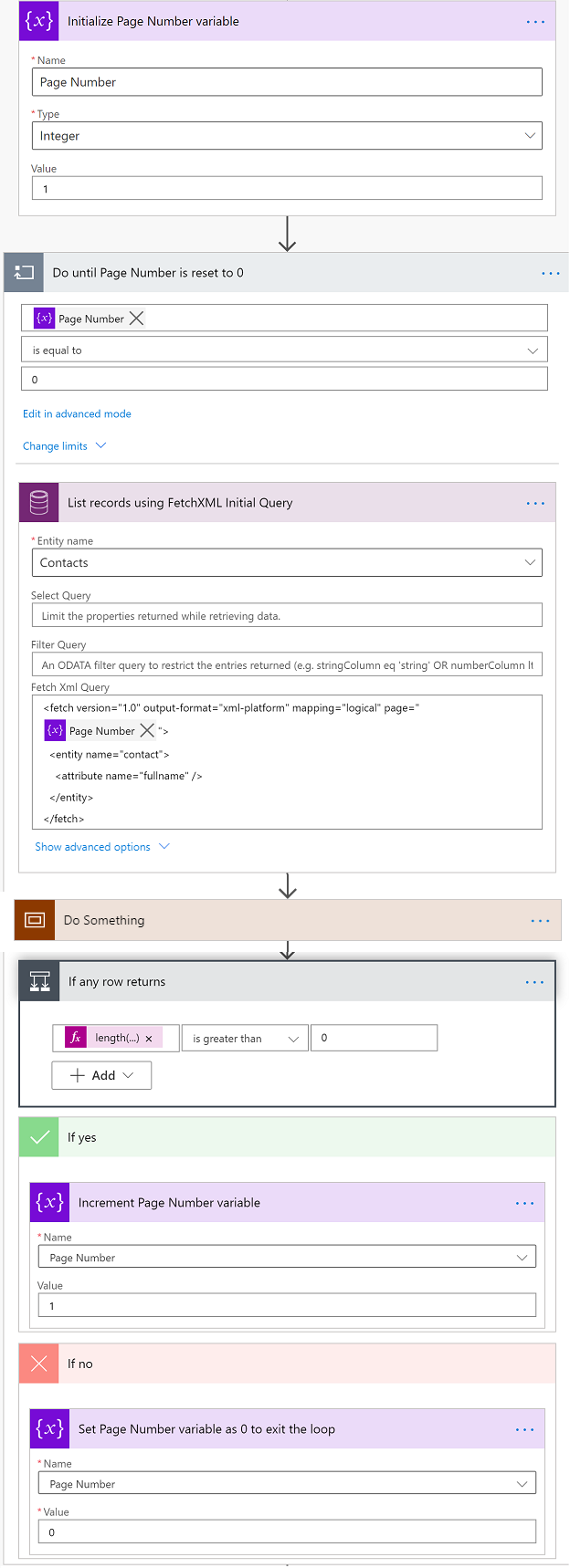
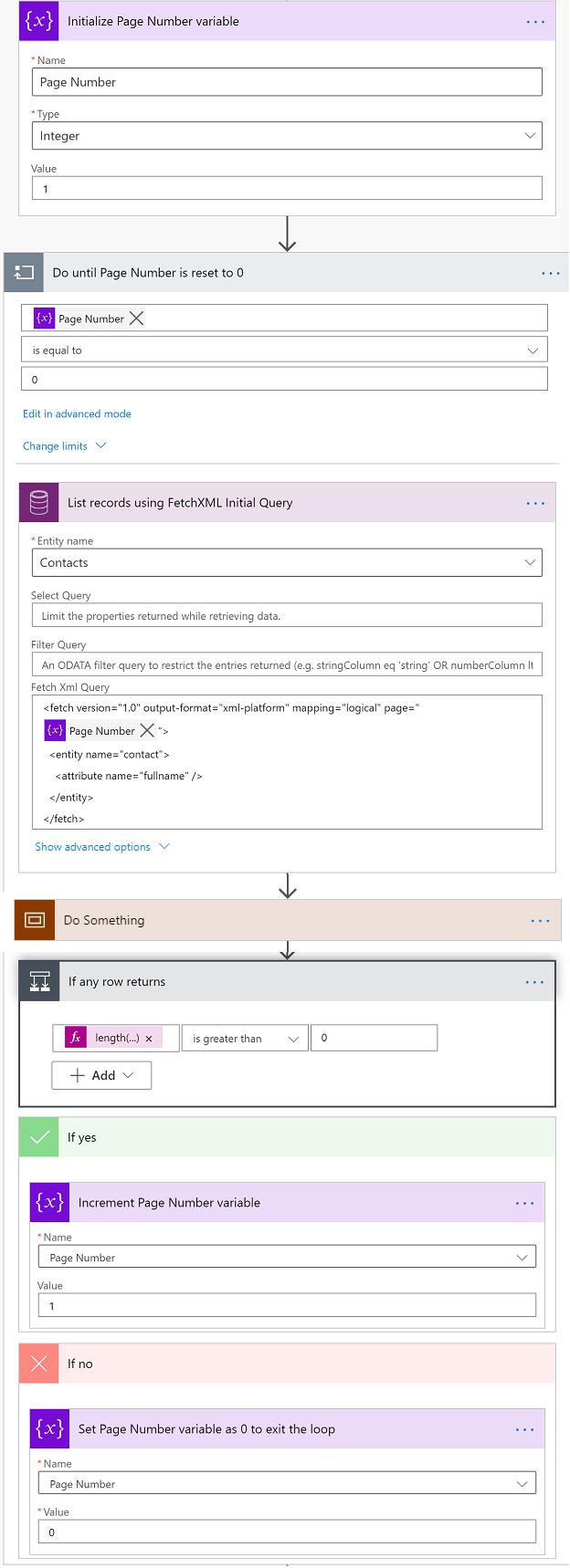
1. Simple Paging using FetchXML
First, you need to initialise the Page Number integer variable and set as 1 for the first query. In the Do Until loop, retrieve the data using the List Records action with Fetch Xml Query parameter which has the page attribute with the variable value in the fetch element. Don't forget to change the default limit of the Until iteration if your result set is more than 300k rows. After List Records step, process the retrieved data before moving into the loop.
If the List Records step returns any data, increment the Page Number variable to loop again and retrieve the next page. If the List Records step no longer returns the data, set the Page Number variable with 0 to exit the loop.
2. Page Large Result Sets using FetchXML with Paging Cookie
When you query for the large result set, it is recommended to use the paging cookie which makes paging faster. In my experience, query using the paging cookie is improved but not so drastically. For 460k rows, it saved 18 seconds (from 3:19 to 3:01) by using the paging cookie. Debajit Dutta has blogged about how to extract the paging cookie from the output of the List Records action by manipulating the @Microsoft.Dynamics.CRM.fetchxmlpagingcookie annotation in his blog post.
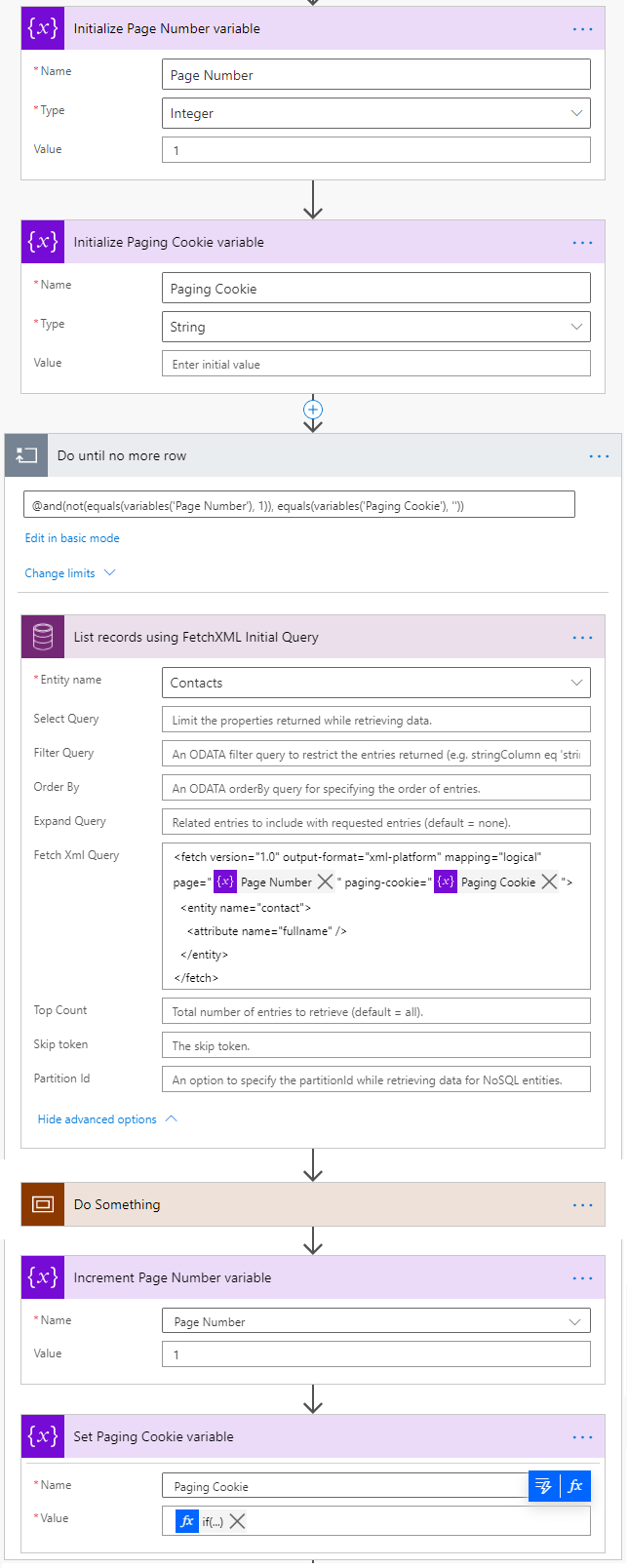
You can find step by step details about extracting the paging cookie in Debajit's blog post, but in my flow, I extracted the paging cookie with a single expression to save some API calls.
if
(
empty(outputs('List_records_using_FetchXML_Initial_Query')?['body']?['@Microsoft.Dynamics.CRM.fetchxmlpagingcookie']),
'',
replace
(
replace
(
replace
(
decodeUriComponent
(
decodeUriComponent
(
first(split(last(split(outputs('List_records_using_FetchXML_Initial_Query')?['body']?['@Microsoft.Dynamics.CRM.fetchxmlpagingcookie'], 'pagingcookie="')), '" '))
)
),
'<', '<'
),
'>', '>'
),
'"','"'
)
)
The value of @Microsoft.Dynamics.CRM.fetchxmlpagingcookie annotation looks something like this and we need the value of the pagingcookie as highlighted below.
<cookie pagenumber="2" pagingcookie="%253ccookie%2520page%253d%252291%2522%253e%253ccontactid%2520last%253d%2522%257b21883F50-3084-E911-A850-000D3AE02BC5%257d%2522%2520first%253d%2522%257bB5C46C64-2C84-E911-A850-000D3AE02BC5%257d%2522%2520%252f%253e%253c%252fcookie%253e" istracking="False" />
To do so, we can use first(split(last(split(<<String>>, 'pagingcookie="')), '" ')) expression to get the value between the two text. Thanks to Antti Pajunen for sharing that tip in his session at Automate Saturday.
%253ccookie%2520page%253d%252291%2522%253e%253ccontactid%2520last%253d%2522%257b21883F50-3084-E911-A850-000D3AE02BC5%257d%2522%2520first%253d%2522%257bB5C46C64-2C84-E911-A850-000D3AE02BC5%257d%2522%2520%252f%253e%253c%252fcookie%253e
The value is double URL encoded, so x2 decodeUriComponent functions are required to get this value.
<cookie page="91"><contactid last="{21883F50-3084-E911-A850-000D3AE02BC5}" first="{B5C46C64-2C84-E911-A850-000D3AE02BC5}" /></cookie>
These special characters < > ' in FetchXML going to cause Invalid XML erorr, so replace those with HTML character reference (because there is no htmlEncode function available for Power Automate expressions).
<cookie page="91"><contactid last="{21883F50-3084-E911-A850-000D3AE02BC5}" first="{B5C46C64-2C84-E911-A850-000D3AE02BC5}" /></cookie>
Finally, add empty() check to avoid null exception.
Summary
By using part of the @odata.nextLink as Skip Token parameter in List Records using oData queries, you can retrieve any number of rows even more than the 100k limit.
For List Records using FetchXML queries, you can paginate with 5k rows per page by setting the page attribute of the fetch element in FetchXML. But to improve the performance when querying large volume of data, you may need to extract the value for page-cookie attribute from @Microsoft.Dynamics.CRM.fetchxmlpagingcookie annotation.
Published on:
Learn more
Need help with this product?
We can help you with Retrieve more than 100,000 Dataverse Rows with List Records Action in Cloud Flow Using Skip Token
If you want help implementing, troubleshooting, or improving this product, contact us and we’ll point you in the right direction.
