
Series: Build Power Apps that don't look like Power Apps - Material Design part 2

For real, your low code apps don’t need to look like as if design wasn’t important. I hear lots of people say, that they suck at design or don’t have an eye for good UX. But a visually appealing UI is not the cherry on the cake but one of the core tasks of everyone who builds apps. Let me guide you step by step how you can improve your design skills - we will be again leveraging Google’s Material Design system. This is part 2 of How to build Power Apps - that don’t like Power Apps. If you didn’t read part 1 yet, this is your chance to catch up :-)
Why do we use Material Design? It’s
- goodlooking
- well documented
- widely used
Also: If we can build Google/Android look-a-like apps with Microsoft Power Apps, we can build everything :-)
This blog post focuses on how to create those beautiful Material Design quilted image lists in Power Apps galleries.

This is the schema that we are aiming for: it consists of 4 types of rows which hold different amount of images in different widths and x positions.
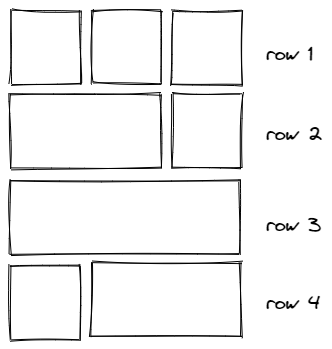
Create a component
Let’s do this properly and create a canvas component cmp_MD_Gallery with the following custom properties:
- singleImageWidth:
200 - imagePadding:
10
Now let’s take care of how to feed our gallery. Create an additional custom property galleryContent in the component of type Table:
Table(
//row 1, 3 images
{
id: 1,
image: "<link to your image goes here>",
width: cmp_MD_Gallery.singleImageWidth
},
{
id: 2,
image:"<link to your image goes here>",
width: cmp_MD_Gallery.singleImageWidth
},
{
id: 3,
image:"<link to your image goes here>",
width: cmp_MD_Gallery.singleImageWidth
},
// row 2, 2 images (1st 2/3, 2nd 1/3)
{
id: 4,
image: "<link to your image goes here>",
width: 2 * (cmp_MD_Gallery.singleImageWidth) + cmp_MD_Gallery.imagePadding
},
{id: 5},
{
id: 5,
image: "<link to your image goes here>",
width: cmp_MD_Gallery.singleImageWidth
},
//3rd row - 1 image
{
id: 6,
image: "<link to your image goes here>",
width: 3 * (cmp_MD_Gallery.singleImageWidth) + 2 * ( cmp_MD_Gallery.imagePadding)
},
{id: 7},
{id: 8},
//4th row - 2 images (1st 1/3, 2nd 2/3)
{
id: 7,
image: "<link to your image goes here>",
width: cmp_MD_Gallery.singleImageWidth
},
{
id: 8,
image: "<link to your image goes here>",
width: 2 * (cmp_MD_Gallery.singleImageWidth) + cmp_MD_Gallery.imagePadding
},
{id: 9},
//5th row - 3 images
{
id: 9,
image: "<link to your image goes here>",
width: cmp_MD_Gallery.singleImageWidth
},
{
id: 10,
image: "<link to your image goes here>",
width: cmp_MD_Gallery.singleImageWidth
},
{
id: 11,
image: "<link to your image goes here>",
width: cmp_MD_Gallery.singleImageWidth
},
//6th row -rest
{
id: 12,
image: "<link to your image goes here>",
width: cmp_MD_Gallery.singleImageWidth
},
{
id: 13,
image: "<link to your image goes here>",
width: 2 * (cmp_MD_Gallery.singleImageWidth) + cmp_MD_Gallery.imagePadding
}
)
As you notice, we leave some items blank to make room for items that span the width of two items.
Create a gallery
- Create a vertical gallery, set its Width to
Parent.Width, its Height to1000, its TemplateSize to300 - Set the the Items to
cmp_MD_Gallery.galleryContent - Insert an image into the gallery, set its Height to
Parent.TemplateHeight - Set the Image property of the image to
ThisItem.image - Set the Width property of the image to
ThisItem.width
Create the invisible scrollbar
If you want to create an invisible scrollbar
- add a vertical slider on top of the gallery, set its Max to
0and its Min to-1000, and its Height toGallery1.Height - Set all its colors to
Transparentto make it disappear, but don’t set Visible tofalse(Users can’t interact with a control that has that setting) - Set the Y of the Image to
Slider1.Value- boom, done 🚀
You can set the Width of the slider and the Size of the Handle to the Width of the gallery if users shall use the entire gallery width to scroll or you can limit this and give them a visual cue (a button, circle, etc) so that they know that they can scroll here.
Feedback and what’s next
As you can see, its relatively easy to create an engaging UX in Power Apps. When discussing this with the Math & SVG magician Robin Rosengrün, he found an even more elegant way to calculate widths and x positions of each image, hope he records a video on that soon - #TeamWorkMakesTheDreamWork
Would you try this gallery in your Power Apps? Let me know what you think on twitter.
If you found this blog post useful, please also subscribe to my newsletter - news coming about every 2 months, I promise to not spam you! Next blog post in this series is how to create basic UI elements that you will love.
Published on:
Learn moreRelated posts
Power Apps – Build generative pages using external code generations tools
We are announcing the ability to build and edit generative pages for your model-driven apps directly from code generation tools. This feature ...
Power Platform Fundamentals #4: Understanding Power Fx in Power Apps: Core Functions, Formula Patterns, and Real-Time Business Scenarios: Quick Read Series
1. Business Scenario In modern enterprise applications, business logic is deeply embedded across user interfaces and data processes. This incl...
Decode & Fix : Shared App host initialization has timed out in Microsoft Power Apps
Issue :While working with apps in the Microsoft Power Platform, we encountered a critical issue where the application failed to load pro...
How to patch images from Power Apps to Dataverse
Patching images is a very common use case for Power Apps. Learn how to patch images from an app to Dataverse! The post How to patch images fro...
How to patch images from Power Apps to D365 F&SCM
Patching images is a very common use case for Power Apps. Learn how to patch images from an app to D365 Finance & Supply Chain Management...
Power Apps Code App | Connecting to a Copilot Studio Agent
In this article, let’s explore how to use a Power Apps Code App to connect and chat with a Microsoft Copilot Studio agent — directly fro...
Power Apps Code App | Querying data Across Environments
In this article, let’s explore how to use a Power Apps Code App to fetch Dataverse data from a different Power Platform environment. Thi...
Power Apps Code App | Images blocked by Content Security Policy (CSP)
Recently I was working on a Power Apps Code App and rendering images using <img> tags with external URLs inside a grid. But the images...
Power Apps – Use Microsoft 365 Copilot in model-driven apps
We are announcing the ability to use Microsoft 365 Copilot in model-driven apps in Power Apps. This feature will reach general availability on...