
GA: Azure Key Vault secrets provider extension for Arc enabled Kubernetes clusters
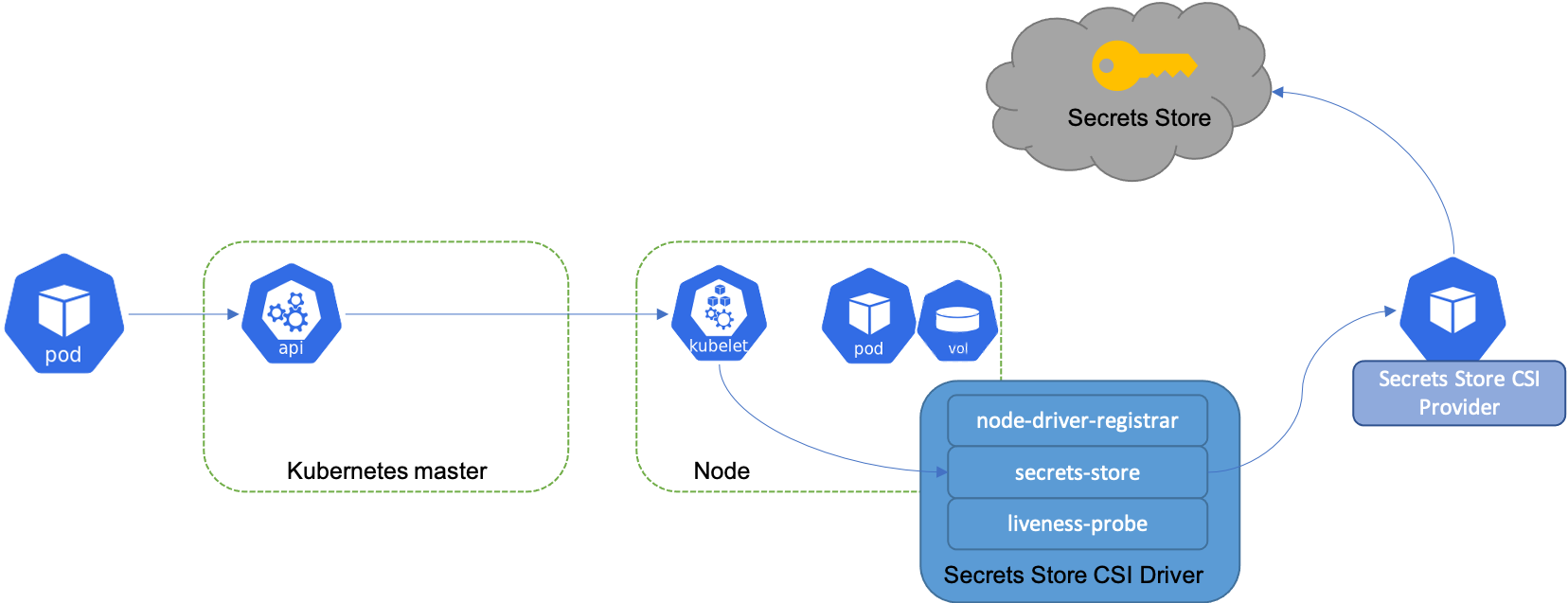
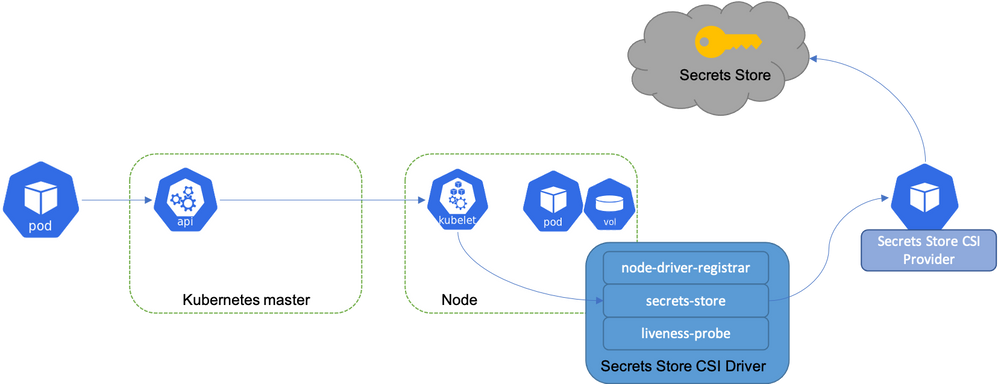
The Azure Arc team is happy to announce the GA of Azure Key Vault Secrets Provider extension for Arc enabled Kubernetes clusters. This is a Microsoft managed extension that allows you to get secret contents stored in an Azure Key Vault instance and mount them into Kubernetes pods of your Azure Arc enabled Kubernetes clusters, thereby reducing the exposure of secrets to the minimum. It can pull any type of object from an Azure Key Vault, including keys, secrets and certificates.
The extension is installed by a cluster admin. With the installation, Secrets Store CSI driver and AKV secrets provider are deployed as daemon sets. On application pod start and restart, the Secrets Store CSI driver communicates with the Azure Key Vault secrets provider using gRPC to retrieve the secret content from the Azure Key Vault. Then the volume is mounted in the pod as tmpfs and the secret contents are written to the volume. On pod delete, the corresponding volume is cleaned up and deleted.
This extension can be deployed using az k8s-extension CLI and also using Azure Portal. For deployment through portal, go to the Arc connected Kubernetes cluster and click on Extensions under Settings. Further, click on +Add to add Azure Key Vault Secrets Provider extension. Check out the full documentation on how to enable it for an Arc enabled Kubernetes cluster.
The extension allows for 3 configuration options:
- Secret Rotation - Periodically update the pod mount with the latest secret from the AKV secrets store. The polling of latest secret does not require pod restart. It is disabled by default.
- Rotation Poll Interval - Frequency of the pod mount update if Secret Rotation configuration is enabled. The default is 2 minutes.
- Sync as Kubernetes secret - Create Kubernetes secret(s) to mirror the mounted content. It is disabled by default.
A service principal is required to enable the access to Azure Key Vault from within the Arc cluster. Further, a Kubernetes secret needs to be created in the application namespace that references this service principal in order to gain access to the vault.
What next?
The identity option available today is service principal. However, we are investing in using workload identity as another option in future.
Learn more at the Azure Hybrid, Multicloud, and Edge Day digital event
We will be hosting our annual Azure Hybrid, Multicloud, and Edge Day digital event on June 15, 2022. You’ll hear from Microsoft leadership and engineers on how you can innovate anywhere with Azure Arc, learn from customers using Azure solutions for their hybrid scenarios, and get to ask questions in the live Q&A chat. Register now >
Published on:
Learn moreWe can help you with GA: Azure Key Vault secrets provider extension for Arc enabled Kubernetes clusters
If you want help implementing, troubleshooting, or improving this product, contact us and we’ll point you in the right direction.
Related posts
Azure Adaptive Cloud Pre-Days at Microsoft Ignite 2024
As the excitement builds for Microsoft Ignite 2024, tech enthusiasts and professionals worldwide are eagerly anticipating the Azure Adaptive C...
Launching the Arc Jumpstart Newsletter: October 2024 Edition
👋 Welcome! We are excited to kick off this monthly newsletter, where you can get the latest updates on everything happening in the Arc Jumpst...
Announcing Public Preview of Windows Server Hotpatch enabled by Azure Arc
We’re excited to announce the Public Preview of Hotpatch enabled by Azure Arc for Windows Sever 2025 Datacenter and Standard editions! ...
Public Preview of Azure Container Storage enabled by Azure Arc Edge Volumes
Release Summary We are thrilled to announce the Public Preview of Azure Container Storage enabled by Azure Arc Edge Volumes, a groundbre...
Introducing ArcBox 3.0 General Availability
Today, the Arc Jumpstart team is excited to announce the general availability of ArcBox 3.0! Since it was first introduced in 2021, Ar...
CloudCasa for Azure Arc
Azure Arc is a platform that helps users build and develop their applications by extending Azure to their datacenters, edge, or even to multic...
Generally Available: Transition to WS2012 / R2 ESUs enabled by Azure Arc from Volume Licensing
Customers that have enrolled in WS2012/ R2 ESUs through Volume Licensing for Year 1 can transition to Azure Arc for Year 2 of the program. Ext...
Comparing feature sets for AKS enabled by Azure Arc deployment options
This article shows a comparison of features available for the different deployment options under AKS enabled by Azure Arc. ...
Increasing Security for SQL Server Enabled by Azure Arc
Back in November 2023, the least privileges deployment model was introduced as a public preview. After thorough testing, we are excited to ann...
Five Key Updates on WS2012 ESUs enabled by Azure Arc
We have a myriad of key updates for customers enrolled in WS2012/R2 ESUs enabled by Azure Arc! As we continue to refine and expand the offer, ...