
ISV network connectivity pattern for data exchange over public IP address between Azure and onPrem
This blog discusses ISV connectivity patterns for a customer who wants to exchange data with an Azure SaaS provider.
Contoso Corporation (Customer)
Contoso Corporation wants to access a SaaS application hosted on Azure from his on-premises data centres. The customer wants to be able to securely send and receive data.
Fabrikam Technologies(SaaS Solution Provider on Azure)
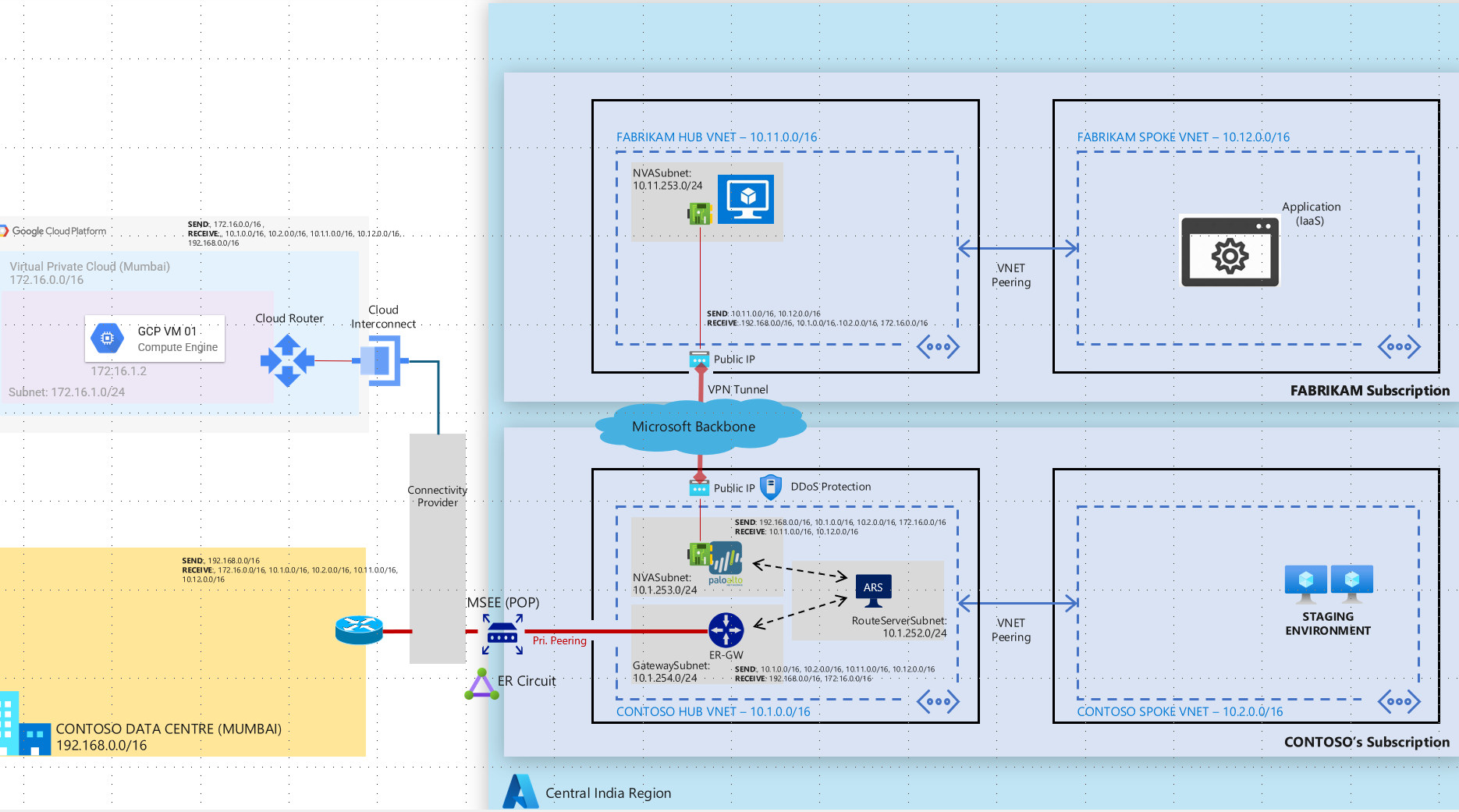
The SaaS solution provider has a fixed architecture where the incoming connections can only come in via a public IP which would be shared with all their customers. This public IP belongs to the NVA hosted in it's hub subscription. The SaaS provider would in turn whitelist customers public IP address on their NVA to allow exchange of data. It will not accept any incoming connections via VNET peering as it wants to follow a uniform method of connectivity for all it's customers.
Possible Solutions
Provided below are some connectivity patterns that can be used for data exchange in this scenario.
1> Connection over Express route Private Peering
In this connectivity pattern Contoso will need to have a hub and spoke architecture with key components such Express Route Gateway, Azure Route Server and NVA deployed in the hub network. Customer will need to have a Express Route circuit provisioned. Express route gateway will be used to send and receive traffic from on-premises over the express route circuit. Azure route server will be used to exchange traffic using BGP between ER Gateway and NVA as NVA and ER gateway are not capable of exchanging traffic directly between themselves. A secure VPN tunnel between Fabrikam and Contoso NVAs will be used to securely exchange traffic over public IP addresses. In order to further secure this architecture both Fabrikam and Contoso can deploy Azure DDoS per IP protection to secure public IP addresses from DDoS attacks.
2> IP Sec overlay on MS Peering connection
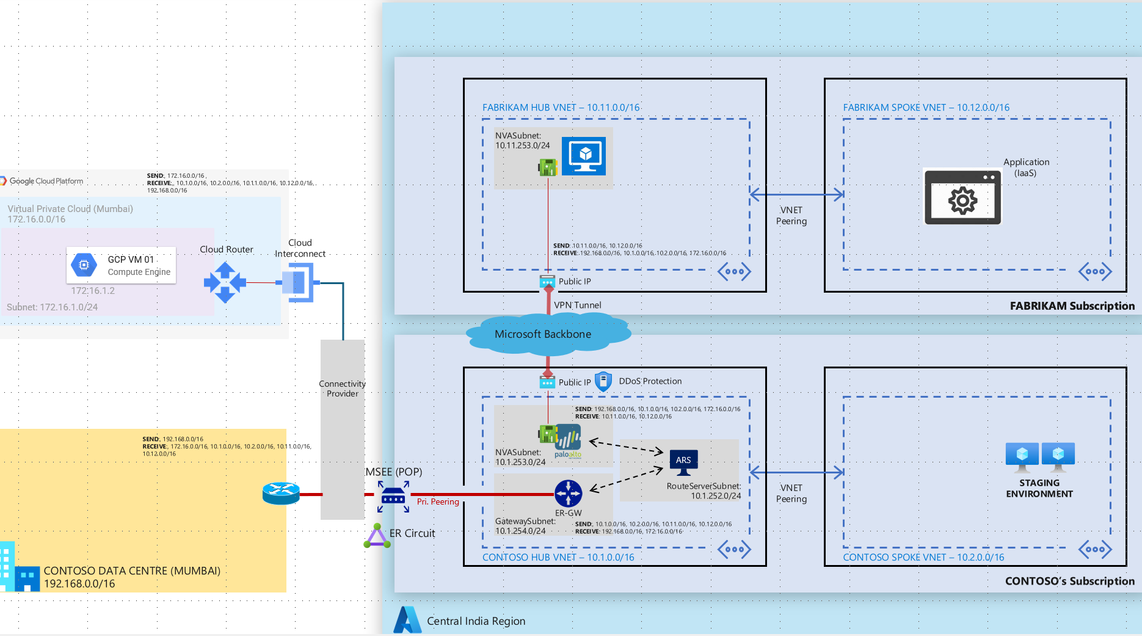
Microsoft Peering is the interconnection between Microsoft’s global network (AS8075) and customer/ISP network for the purpose of exchanging internet traffic from/to Microsoft online services and Microsoft Azure Services or connections to/from public IP address range on Azure. Carriers or Service Providers can request to connect with Microsoft at any of the available Edge locations.
Contoso can request a Microsoft Peering circuit. The connectivity provider will then provision a MS peering connection between the providers location and Microsoft Edge routers. Both Fabrikam and Contoso will be required to announce their public IP addresses over this connection. Fabrikam and Contoso can setup a VPN tunnel over the MS Peering connection to provide a secure encrypted channel for data exchange. Azure DDoS per IP protection to be leveraged for protecting the public IP from DDoS attacks. Contoso does not need to have a subscription on Azure for this end to end connectivity.

Published on:
Learn moreWe can help you with ISV network connectivity pattern for data exchange over public IP address between Azure and onPrem
If you want help implementing, troubleshooting, or improving this product, contact us and we’ll point you in the right direction.
Related posts
Enable IP restriction for a public facing App service
In this blog article, we will cover how to control the app service deployment to support only public facing app service with IP restriction en...
Selecting the Optimal Container for Azure AI: Docker, ACI, or AKS?
Deploying Azure AI services in containers like Docker, Azure Container Instances (ACI), or Azure Kubernetes Service (...
Securing Hardware and Firmware Supply Chains
In the modern cloud data center, ensuring the authenticity, integrity, and security of hardware and firmware is paramount. Firmware is the low...
Liquid Cooling in Air Cooled Data Centers on Microsoft Azure
With the advent of artificial intelligence and machine learning (AI/ML), hyperscale datacenters are increasingly accommodating AI accelerators...
Mt Diablo - Disaggregated Power Fueling the Next Wave of AI Platforms
Authors: Jason Adrian – General Manager, Azure Platform Architecture Laurentiu Olariu – Power Architect, Azure Platform Architecture Banha Sok...
Deny inbound NSG Rule creation via Azure Policy
In this blog article, we will cover how to deny the creation of inbound Network Security Group Rules if the inbound NSG Rule contains&n...
Azure Extended Zones: Optimizing Performance, Compliance, and Accessibility
Azure Extended Zones are designed to bring the power of Azure closer to end users in specific metropolitan areas or jurisdictions, cate...
Inside Maia 100: Revolutionizing AI Workloads with Microsoft's Custom AI Accelerator
Authored by: Sherry Xu, Partner Lead SoC Architect, Azure Maia Chandru Ramakrishnan, Partner Software Engineering Manager As the advanc...
Accelerate Cloud Potential for Your SAP Workloads on Azure with these Learning Paths
Accelerate Cloud Potential for Your SAP Workloads on Azure with these Learning Paths In today's rapidly evolving digital landsc...
Azure Role Assignments Audit Report
Overview: Azure Administrators often come across challenges while tracking multiple Azure role assignments and removals. At present Azur...