
Confidential Virtual Machine support for Azure Virtual Desktop now in Public Preview

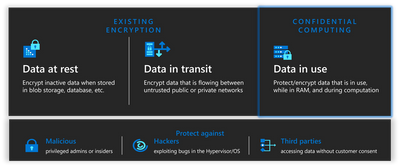
We’re announcing that Azure Virtual Desktop has public preview support for Azure Confidential Virtual Machines. Confidential Virtual Machines increase data privacy and security by protecting data in use. The Azure DCasv5 and ECasv5 confidential VM series provide a hardware-based Trusted Execution Environment (TEE) that features AMD SEV-SNP security capabilities, which harden guest protections to deny the hypervisor and other host management code access to VM memory and state, and that is designed to protect against operator access and encrypts data in use.
With this preview, support for Windows 11 22H2 has been added to Confidential Virtual Machines. Confidential OS Disk encryption and Integrity monitoring will be added to the preview at a later date. Confidential VM support for Windows 10 is planned.
How to deploy Confidential Virtual Machines with AVD Host pool provisioning:
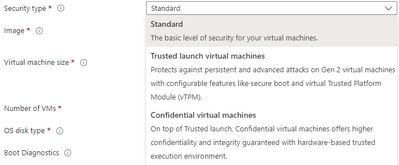
1) Select Confidential virtual machines from the Security Type dropdown in the AVD Host Pool Virtual Machine blade.
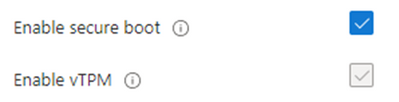
2) Once Security Type is set to Confidential virtual machines, you will see Enable Secure Boot and Enable vTPM each selected. You have the option to disable Secure Boot though it is not recommended. vTPM is required.
Learn More:
Review the Confidential Virtual Machine documentation for more information.
Published on:
Learn moreWe can help you with Confidential Virtual Machine support for Azure Virtual Desktop now in Public Preview
If you want help implementing, troubleshooting, or improving this product, contact us and we’ll point you in the right direction.
Related posts
App attach now integrates with partner solutions
For many IT admins, application delivery management is one of their most complex tasks. However, with the recent general availability of App a...
New features for Azure Virtual Desktop for Azure Stack HCI
Today, we’re excited to announce new features and capabilities for Azure Virtual Desktop for Azure Stack HCI that will benefit admins responsi...
MMR Call Redirection for Azure Virtual Desktop, Windows 365 now available
Today, I am pleased to share the launch of Multimedia Redirection (MMR) Call Redirection for Azure Virtual Desktop and Windows 365. Call Redir...
OneDrive support for RemoteApp in Azure Virtual Desktop
We are excited to announce that Microsoft OneDrive support is now available for RemoteApp in Azure Virtual Desktop! Previously, OneDrive could...
Custom Shortpath settings for host pools now available
We are excited to announce the general availability of custom Shortpath settings at the host pool level. Now you can granularly control how RD...
Recovery options for Azure Virtual Desktop session host VMs
Last week an update issue caused unresponsiveness and startup failures on Windows machines using the CrowdStrike Falcon agent, including some ...
Connection Reliability in Azure Virtual Desktop Insights
We are thrilled to announce that the Connection Reliability tab in Azure Virtual Desktop Insights is now generally available. IT administrator...
Preferred app group type settings enhance user feed display
In line with our commitment to provide seamless and efficient experiences for Azure Virtual Desktop users, we've recently implemented Preferre...
App attach for Azure Virtual Desktop now generally available
App attach for Azure Virtual Desktop allows IT admins to dynamically attach applications from an application package to a user session in Azur...
Hibernation support now available for Azure Virtual Desktop
Today we are happy to announce the general availability of hibernation support in Azure Virtual Desktop. Explore additional capabilities that ...