
Enable Change Tracking service for Arc Onboarded machines (Windows and Linux)
Azure Arc is a multi-cloud and on-premises management platform that simplifies governance and management by delivering a consistent way to manage your entire environment together by projecting your existing non-Azure and or on-premises resources into Azure Resource Manager.
Azure Arc has benefited multiple customers by simplifying governance and management by delivering a consistent multi-cloud and on-premises management platform such as patch management using Azure Update Manager, enabling Security using Defender for cloud, Standardized role-based access control (RBAC), Change tracking etc. for resource types hosted outside of Azure such as Sever, Kubernetes, SQL Server etc. Today, we will discuss and enable Change Tracking service for Arc Onboarded devices. To know more about Azure arc benefits and Onboarding process refer to the link here.
Let's look at what the change tracking service does before we activate it.
The Change Tracking and Inventory services track changes to Files, Registry, Windows Software, Linux Software (Software Inventory), Services and Daemons, also supports recursion, which allows you to specify wildcards to simplify tracking across directories.
Let’s understand how to enable Change tracking and Inventory feature for Arc Onboarded device.
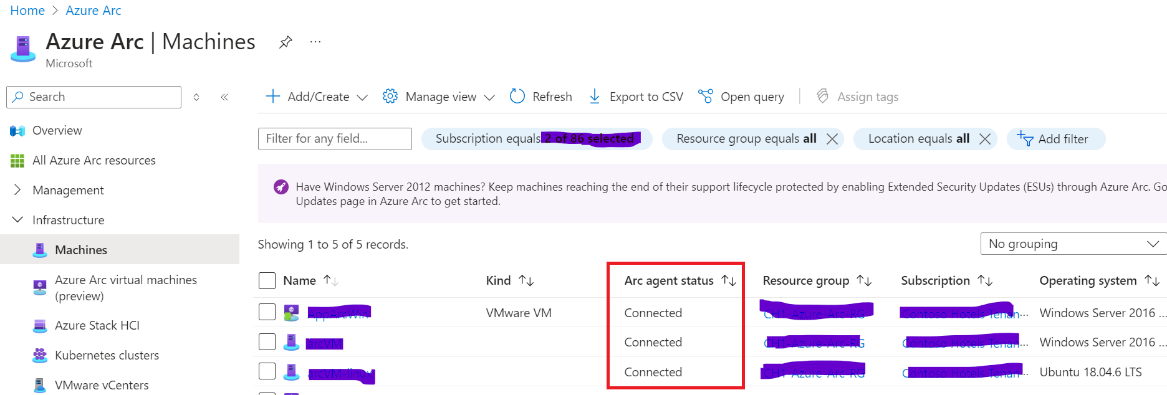
Note: Please make sure that the arc machines are registered, and their status is shown as connected before you turn on the feature, as seen below.
Go to Azure Policy then Definition and filter the category by Change tracking and Inventory. You need to enable all the built-in policies present in Enable change tracking Inventory for Arc enabled virtual machines initiatives for Arc enabled windows and Linux devices respectively.
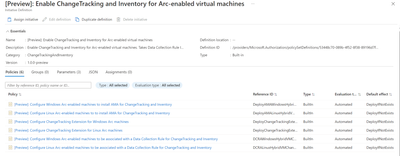
- Assign Configure Windows Arc-enabled machines to install AMA for ChangeTracking and Inventory built-in policy (Scope it to Subscription of Arc Onboarded device). Make Sure you have unchecked the Parameter and verify Effect to DeployIfNotexist and create Remediation task. This will ensure existing resources can be updated via a remediation task after the policy is assigned. Similarly, Configure Linux Arc-enabled machines to install AMA for ChangeTracking and Inventory built-in policy for Arc Onboarded Linux devices. Once configured using Azure Policy, Arc machine will have AMA Agent deployed.
- Assign Configure Change Tracking Extension for Windows Arc machines built-in policy (Scope it to Subscription of Arc Onboarded device). Follow the same steps as mentioned in point 1. Similarly, Configure Change Tracking Extension for Linux Arc machines built-in policy for Arc Onboarded Linux devices. Once configured using Azure Policy, Arc machine will have change tracking extension deployed.
- Create data collection rule.
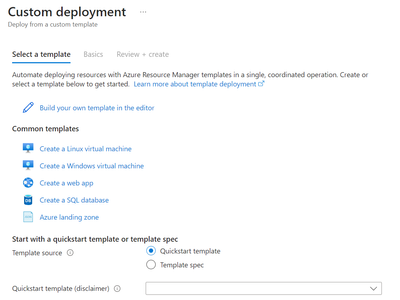
a. Download CtDcrCreation.json file. Go to Azure portal and in the search, enter Deploy a custom template. In the Custom deployment page > select a template, select Build your own template in the editor. In the Edit template, select Load file to upload the CtDcrCreation.json file or just copy the json and paste the template. And select Save. In the Custom deployment > Basics tab, provide Subscription and Resource group where you want to deploy the Data Collection Rule. The Data Collection Rule Name is optional.
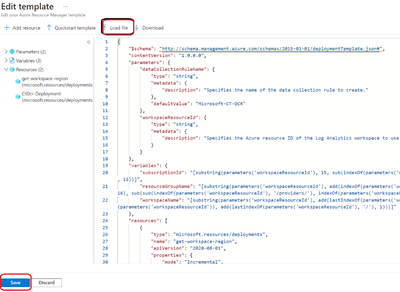
b. In the Custom deployment > Basics tab, provide Subscription and Resource group where you want to deploy the Data Collection Rule. The Data Collection Rule Name is optional. Workspace Resource ID of Log analytic Workspace. (You will get the workspace ID in the overview page of Log analytic workspace) .
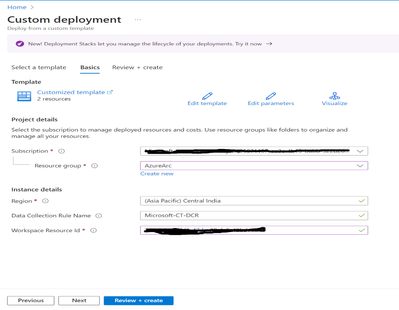
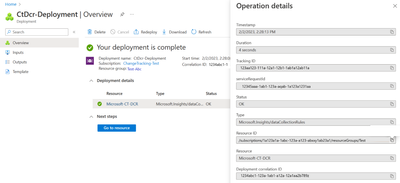
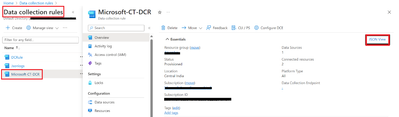
c. Select Review+create > Create to initiate the deployment of CtDcrCreation. After the deployment is complete, select CtDcr-Deployment to see the DCR Name. Go to the newly created Data collection Rule (DCR) rule named (Microsoft Ct-DCR). Click on json view and copy the Resource ID.

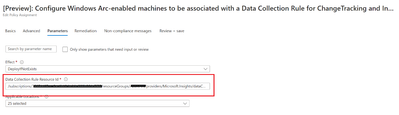
d. Go to Azure Policy Assign [Preview]: Configure Windows Arc-enabled machines to be associated with a Data Collection Rule for ChangeTracking and Inventory built-in policy (Scope it to Subscription of Arc Onboarded device). Make Sure you have enabled the Parameter and paste the Resource ID captured above and create Remediation task. Similarly, Configure Linux Arc-enabled machines to be associated with a Data Collection Rule for ChangeTracking and Inventory built-in policy for Arc Onboarded Linux devices. Once configured using Azure Policy, Arc machine will have change tracking extension deployed.
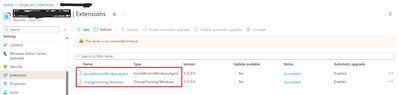
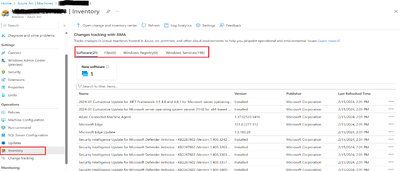
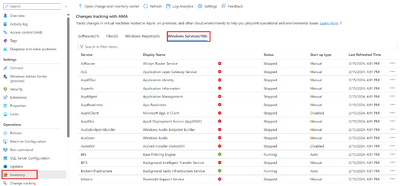
After all the policies are configured and deployed. Go to the Arc device, you will be able to view the change tracking and Inventory is enabled.
Published on:
Learn moreRelated posts
Azure Adaptive Cloud Pre-Days at Microsoft Ignite 2024
As the excitement builds for Microsoft Ignite 2024, tech enthusiasts and professionals worldwide are eagerly anticipating the Azure Adaptive C...
Launching the Arc Jumpstart Newsletter: October 2024 Edition
👋 Welcome! We are excited to kick off this monthly newsletter, where you can get the latest updates on everything happening in the Arc Jumpst...
Announcing Public Preview of Windows Server Hotpatch enabled by Azure Arc
We’re excited to announce the Public Preview of Hotpatch enabled by Azure Arc for Windows Sever 2025 Datacenter and Standard editions! ...
Public Preview of Azure Container Storage enabled by Azure Arc Edge Volumes
Release Summary We are thrilled to announce the Public Preview of Azure Container Storage enabled by Azure Arc Edge Volumes, a groundbre...
Introducing ArcBox 3.0 General Availability
Today, the Arc Jumpstart team is excited to announce the general availability of ArcBox 3.0! Since it was first introduced in 2021, Ar...
CloudCasa for Azure Arc
Azure Arc is a platform that helps users build and develop their applications by extending Azure to their datacenters, edge, or even to multic...
Generally Available: Transition to WS2012 / R2 ESUs enabled by Azure Arc from Volume Licensing
Customers that have enrolled in WS2012/ R2 ESUs through Volume Licensing for Year 1 can transition to Azure Arc for Year 2 of the program. Ext...
Comparing feature sets for AKS enabled by Azure Arc deployment options
This article shows a comparison of features available for the different deployment options under AKS enabled by Azure Arc. ...
Increasing Security for SQL Server Enabled by Azure Arc
Back in November 2023, the least privileges deployment model was introduced as a public preview. After thorough testing, we are excited to ann...
Five Key Updates on WS2012 ESUs enabled by Azure Arc
We have a myriad of key updates for customers enrolled in WS2012/R2 ESUs enabled by Azure Arc! As we continue to refine and expand the offer, ...