
Announcing the General Availability of Private Link for Azure Virtual Desktop

We are excited to announce that Private Link for Azure Virtual Desktop is now generally available! With this feature, users can securely access their session hosts and workspaces using a private endpoint within their virtual network. Private Link enhances the security of your data by ensuring it stays within a trusted and secure private network environment.
What is Private Link for Azure Virtual Desktop?
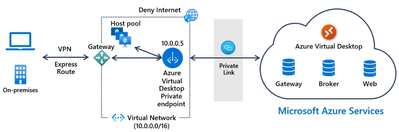
Private Link for Azure Virtual Desktop allows users to establish secure connections to remote resources by using private endpoints. With Private Link, the traffic between your virtual network and the Azure Virtual Desktop service is routed through the highly secure Microsoft "backbone" network. This eliminates the need to expose your service to the public internet, thereby significantly enhancing the overall security of your infrastructure. By keeping the traffic within this protected network, Private Link adds an extra layer of security for your Azure Virtual Desktop environment.
Getting started
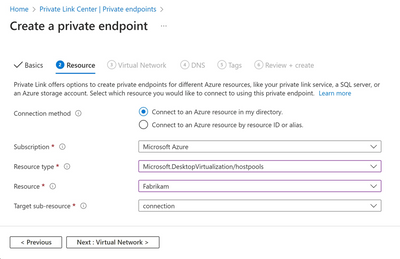
Excited to get started with Private Link for Azure Virtual Desktop? Learn more about this feature and its benefits by visiting here. Get started on setting up Private Link in your environment today by visiting here and enjoy the enhanced security and peace of mind that Private Link brings to your Azure Virtual Desktop experience.
Published on:
Learn moreWe can help you with Announcing the General Availability of Private Link for Azure Virtual Desktop
If you want help implementing, troubleshooting, or improving this product, contact us and we’ll point you in the right direction.
Related posts
App attach now integrates with partner solutions
For many IT admins, application delivery management is one of their most complex tasks. However, with the recent general availability of App a...
New features for Azure Virtual Desktop for Azure Stack HCI
Today, we’re excited to announce new features and capabilities for Azure Virtual Desktop for Azure Stack HCI that will benefit admins responsi...
MMR Call Redirection for Azure Virtual Desktop, Windows 365 now available
Today, I am pleased to share the launch of Multimedia Redirection (MMR) Call Redirection for Azure Virtual Desktop and Windows 365. Call Redir...
OneDrive support for RemoteApp in Azure Virtual Desktop
We are excited to announce that Microsoft OneDrive support is now available for RemoteApp in Azure Virtual Desktop! Previously, OneDrive could...
Custom Shortpath settings for host pools now available
We are excited to announce the general availability of custom Shortpath settings at the host pool level. Now you can granularly control how RD...
Recovery options for Azure Virtual Desktop session host VMs
Last week an update issue caused unresponsiveness and startup failures on Windows machines using the CrowdStrike Falcon agent, including some ...
Connection Reliability in Azure Virtual Desktop Insights
We are thrilled to announce that the Connection Reliability tab in Azure Virtual Desktop Insights is now generally available. IT administrator...
Preferred app group type settings enhance user feed display
In line with our commitment to provide seamless and efficient experiences for Azure Virtual Desktop users, we've recently implemented Preferre...
App attach for Azure Virtual Desktop now generally available
App attach for Azure Virtual Desktop allows IT admins to dynamically attach applications from an application package to a user session in Azur...
Hibernation support now available for Azure Virtual Desktop
Today we are happy to announce the general availability of hibernation support in Azure Virtual Desktop. Explore additional capabilities that ...