
Centralized private resolver architecture implementation using Azure private DNS resolver
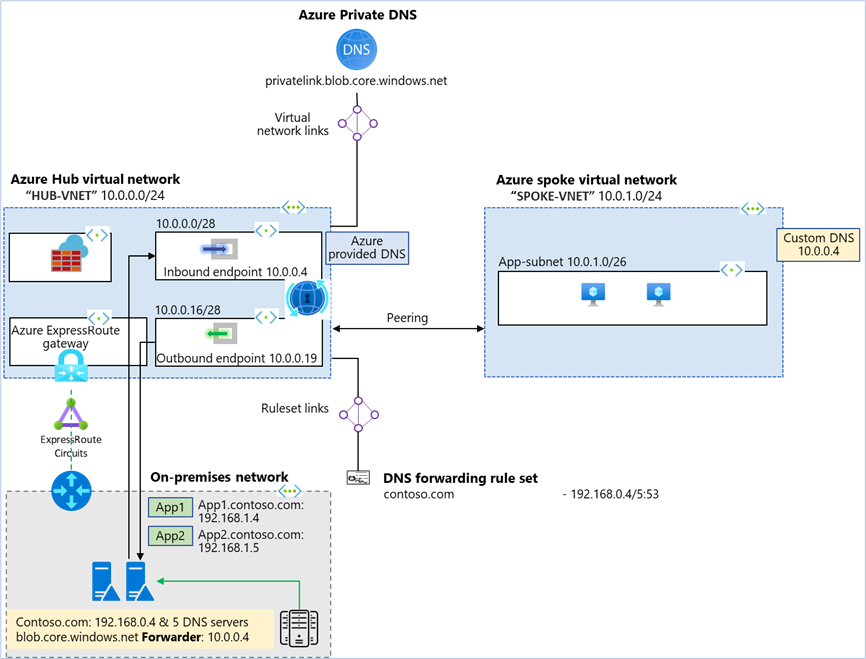
This article walks you through the steps to setup a centralized architecture to resolve DNS names, including private DNS zones across your Azure network and on-premises DNS using an Azure DNS private Resolver in a hub and spoke VNet topology.
Architecture diagram:
In the above architecture:
- Two VNets are created: “HUB-VNET” and “SPOKE-VNET”.
- An Azure DNS private resolver is created in the HUB-VNET with inbound endpoint at (10.0.0.4)
- A DNS forwarding ruleset is created for the private resolver “myruleset”.
- The DNS forwarding ruleset is linked to the HUB-VNET.
- Rules are added to the DNS forwarding ruleset for the on-premises DNS server.
- HUB-VNET is linked to all the Azure private DNS zones with Virtual network link.
- On-premises network is simulated as a third VNet and is peered to the HUB-VNET.
- ExpressRoute, Azure Firewall and ExpressRoute gateway are representational. On-prem to Azure connectivity could be a mix & match of ExpressRoute and Site-to-Site.
- A conditional forwarder is created in the on-premises DNS server for the private DNS zones configured on Azure to inbound endpoint at (10.0.0.4).
Create Azure Hub virtual network:
Create HUB-VNET with address space 10.0.0.0/24 and two subnets.
- Subnet name: snet-inbound
- Subnet address range: 10.0.0.0/28
- Subnet name: snet-outbound
- Subnet address range: 10.0.0.16/28

Create a DNS resolver inside the Azure HUB virtual network:
- Create DNS private resolver in “HUB-VNET” with a DNS forwarding ruleset “myruleset”

DNS forwarding ruleset “myruleset” is created and linked to the HUB-VNET during the DNS private resolver creation. In this example there is only one rule in the ruleset.
- Rule Name: onprem-contosocom
- Domain name: contoso.com
- Destination IP: port: 192.168.0.4:53 (On-premises DNS server)

- Add a Virtual network link for HUB-VNET with Azure private DNS “privatelink.blob.core.windows.net”

Create Azure spoke virtual network:
Create SPOKE-VNET with address space 10.0.1.0/24 and one subnet.
- Subnet name: app-subnet
- Subnet address range: 10.0.1.0/26

- Create a peering connection between SPOKE-VNET and HUB-VNET.
- Specify the inbound endpoint IP address of the DNS private resolver (10.0.0.4) as the custom DNS server for SPOKE-VNET.
Create a conditional forwarder:
On-premise DNS server conditional forwarder
- DNS Domain: blob.core.windows.net
- Forwarder: 10.0.0.4

Test the DNS resolution
Now you should be able to send resolve DNS from Azure to on-premise as well as on-premise to Azure.
DNS resolution On-Premises:
- On-premise client query’s on-premise DNS server (192.168.0.4).
- On-premise DNS name is resolved by the on-prem DNS server
- For Azure private DNS conditional forwarder is used. On-premise DNS server forwards the DNS request to Azure private DNS resolver inbound endpoint (10.0.0.4).
- Azure private DNS resolver uses the outbound endpoint to query Azure DNS (168.63.129.16) and resolves the DNS query for “myblobdnsdemo.blob.core.windows.net.” to (192.168.2.78)

DNS resolution in the hub VNet:
- The virtual network link from the private zone to the Hub VNet enables resources inside the hub VNet to automatically resolve DNS records in privatelink.blob.core.windows.net using Azure-provided DNS (168.63.129.16).
- Based on the ruleset “myruleset”, DNS resolution for contoso.com is forwarded and resolved through on-premise DNS server (192.168.0.4).
- All the namespaces which are not matching the ruleset rule are resolved without forwarding using Azure-provided DNS. E.g. public DNS names.

DNS resolution in the spoke VNet:
- The spoke VNet uses custom DNS and sends all of its DNS traffic to the inbound endpoint in the Hub VNet.
- Since “privatelink.blob.core.windows.net” has a virtual network link to the Hub VNet, all resources in the Hub can resolve “privatelink.blob.core.windows.net”, including the inbound endpoint (10.0.0.4). So, the spoke uses the hub inbound to resolve the private zone.
- Contoso.com DNS names is resolved for the spoke VNet through (192.168.0.4) according to rules provisioned in a forwarding ruleset.

Conclusion: Azure private DNS resolver helps implement a private resolver architecture without worrying about maintaining your own DNS server.
One can implement a centralized private resolver architecture as shown above example or can implement a distributed DNS architecture. In case of a distributed DNS architecture, the DNS forwarding ruleset is linked to the spoke VNet with a ruleset rule configured to forward queries for the private zone to the inbound endpoint (10.0.0.4) of the private DNS resolver deployed in the hub VNet and another rule to forward queries for contoso.com to on-premise DNS server (192.168.0.4)
DNS resolution in the hub VNet does not require a ruleset for private zones as it can resolve privatelink.blob.core.windows.net using Azure-provided DNS (168.63.129.16). It requires a ruleset to forward queries for contoso.com as shown in the above example “myruleset” rule “onprem-contosocom”.
Important: Hub VNet linked ruleset must not be linked to a forwarder ruleset with an inbound endpoint forwarding rule because this configuration can cause a DNS resolution loop.
Next Steps:
- Learn how to create an Azure DNS Private Resolver by using Azure PowerShell or Azure portal.
- Learn about private resolver architecture.
- Learn how to Set up DNS failover using private resolvers
Published on:
Learn moreWe can help you with Centralized private resolver architecture implementation using Azure private DNS resolver
If you want help implementing, troubleshooting, or improving this product, contact us and we’ll point you in the right direction.
Related posts
Enable IP restriction for a public facing App service
In this blog article, we will cover how to control the app service deployment to support only public facing app service with IP restriction en...
Selecting the Optimal Container for Azure AI: Docker, ACI, or AKS?
Deploying Azure AI services in containers like Docker, Azure Container Instances (ACI), or Azure Kubernetes Service (...
Securing Hardware and Firmware Supply Chains
In the modern cloud data center, ensuring the authenticity, integrity, and security of hardware and firmware is paramount. Firmware is the low...
Liquid Cooling in Air Cooled Data Centers on Microsoft Azure
With the advent of artificial intelligence and machine learning (AI/ML), hyperscale datacenters are increasingly accommodating AI accelerators...
Mt Diablo - Disaggregated Power Fueling the Next Wave of AI Platforms
Authors: Jason Adrian – General Manager, Azure Platform Architecture Laurentiu Olariu – Power Architect, Azure Platform Architecture Banha Sok...
Deny inbound NSG Rule creation via Azure Policy
In this blog article, we will cover how to deny the creation of inbound Network Security Group Rules if the inbound NSG Rule contains&n...
Azure Extended Zones: Optimizing Performance, Compliance, and Accessibility
Azure Extended Zones are designed to bring the power of Azure closer to end users in specific metropolitan areas or jurisdictions, cate...
Inside Maia 100: Revolutionizing AI Workloads with Microsoft's Custom AI Accelerator
Authored by: Sherry Xu, Partner Lead SoC Architect, Azure Maia Chandru Ramakrishnan, Partner Software Engineering Manager As the advanc...
Accelerate Cloud Potential for Your SAP Workloads on Azure with these Learning Paths
Accelerate Cloud Potential for Your SAP Workloads on Azure with these Learning Paths In today's rapidly evolving digital landsc...
Azure Role Assignments Audit Report
Overview: Azure Administrators often come across challenges while tracking multiple Azure role assignments and removals. At present Azur...