
Announcing General Availability for GitOps with Flux v2 in Azure
This blog has been co-authored by Chris Sanders, Senior Program Manager, Azure Arc at Microsoft.
GitOps capabilities have been an integral part of Azure Kubernetes Service (AKS) since its preview in December 2021 and Azure Arc-enabled Kubernetes since it’s launch at Ignite in 2021.
Today, we are pleased to announce the General Availability of GitOps with Flux v2 in Azure Kubernetes Service (AKS) and Azure Arc-enabled Kubernetes (Arc K8s). With this release, Azure supports GitOps configuration and workload management for your entire cloud and hybrid Kubernetes estate – clusters in AKS and clusters on-premises or in other public clouds. Flux v2 is a major update bringing a Kubernetes-native architecture, observability, and multi-tenancy among other improvements. With a single tool and process, you can manage your modern applications in Kubernetes everywhere.
Deploy modern applications in your cloud and hybrid environments
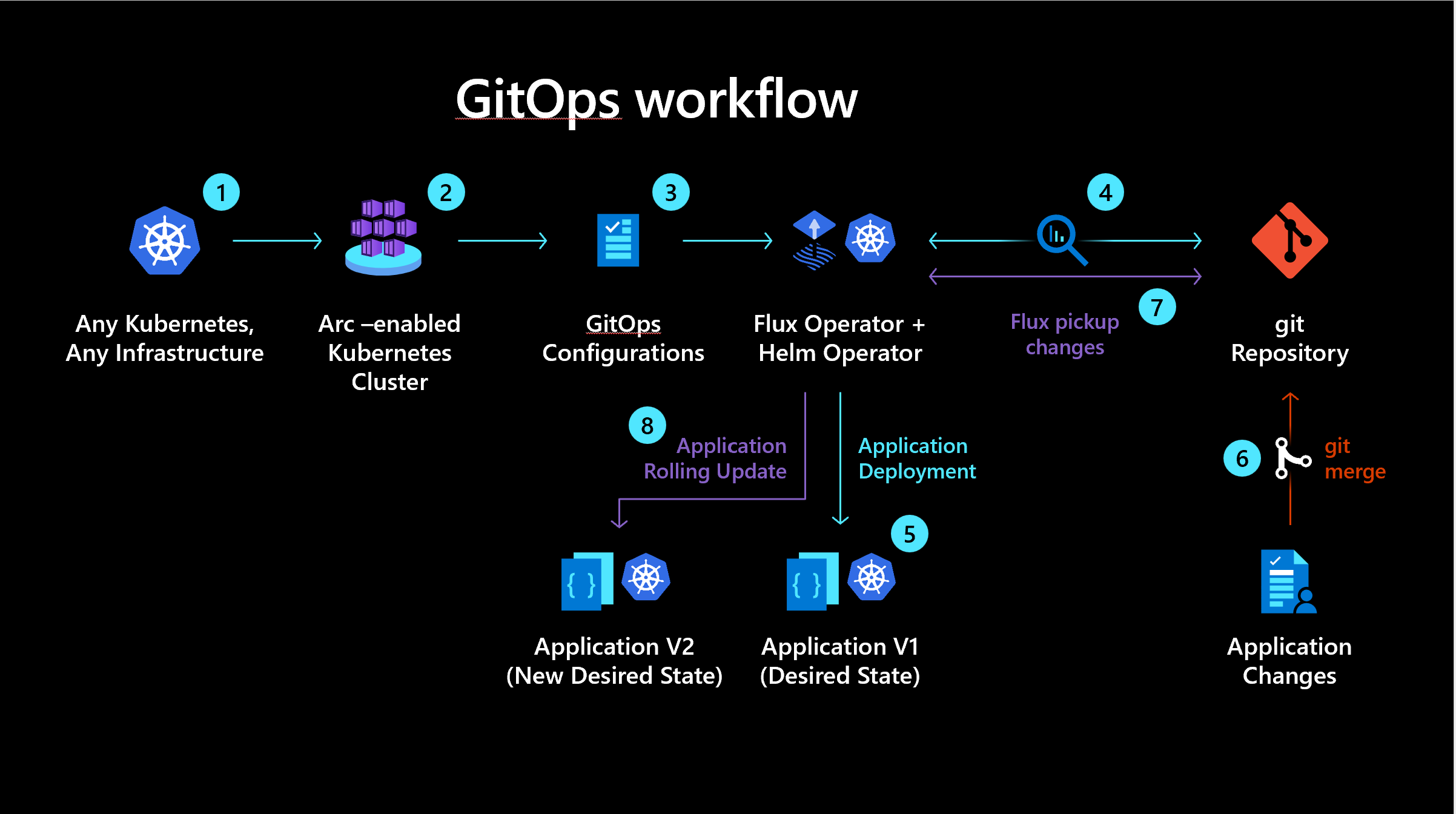
Teams running modern, cloud-native applications need reliable, automated processes for managing Kubernetes cluster configuration and application lifecycle. GitOps is a technique for implementing continuous deployment for these applications and configurations and focuses on using tools and processes developers and cluster admins are familiar with, like Git and pull requests. GitOps enables infrastructure as code, where the state of the environment is declaratively described in Git repositories. Changes to the workload environment, such as an application update, happen via pull request to the Git repository, after which Flux, running in each cluster, automatically syncs the changes and applies them to the cluster. Flux also continuously assures that the cluster remains in the declared state. GitOps enables accurate change management and audit, as cluster state and all changes are fully visible in the Git repository. It also enhances cluster security, as developers and deployment tools don’t need direct access to clusters. In short, GitOps is the modern way to manage continuous deployment for your containerized workloads, and Azure GitOps with Flux brings this capability to you.
How does this work?
Azure uses open source CNCF Flux to enable GitOps in Azure Kubernetes Service (AKS) or Azure Arc-enabled Kubernetes (Arc K8s) clusters. Azure provides simple install, automatic update, and health reporting to simplify your use of GitOps across one to thousands of clusters.
In Azure, GitOps with Flux v2 is enabled as a cluster extension to your AKS or Arc K8s clusters. The Flux extension installs the Flux controllers in the clusters.
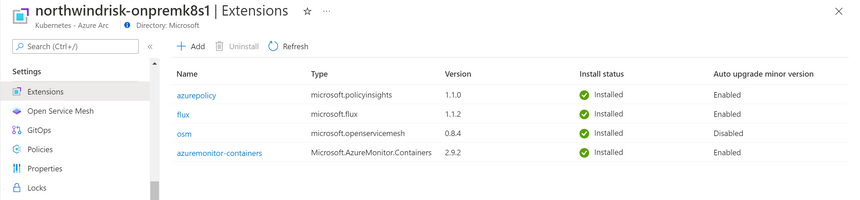
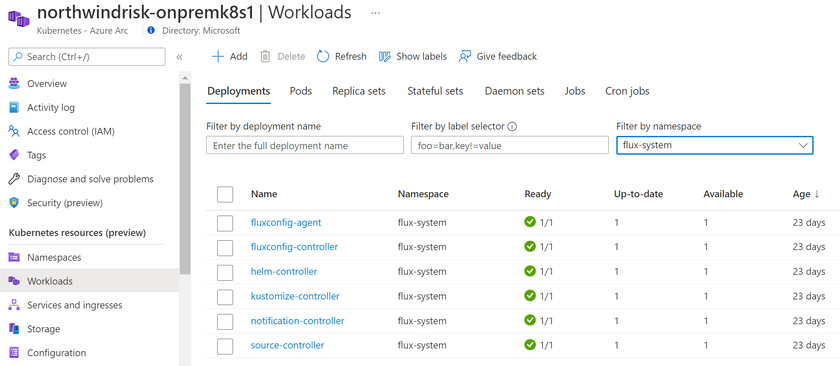
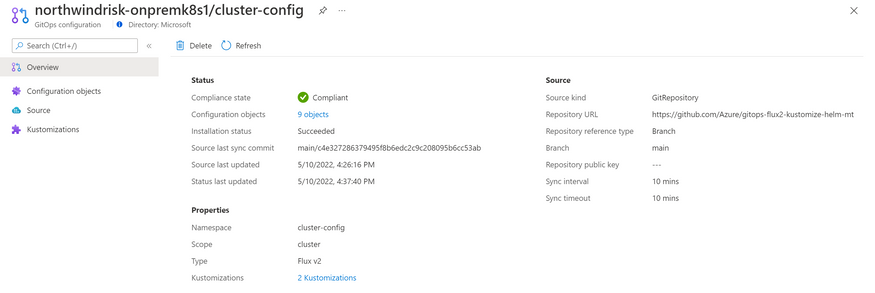
After Flux is enabled, you can then create one or more GitOps configurations in each cluster which enable the connections to your Git repositories and the deployment of the resources defined in the repositories.
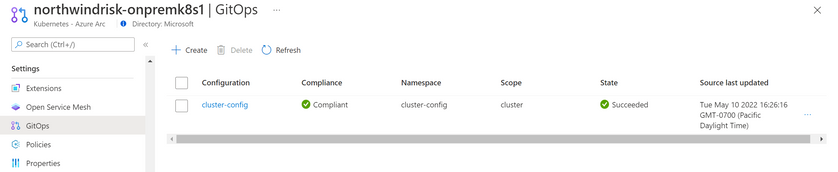
Importantly, in Azure you can track the compliance state of the deployments in each cluster to assure that the clusters are in the state you declared in your Git repositories. This gives you the observability you need to assure healthy cluster state.


GitOps extension for VS Code
We also are happy to announce the release of the new GitOps extension for VS Code. You can manage GitOps with Flux in your AKS, Arc-enabled Kubernetes, or other Kubernetes clusters directly within the VS Code client. This can simplify the developer inner loop when working with clusters managed by GitOps Flux.
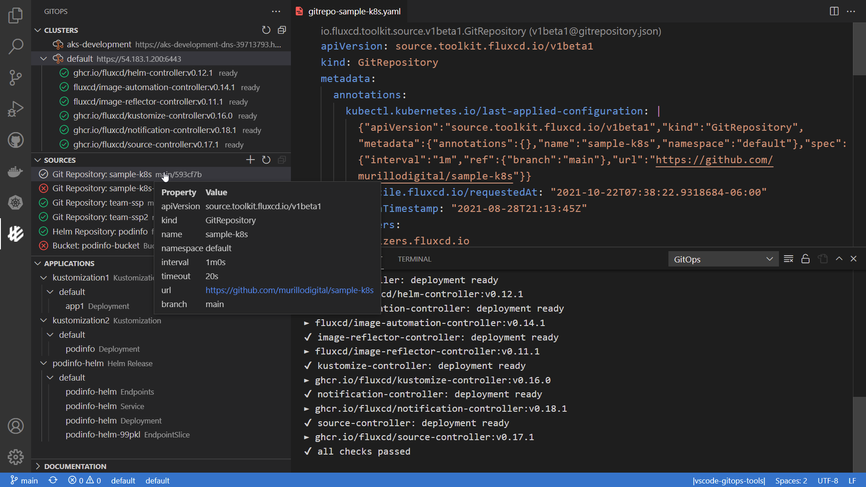
Some key features are:
- View list of configured clusters and switch cluster context
- AKS, Arc K8s, and other clusters are identified
- View Flux controllers, state, and logs
- View sources (Git and Helm Repositories, Bucket) and workloads (Kustomization, Helm Release)
- Create Git Repository source and Kustomization workload on the cluster
- Reconcile Sources and Workloads on demand
- Load Kubernetes Object manifest .yaml configs in VS Code editor
- Pull Git Repository Source to user machine and open it in VS Code
- Links to GitOps, Flux, and Azure Kubernetes documents
This is an open-source project, and your contributions are welcome to improve the GitOps extension.
Open-Source Partnerships
The work to integrate Flux in Azure GitOps, enhance Flux capabilities, and create the VS Code extension has been done in partnership with Weaveworks and the Flux maintainers. Microsoft is continuing to partner with Weaveworks and participate in advancing the Flux CNCF project and OpenGitOps.
Next Steps
We are excited for you to start using the new capabilities in GitOps with Flux v2 in Azure Kubernetes Service and Azure Arc-enabled Kubernetes. For details on how you can get started, please see these documents:
- GitOps in Azure conceptual overview
- Tutorial: Use GitOps with Flux v2 in Azure Arc-enabled Kubernetes or AKS clusters
- Leverage the Azure Arc Jumpstart to get started quickly with an AKS cluster
- Azure Architecture Center GitOps for AKS
Published on:
Learn moreWe can help you with Announcing General Availability for GitOps with Flux v2 in Azure
If you want help implementing, troubleshooting, or improving this product, contact us and we’ll point you in the right direction.
Related posts
Azure Adaptive Cloud Pre-Days at Microsoft Ignite 2024
As the excitement builds for Microsoft Ignite 2024, tech enthusiasts and professionals worldwide are eagerly anticipating the Azure Adaptive C...
Launching the Arc Jumpstart Newsletter: October 2024 Edition
👋 Welcome! We are excited to kick off this monthly newsletter, where you can get the latest updates on everything happening in the Arc Jumpst...
Announcing Public Preview of Windows Server Hotpatch enabled by Azure Arc
We’re excited to announce the Public Preview of Hotpatch enabled by Azure Arc for Windows Sever 2025 Datacenter and Standard editions! ...
Public Preview of Azure Container Storage enabled by Azure Arc Edge Volumes
Release Summary We are thrilled to announce the Public Preview of Azure Container Storage enabled by Azure Arc Edge Volumes, a groundbre...
Introducing ArcBox 3.0 General Availability
Today, the Arc Jumpstart team is excited to announce the general availability of ArcBox 3.0! Since it was first introduced in 2021, Ar...
CloudCasa for Azure Arc
Azure Arc is a platform that helps users build and develop their applications by extending Azure to their datacenters, edge, or even to multic...
Generally Available: Transition to WS2012 / R2 ESUs enabled by Azure Arc from Volume Licensing
Customers that have enrolled in WS2012/ R2 ESUs through Volume Licensing for Year 1 can transition to Azure Arc for Year 2 of the program. Ext...
Comparing feature sets for AKS enabled by Azure Arc deployment options
This article shows a comparison of features available for the different deployment options under AKS enabled by Azure Arc. ...
Increasing Security for SQL Server Enabled by Azure Arc
Back in November 2023, the least privileges deployment model was introduced as a public preview. After thorough testing, we are excited to ann...
Five Key Updates on WS2012 ESUs enabled by Azure Arc
We have a myriad of key updates for customers enrolled in WS2012/R2 ESUs enabled by Azure Arc! As we continue to refine and expand the offer, ...