
Latest improvements to the Azure CLI experience

Hello all, welcome to another CLI release blog. Today we will be sharing with you our recent effort and investment in improving the Azure CLI user experience, which includes the new colorization guidelines, enhanced error output, output hints for az login, and command progress bars. You could read more about our previous UX work here
You can also download the latest official release from the Azure CLI page or the dev build from the GitHub Azure CLI homepage
CLI colorization guideline:
The CLI colorization guideline was developed to improve the legibility of command line text. We took inspiration from other popular CLIs, prescribed new meaning to some of the traditional colors, ensured that this is accessible to all, and standardized its application across the Azure CLI. In the latest beta release, we support both dark and light themes which can be configured via az config set core.theme = dark/light:
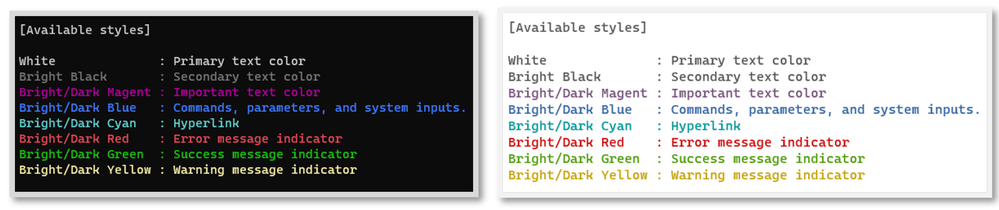
Figure1: Dark and light theme of CLI color application
A few other things to note:
- The theme and colorization are on by default, although they can be toggled on/off via az config set core.no_color = true/false
- Colors from the Azure CLI theme will not override your pre-customized settings. We only map the color names to the corresponding color values from your terminal settings, and for colors that don’t provide sufficient contrast (like blue in Windows PowerShell terminal), they are disabled and are defaulted back to your terminal’s primary output color
We are currently in discussion with the PowerShell and Azure Cloud Shell teams to standardize the terminal color application all up. If this is something of interest to you, please leave a comment below and share with us your feedback.
New error output v2 design:
As per the pre-announcement made here a couple of months ago, our team has been working towards refining both the i) error output design, and the ii) recommendation accuracy – to enable faster error resolution. We often hear from you, our customers, that dealing with errors is difficult due to incomplete or cryptic messages. We hope our v2 design will continue to enhance the legibility those messages and help you recover from them quickly.

Figure2: New error output design

Figure 3: new error output with recommendations disabled
For those of you who don’t want these recommendations, they can be suppressed via az config set core.error_recommendations = off. For example, if you are only interested in basic error messages in an automation scenario (like a DevOps pipeline), the output logs won’t be overwhelmed by these recommendations
If you would like to learn more about how we used AI to build out these recommendations, you can learn more about how we empower developers through AI and the architectural implementation of the underlying service powering this.
az login post output hint
We hear from our customers that discovering what their default subscription is in midst of 20+ active subscriptions after they run az login is time consuming. We experimented with post-output hints where we enable and extended additional outputs beyond the default output. In the example of az login post-output hint below, we provide the default subscription info at the end, so that you no longer have to scroll through multiple screens to find that needle in the haystack:
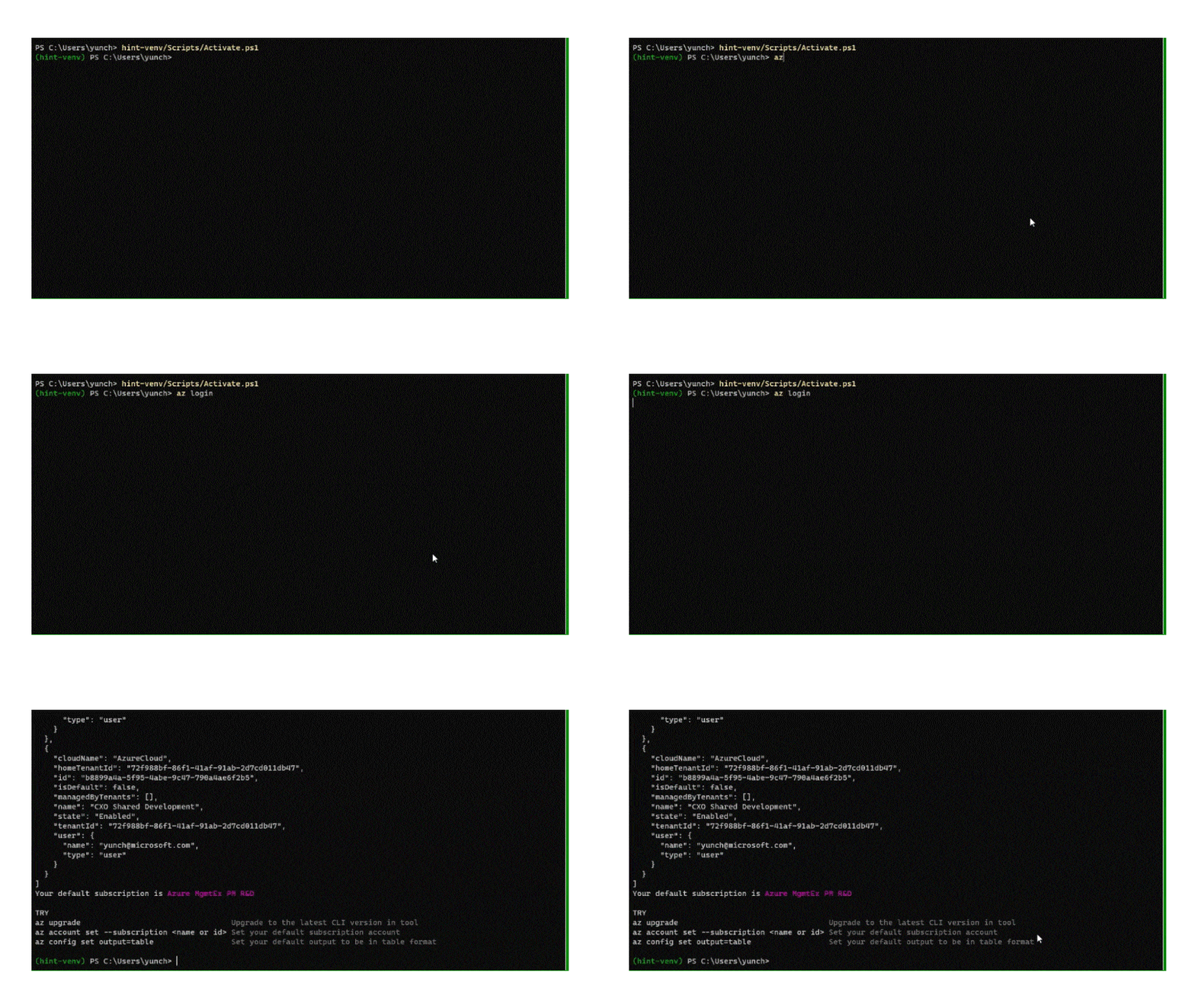
Gif 1: post output hint for az login to display default subscription
In the same example, there are a few other commands being recommended as part of the extended output. The reason being we’re leveraging this to introduce some popular commands which customers have been asking for. So far we’ve been receiving positive feedback on this enhancement and would certainly love your additional thoughts! Feel free to give the edge build a try!
New command progress bars:
Not-so-fun fact: almost all of our long running operations do not display dynamic progress bars during command execution. Most of the time, they only display the static ‘Running…’ indicator without any process updates. This means that interactive users who manage their Azure resources in the terminal are often confused with the execution status. This has been noted as a primary source of frustration in our user testing labs, where the terminal is misinterpreted as hanging and users would terminate their current session, leading to a loss of productivity
As a mitigation to the above challenge, our team worked through several iterations of the progress bar designs and explored their pros and cons. Determinant progress bars are ones where we provide approximate time to command completion, while indeterminant designs are for commands that we do not have an approximate time to completion for, but would still like to provide an indication to our users that the command is running. The GIF below presents our top designs in action, which are implemented as preview across some of our long running operations:
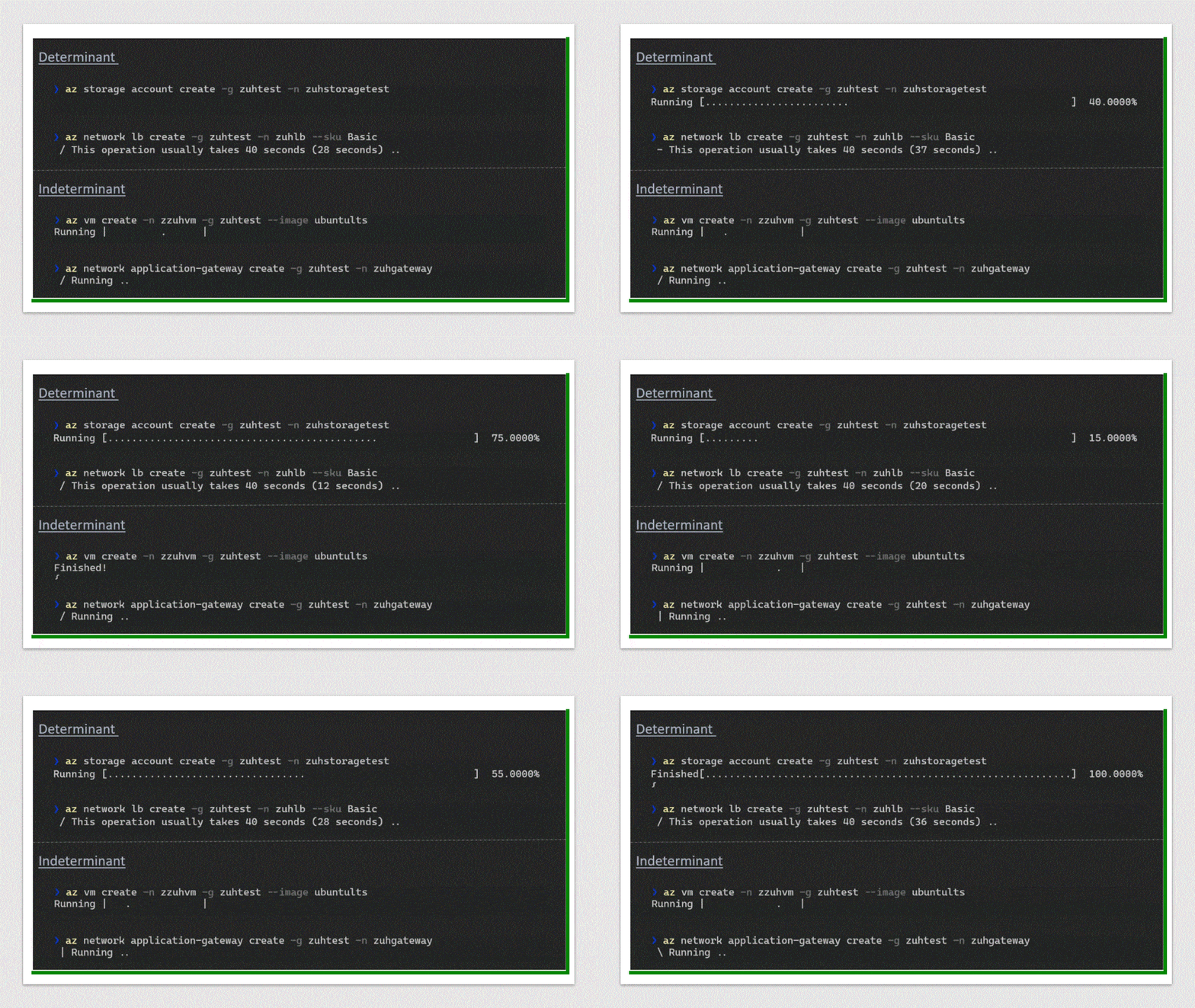
Gif 2: Determinant and indeterminant progress bar design
We plan to roll out broad support for all long running operations. By the end of February, all long running operations will support the indeterminant progress bars. For the time being, they are supported in the edge build below. If you have specific insights or preferences on the above design, feel free to also leave us a comment below.
Next steps and getting started with edge build:
Here's how you could get started with the edge build:
# 1) Create a virtual environment
python -m venv edge-venv
# 2) Activate the virtual environment
# a) PowerShell on Windows, or
. .\edge-venv\Scripts\Activate.ps1
# b) Linux/MacOS Bash
. ./edge-venv/bin/activate
# c) Install Azure CLI edge build
pip install --extra-index-url https://azurecliedge.blob.core.windows.net/edge/simple/ azure-cli
There you'd be able to play with the az login post output and the command progress bars
We’d love for you to try out these new experiences and share us your feedback on their usability and applicability for your day-to-day use cases
Thank you!
Published on:
Learn moreWe can help you with Latest improvements to the Azure CLI experience
If you want help implementing, troubleshooting, or improving this product, contact us and we’ll point you in the right direction.
Related posts
Unlocking the Best of Azure with AzureRM and AzAPI Providers
With the recent release of AzAPI 2.0, Azure offers two powerful Terraform providers to meet your infrastructure needs: AzureRM and AzAPI. The ...
Announcing AzAPI 2.0
The AzAPI provider, designed to expedite the integration of new Azure services with HashiCorp Terraform, has now released 2.0. This updated ve...
Azure CLI docker container base Linux image is now Azure Linux
Starting from the version 2.64.0 of Azure CLI, the base Linux distribution of Azure CLI is now Azure Linux. Impact of the change ...
Mastering the Shorthand Syntax in your daily workflow
Introduction In this tech blog, we'll unravel the magic behind Azure CLI shorthand syntax and discover how it can elevate your command-line ex...
Azure Verified Modules - Monthly Update [June]
AVM Module Summary The AVM team are excited that our community have been busy building AVM Modules. As of June 17th, the AVM Footprint curren...
Azure Verified Modules - Monthly Update [May]
Quarterly Community Call This month we held our first community call. Thank you to everyone that attended & contributed. It was amazing t...
Azure CLI and PowerShell Tools Build 2024 Announcement
Microsoft has announced several new capabilities for Azure CLI and Azure PowerShell at the Microsoft Build 2024. The priority remains to provi...
Terraform on Azure May 2024 Update
Welcome to our April 2024 update! These blogposts will be covering everything we've gotten up to recently with Terraform on Azu...
Azure Verified Modules - Monthly Update [April]
In the April edition of the Azure Verified Modules update, the AVM team announces their upcoming quarterly community call scheduled for 21st M...
Announcing AzAPI Dynamic Properties
It’s been almost two years since the announcement of AzAPI, and the provider has eclipsed 20M+ downloads thanks to all of you. We’re ex...