
Creating Tests with GitHub Copilot for Visual Studio
One of the recurring jokes in our industry is that developers are not very good at two things when coding: Documenting code, and creating unit tests. These are two areas where GitHub Copilot can help! Let's see how in the new short video that I just published.
The slash commands, "magic spells" for Visual Studio
In previous videos, we talked about the availability of "Slash commands" in Visual Studio. These can be invoked by typing a Slash character '/' in a GitHub Copilot chat dialog. This will open a context menu where you can select a command, for example /fix to fix some code, or /optimize like we saw in our previous article. We also have /doc which, as the name shows, will create documentation for the code currently in context, for example a method or a property.
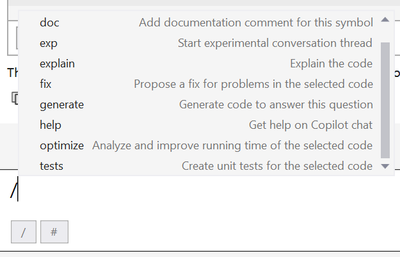
The last command available on the screenshot above is /tests. That one is particularly useful to help you getting started with unit tests for the current code in context. In the new short video I just published, Bruno Capuano shows how GitHub Copilot can propose unit tests for a whole class.
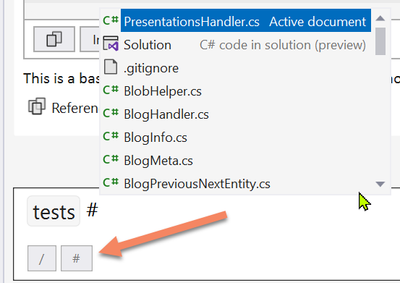
In order to do that, Bruno starts by typing /tests in the Copilot chat window, and then type a hash '#' which will open another context menu to select the context.
The importance of context
For Large Language Models (LLMs), context is crucial to the good execution of the prompt. The context will be injected in the prompt together with the user input. We talk about metaprompts. In other words, everything that can be used to help the LLM to generate more precise and factual outputs is useful. In GitHub Copilot for Visual Studio, the context can be the currently selected code, another code file, or even the whole Solution. These options can be selected from the "hash context menu" as shown here:
Creating the tests
Once this command is executed, Copilot chat will propose an outline of what the tests could look like. Note that like with every other feature of GitHub Copilot, this is meant to assist you, the Developer-in-Charge, and not to just do the work for you. The code created must be verified and approved by you, and thoroughly tested to make sure that it actually does what you expected (yes, you are going to test your unit tests  ). Copilot is making you faster and more efficient, but it is not replacing your role.
The particularity here, compared to previous features we showed, is that Copilot proposes to create the tests in a new file. This is usually what we do for unit tests, with dedicated classes and methods. This is available here with the button labeled Insert in new file. Once the new file is created, you must save it to the solution. In fact, you will probably want to arrange your tests in a separate class library in the same solution.
More information
We have compiled a list of resources here, and we hope that this information is useful to get you started and improve your best practices in Visual Studio. You can also see the related 13 minutes long video here, and see all the videos in this series here. Stay tuned to more content by subscribing to this blog, and to the Visual Studio YouTube channel.
Published on:
Learn moreWe can help you with Creating Tests with GitHub Copilot for Visual Studio
If you want help implementing, troubleshooting, or improving this product, contact us and we’ll point you in the right direction.
Related posts
This Month in Azure Static Web Apps | 09/2024
We are back with another edition of the Azure Static Web Apps Community! :party_popper: September was yet another month ...
GitHub Copilot for Azure: 6 Must-Try Features
As developers, we are constantly seeking tools that streamline our workflows and boost productivity. … Enter GitHub Copilot for Azure, now in ...
Responsible AI Mitigation Layers
Generative AI is increasingly being used in various kinds of systems to augment humans and infuse intelligent behavior into existing and new a...
Streamline Your Azure Workflow: Introducing GitHub Copilot for Azure in VS Code
I'm excited to announce the public preview of GitHub Copilot for Azure - a new addition to your toolkit that seamlessly integrates with G...
Build Intelligent Apps Code-First with Prompty and Azure AI
Building Generative AI applications can feel daunting for traditional app developers. What does the end-to-end applicati...
Certificación AI-900 (Fundamentos de IA) con Chicas en IA
La inteligencia artificial ha llegado para quedarse, ¡y más aún con la revolucionaria IA generativa! Para ayudar a los profesionales a especia...
Get certified with Learn Live GitHub series!
GitHub Universe is coming, and Microsoft and GitHub are partnering to offer a new special Learn Live series in Brazilian Portuguese, English a...
Certifícate con Learn Live GitHub en Español
Microsoft y GitHub se han unido para ofrecer una nueva serie especial de Learn Live en inglés y español: GitHub 2024. Del 10 al 24 de Octubre,...
Evaluating generative AI: Best practices for developers
As a developer working with generative AI, you've likely marveled at the impressive outputs your models can produce. But how do you ensure the...
Introducing Azure Product Retirement Livestreams
The Azure Retirements team, in collaboration with key partner groups, is excited t...