
Codename Project Bose: Calculate Azure Cost of an Enterprise by cost centers, divisions, projects

While working on various customer and partner facing roles, I felt the necessity of a simple and flexible solution to align Azure Cost to the customer’s organizational structure. “Project Bose” is a fully operational prototype derived from the same thought process. This is a side project I am working on during my leisure time. I found various customers derived similar solutions in-house, and there are ISV solutions as well. But there are a few fundamental differences between “Project Bose” and all the other solutions I found. “Project Bose” has a flexible backend and hence any changes in organizational structure can easily be implemented on it without disruption. It is also independent of using Resource Tags, which gives it the opportunity to remain non-vulnerable to erroneous values injected intentionally or non-intentionally by IT-Ops.
Project Bose is dedicated to an eminent Indian physicist, who predicted (theoretically) a special behavior of atoms, which later became famous as Bose-Einstein condensates. He also discovered a sub-atomic particle, later named after him – Boson.
Why Project Bose?
- To replace Azure specific hierarchy of Cost Analysis (Tenant>Management Group>Subscription>Resource Group) with organization specific hierarchy such as Business Unit>Department>Cost Center>Project/Application.
- Provide an alternative option to mark projects/applications under different divisions/departments – moving away from using resource tags.
- Flexible way to replicate organizational hierarchy through easy-to-use interface and change/edit the tree vertically or horizontally with minimum effort and no disruption.
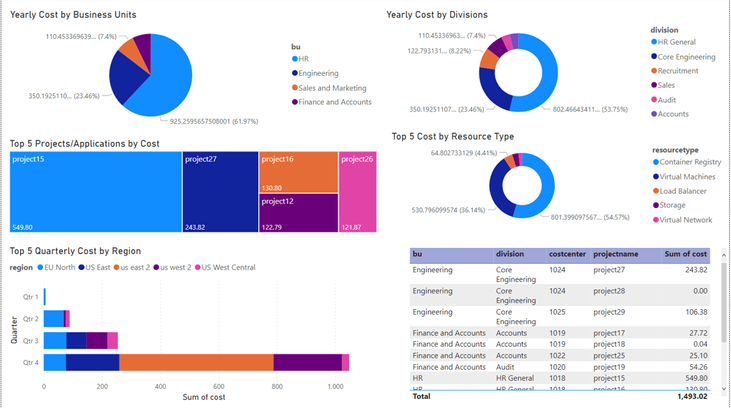
- A great way of presenting ongoing and past expenses on different projects and slice and dice cost at different levels. Optional implementation of forecasting.
How does it work?
- Admins – can create the hierarchy according to organizational structure (ex. BU>Division>Cost Center>Project) and add items at each level. This structure is flexible. They can change the hierarchy at any time. For example – can change name of a Division, add or remove a Cost Center etc.
- Project/Application Owners – can add their project under a specific branch of the organizational tree and then align Azure Resource Group(s) to it.
- Business Owners/Decision Makers – see current and past cost, trends and forecasting.
Base Architecture
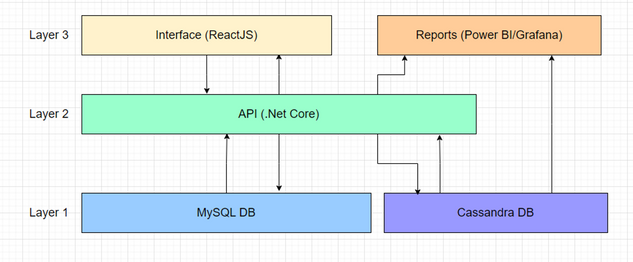
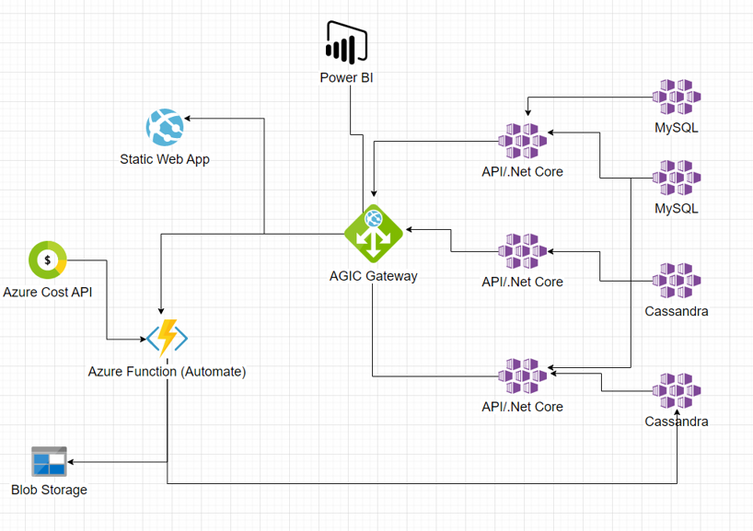
Azure Deployment
Sample Visualization
The code base with IaC is available with my GitHub repo. I can share with anyone interested.
Published on:
Learn moreRelated posts
End-to-End Full-Stack Web Application with Azure AD B2C Authentication: A Complete Guide
Application Overview The purpose of this sample application is to demonstrate the usage of Azure Active Directory B2C (Azure AD B2C) for authe...
Complex Data Extraction using Document Intelligence and RAG
Section 1: Introduction Historically, data extraction from unstructured documents was a manual and tedious process. It consisted of a c...
Harnessing Generative AI with Weaviate on Azure Kubernetes Service and Azure NetApp Files
Table of Contents Introduction Prerequisites Install Weaviate Approximate Nearest Neighbor (ANN) Benchmarks ANN Benchmarks Setup ANN Benchmark...
Securing Containerized Applications with SSH Tunneling
As cloud engineers and architects embrace containerization, ensuring secure communication becomes paramount. Data transmission and access cont...
Exploring AI Agent-Driven Auto Insurance Claims RAG Pipeline.
Introduction: In this post, I explore a recent experiment aimed at creating a RAG pipeline tailored for the insurance industry, specificall...
Azure NetApp Files now stores sensitive data DoD IL5 compliant in Azure US Government regions
Table of Contents Introduction Why Azure NetApp Files? DoD IL5 compliance in Azure Government Azure NetApp Files reaches feature parity betwee...
Data Intelligence End-to-End with Azure Databricks and Microsoft Fabric
This Azure Architecture Blog was written in conjunction with Isaac Gritz, Senior Solutions Architect, at Databricks. The Data Inte...
AI Studio End-to-End Baseline Reference Implementation
Azure AI Studio is designed to cater to the growing needs of developers seeking to integrate advanced AI capabilities into their appli...
Mastering AI adoption: Essentials to building, operating and optimizing genAI workloads on Azure
Mastering your AI adoption: Essentials to building, operating and optimizing genAI workloads on Azure As the demand for scalable, efficient AI...
Optimize Azure Stack HCI with the Well-Architected Framework
Azure Stack HCI is a hyperconverged infrastructure (HCI) solution that provides storage, network, and compute resources in on-premises...