
Azure Event Hub | How to stop the incurring Cost on my EventHub, while not in use
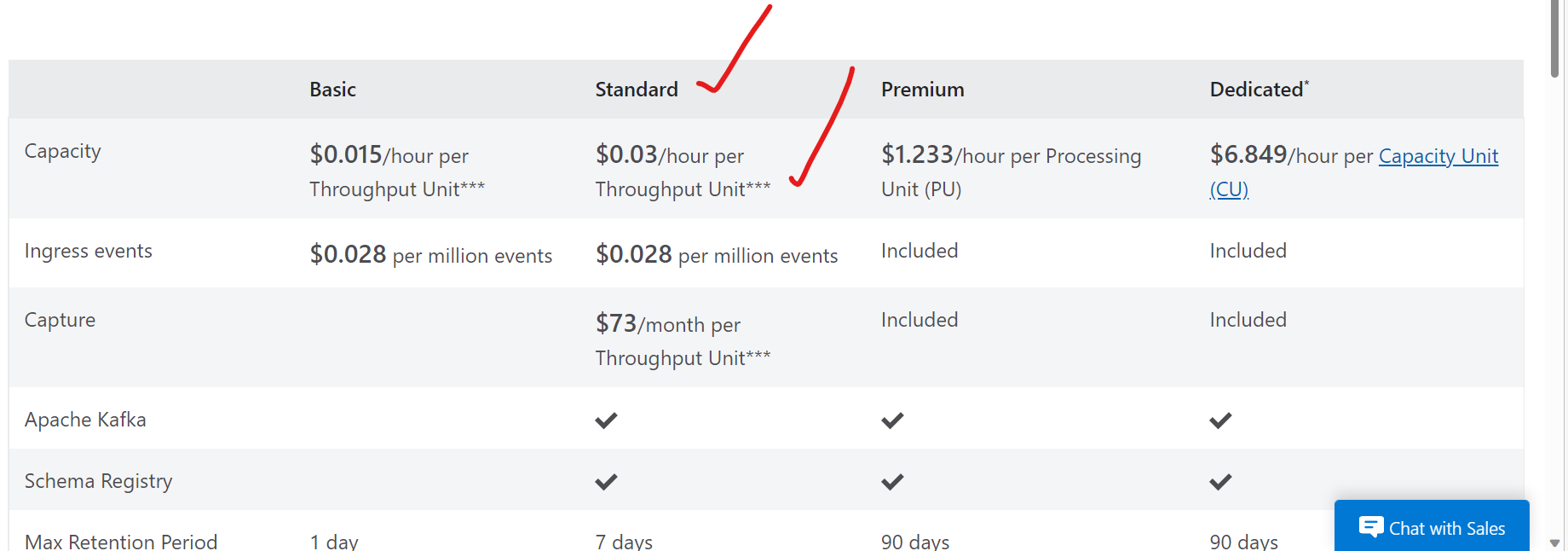
Case: In a situation, you observe your EventHub namespace is still incurring the cost, even though you are not doing any operations (read/write/management) on it and your EventHub namespace has no active EventHub instances present.
Root Cause of the behavior:
- At the time of creating the Azure EventHub namespace (Basic/Standard/Premium/Dedicated tier), you may have to give pre-purchased units of capacity in terms of Throughput units/Processing units/Capacity units based on the tier you choose. These pre-purchased units of capacity controls throughput capacity of the EventHub namespace.
- Among all the other pricing factors, cost will be incurred based on the number of pre-purchased units of capacity (Throughput units/Processing units/Capacity units) at the EventHub namespace level.
- Here I have attached a document, referring to the Azure EventHub pricing. Pricing - Event Hubs | Microsoft Azure
- As the pre-purchased units of capacity (Throughput units/Processing units/Capacity units) are defined at the EventHub namespace level, you will be charged per pre-purchased units of capacity configured hourly, even though there are no active EventHub instances present, and you are not performing any kind of operations on it.

How to mitigate this behavior:
- To stop the incurring cost while EventHub is not in use, you may have to delete the EventHub namespace, instead of disabling the EventHub instances.
- You can as well export the ARM template to create the same EventHub namespace in future, before deleting the existing EventHub namespace. Export template in Azure portal - Azure Resource Manager | Microsoft Learn
Published on:
Learn moreWe can help you with Azure Event Hub | How to stop the incurring Cost on my EventHub, while not in use
If you want help implementing, troubleshooting, or improving this product, contact us and we’ll point you in the right direction.
Related posts
Azure Storage - TLS 1.0 and 1.1 retirement
Overview TLS 1.0 and 1.1 retirement on Azure Storage was previously announced for Nov 1st, 2024, and it was postponed recently to 1 year later...
Efficient Management of Append and Page Blobs Using Azure Storage Actions
Overview In Azure Storage, Blob Lifecycle Management (BLM) allows you to automate the management of your data based on rules defined by...
[Azure AI Search] Internal Server Error when creating CMK encrypted objects
Scenario Customers follow the Microsoft doc to create CMK encrypted objects (data source, index etc.), but get the 500 Internal Serv...
Optimizing Azure Table Storage: Automated Data Cleanup using a PowerShell script with Azure Automate
Scenario This blog’s aim is to manage Table Storage data efficiently. Imagine you have a large Azure Table Storage that accumulates logs from ...
Optimizing Azure Table Storage: Automated Data Clean-up using a PowerShell script with Azure Automat
Scenario This blog’s aim is to manage Table Storage data efficiently. Imagine you have a large Azure Table Storage that accumulates logs from ...
Restoring Soft-Deleted Blobs with multithreading in Azure Storage Using C#
Blob soft delete is an essential feature that safeguards your data against accidental deletions or overwrites. By retaining deleted data for a...
Performing simple Azure Table Storage REST API operations using curl command.
The blog provides guidance to perform simple Table Storage REST API operations such as Create table, Delete Table, Insert entity, Delete entit...
Bulk delete all the old jobs from the batch account
Deleting a Job also deletes all Tasks that are part of that Job, and all Job statistics. This also overrides the retention period for Task dat...
Utilizing Azure Storage and Runbooks for scheduled automated backups of Azure SQL Databases
In this article, we are going to provide detailed steps to create a scheduled Azure SQL Database backup to storage account using automation. T...
[Azure Service Bus] JMS messages getting dead-lettered
The article discusses a problem where numerous messages end up in the dead letter queue (DLQ) when the JMS service bus consumer connects to th...