
Act now: Turn on or customize Microsoft-managed Conditional Access policies

As part of our Secure Future Initiative, we announced Microsoft-managed Conditional Access policies in November 2023. These policies are designed to help you secure your organization's resources and data based on your usage patterns, risk factors, and existing policy configuration, all while minimizing your effort. Our top recommendation for improving your identity secure posture is enabling multifactor authentication (MFA), which reduces the risk of compromise by 99.2%. This is why our first three policies are all related to MFA for different scenarios.
Since we announced Microsoft-managed Conditional Access policies, we’ve rolled out these policies to more than 500,000 tenants in report-only mode. In this mode, the policies don’t impact access but log the results of policy evaluation. This allows administrators to assess the impact before enforcing these policies. Thanks to proactive actions taken by administrators to enable or customize these policies, over 900,000 users are now protected with MFA.
We’ve been actively listening to your feedback. Customers shared that Microsoft-managed policies impact the number of Conditional Access policies that organizations can create. We’ve addressed this by making a significant change: Microsoft-managed policies will no longer count towards the Conditional Access policy limit. Another adjustment relates to existing Conditional Access policies. If you already have a policy in the “On” state that meets or exceeds the requirements set by the Microsoft-managed policy, the latter will not be automatically enforced in your tenant.
Initially, we communicated that these policies would be automatically enabled 90 days after creation. However, based on customer feedback, we recognize that some customers need additional time to prepare for these policies to be enforced. As a result, we have extended the time frame before enforcing the policies for this initial set of policies. For these three policies, you will have more than 90 days to review and customize (or disable) your Microsoft-managed Conditional Access policies before they are automatically enforced. Rest assured, you’ll receive an email and a Message Center notification providing a 28-day advance notification before the policies are enforced in your tenant.
Call to Action
- Review these policies in the Conditional Access policies blade.
- Add customizations such as excluding emergency accounts and service accounts.
- Once ready, the policies can be moved to the ON state.
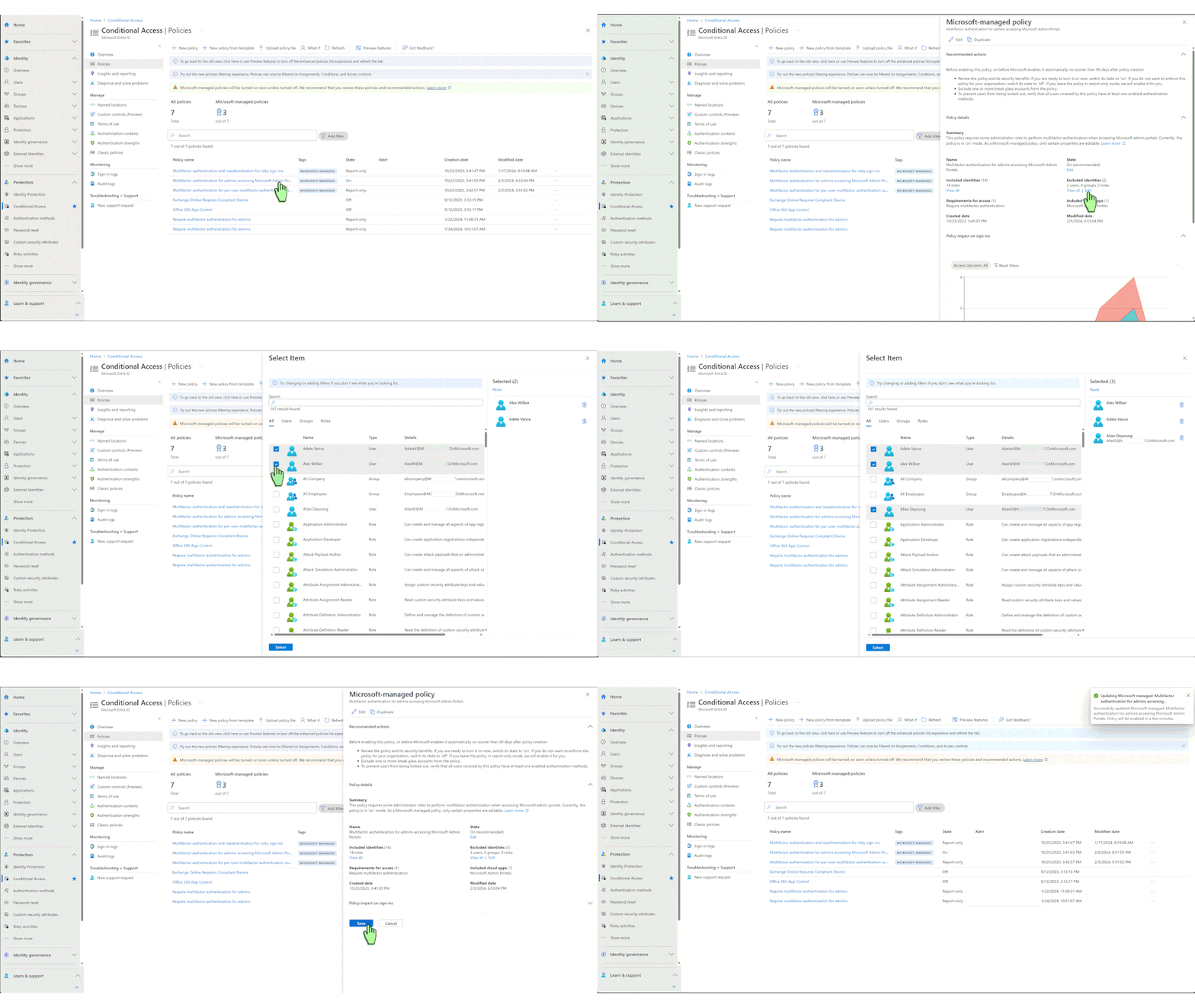
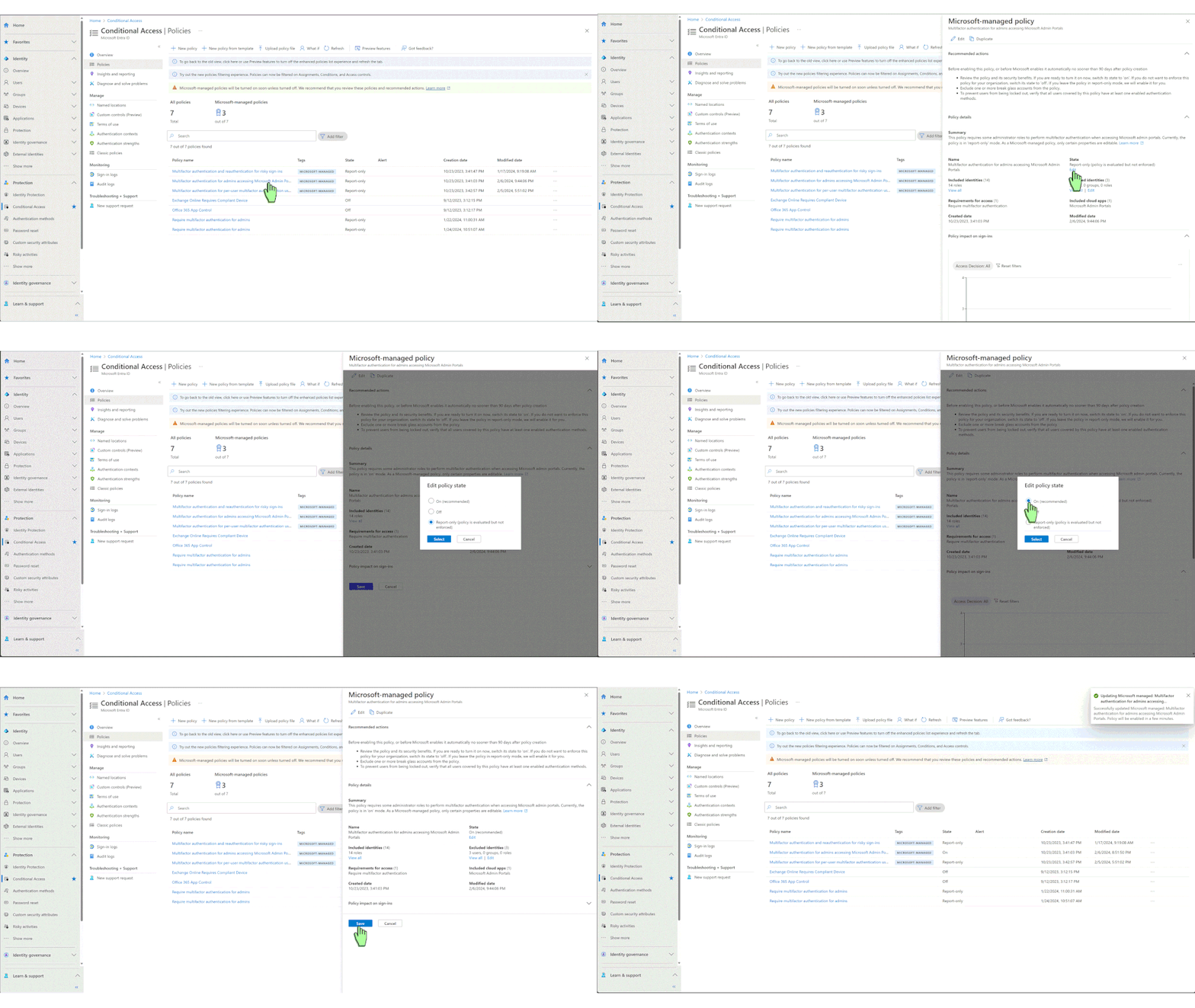
For additional customization needs, you can duplicate these policies and make further adjustments.
To learn more about how to secure your resources, visit our Microsoft-managed policies documentation.
Nitika Gupta
Principal Group Product Manager, Microsoft
Learn more about Microsoft Entra:
- See recent Microsoft Entra blogs
- Dive into Microsoft Entra technical documentation
- Learn more at Azure Active Directory (Azure AD) rename to Microsoft Entra ID
- Join the conversation on the Microsoft Entra discussion space and Twitter
- Learn more about Microsoft Security
Published on:
Learn moreWe can help you with Act now: Turn on or customize Microsoft-managed Conditional Access policies
If you want help implementing, troubleshooting, or improving this product, contact us and we’ll point you in the right direction.
Related posts
Sync identities from Rippling to Microsoft Entra ID
Today, we’re thrilled to announce that customers using Rippling HCM can now automatically provision users to on-premises Active Directory and ...
Microsoft Entra ID Governance for government
I’m pleased to announce that as of November 1, 2024, Microsoft Entra ID Governance is available for federal agencies, state and local governme...
Update to security defaults
As part of the Secure Future Initiative, we’ve evolved our security approach to align with three security principles: secure by design, secure...
Meet Microsoft Entra at Ignite 2024: November 18-22
Microsoft Ignite is just around the corner, taking place from Monday, November 18, 2024 through Friday, November 22, 2024, in Chicago, Illinoi...
Manage Microsoft Entra ID role assignments with Microsoft Entra ID Governance
I’m excited to announce that we now support Microsoft Entra role assignments in Microsoft Entra ID Governance's Entitlement Management feature...
The latest enhancements in Microsoft Authenticator
Hi folks, I'm thrilled to announce three major Microsoft Entra ID advancements that will help you protect your users with phishing-resi...
Microsoft Security announcements and demos at Authenticate 2024
The Microsoft Security team is excited to connect with you next week at Authenticate 2024 Conference, taking place October 14 to 16 in Carlsba...
What's new in Microsoft Entra - September 2024
We’re excited to announce the general availability of Microsoft Entra Suite—one of the industry’s most comprehensive secure access solutions f...
Explore the key benefits of Microsoft Entra Private Access
The traditional network security models are becoming increasingly ineffective in a world where remote work and cloud services are the norm. Co...
Join us at the Microsoft Entra Suite Showcase!
This fall, we are bringing the Microsoft Entra Suite Showcase to cities worldwide. Join us to explore how our latest advancements in secure id...