
Building a RAG Pattern chat bot with Azure OpenAI and LangChain.js | Azure Developers JavaScript Day
In this second article on this year's Microsoft event aimed at JavaScript developers: Azure Developers JavaScript Day 2024, we're going to talk about creating a chatbot using the RAG (Retrieval Augmentation Generation) architecture with Azure OpenAI and LangChain.js! And this time we have the special participation of Lars Gyrup, a Microsoft MVP from Denmark, GitHub star, NX Champion, Angular hero of education and a fervent community organizer. And, also with Wassim Chegham, a Senior Developer Advocate Engineer at Microsoft with a long history in JavaScript development, and Natalia Venditto, a Principal Product Manager at Microsoft focused on the Developer Experience in Azure.
Let's get to the content!
What was covered during the session?
The Confluence of Expertise
Lars introduced his extensive background, highlighting his contributions to Developer Technologies, Open-Source projects, and educational initiatives. His foundational work with the This is Learning community, which evolved from an Angular-centric hub to a broader tech community, showcases his commitment to fostering growth and knowledge sharing among tech enthusiasts of all skill levels.
Wassim and Natalia, complemented the discussion with their vast experiences. Their collaboration has led to the development of samples that guide the community on best practices for application implementation using Azure services and Developer Tools.
Unraveling the RAG Pattern
The core of the session was the deep dive into the RAG pattern, a sophisticated architecture designed to enhance AI-driven applications by leveraging large language models for predictive content generation. This pattern, integral to generative AI technologies like GitHub Copilot, empowers applications to construct responses to user queries with unprecedented accuracy and relevance.
Architectural Overview and Implementation
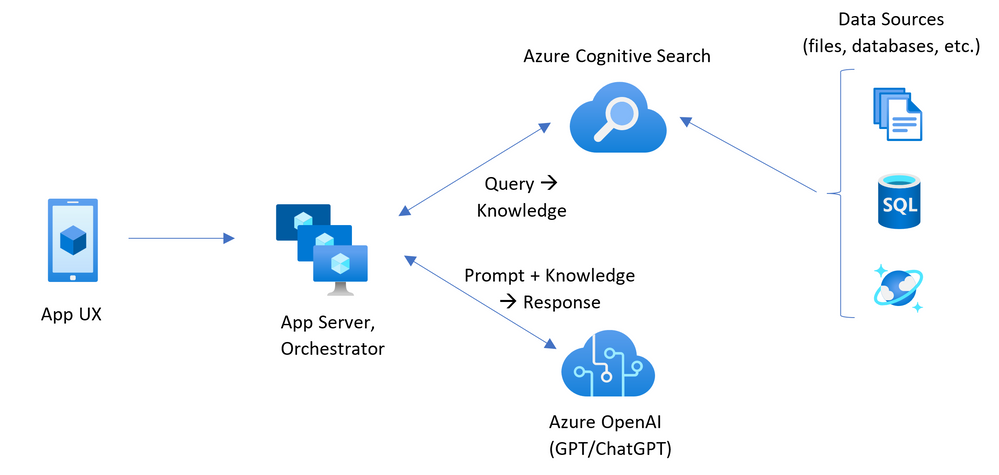
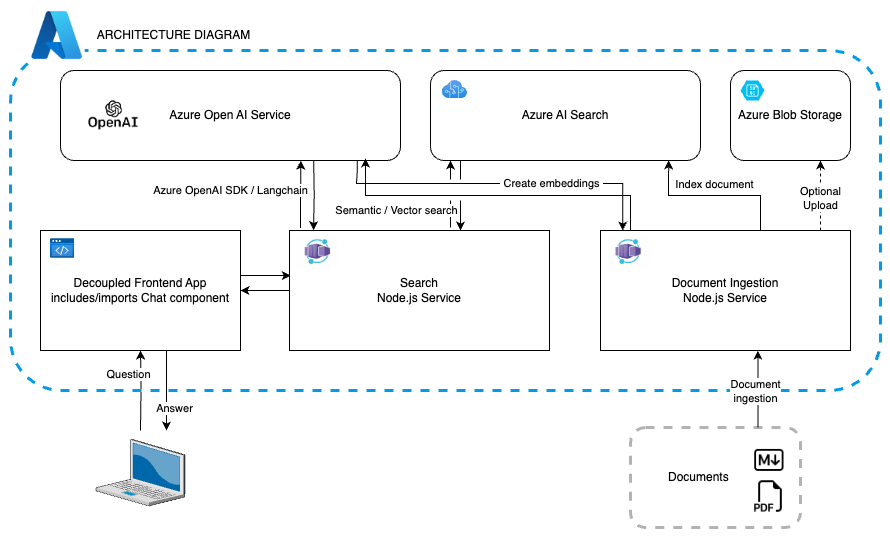
Wassim and Natalia walked through the architecture of the sample RAG chatbot application, detailing the utilization of various Azure services, including:
- Azure Static Web Apps for the UI deployment
- Azure Container Apps for the backend logic
- Azure AI Search for data indexing and retrieval
The integration with OpenAI’s APIs plays a pivotal role in fetching predictive models and responses.
The session also shed light on the application's backend components: the indexer and the search API, highlighting the use of Fastify for API exposure and the strategic implementation of the sliding window algorithm for efficient text chunking and indexing.
Below you can see a diagram of the project's architecture:
Engaging with the Code
The practical segment involved a detailed code walkthrough, emphasizing npm workspaces, monorepo organization, and the use of libraries like LangChain.js for seamless interaction with Azure OpenAI. The discussion also touched on the importance of semantic search and vector embeddings in improving the chatbot's response quality.
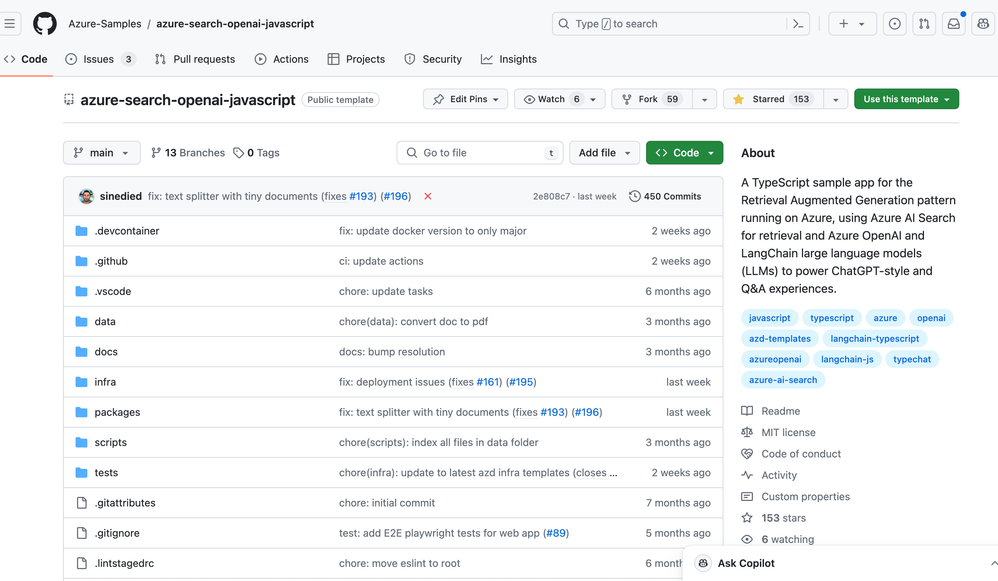
You can get an overview of the project's code at GitHub. Help us improve the project with your contributions and feedback! The project is completely open-source and available to the community. And give stars to the repository if you like it! ;)
Frontend Realizations and Angular Insights
Lars provided a comprehensive overview of the latest features and improvements in Angular, including:
- Signals for managing state changes.
- Standalone components for modular development.
- And the evolution of template syntax for more intuitive code structuring.
The session illustrated how these Angular advancements could be leveraged in the context of the RAG chatbot application, enhancing its functionality and user interaction.
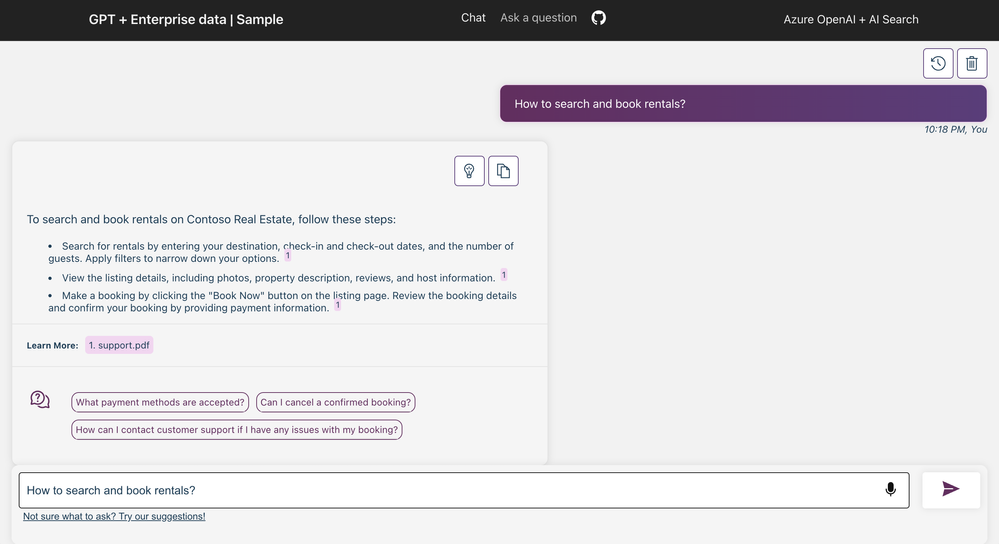
You can see in the image below an example of how the chatbot has been implemented in the user interface, making use of Angular's new features:
Deployment and Contributions to the Project
The deployment process to Azure was demystified, showcasing the use of:
-
Azure Developer CLI: which is a command line tool that allows you to create, manage and deploy Azure resources directly from the terminal.
-
Bicep: which is an Infrastructure as Code (IaC) language that allows Azure resources to be defined declaratively.
The open invitation for community contributions to the project underscores the collaborative spirit of the initiative.
Conclusion for the Session
This enriching session at the JavaScript Developer Days 2024 not only offered a comprehensive guide to developing a RAG pattern chatbot but also illuminated the potential of combining Angular’s new features with Azure's robust cloud services. The contributions of Lars, Wassim, and Natalia provided attendees with valuable insights into leveraging modern web development practices and AI technologies to create dynamic, responsive applications.
The collaborative effort to build and refine this project invites developers from across the spectrum to contribute, learn, and grow within this innovative domain, further bridging the gap between AI advancements and practical web development applications.
Azure Developers JavaScript Day Cloud Skills Challenge
As mentioned in previous article, the event also featured a cloud skills challenge focused on JavaScript Developers, where participants could test their knowledge and skills in Azure. Although the challenge is over, you can continue your studies!
Link to the challenge: JavaScript and Azure Cloud Skills Challenge
Additional Resources
- Free Course - Learn Path - Bicep
- Free Course - Implement Retrieval Augmented Generation (RAG) with Azure OpenAI Service
- Collection - Microsoft Ignite: Generative AI with Azure OpenAI
- Collection - Master the basics of Azure: AI Fundamentals
- Free Course - Using GitHub Copilot with JavaScript
- Free Course - Build a Form Recognizer custom skill for Azure Cognitive Search
- Free Course - Search Azure Cosmos DB for NoSQL data with Azure Cognitive Search
- Free Course - Azure Static Web Apps Learn Path
Stay Tuned!
If you wish, you can follow what happened during the two days of the event via the playlist on YouTube. The event was full of interesting content and insights for JavaScript developers!
Stay tuned for more articles about this event and keep learning with us!
Published on:
Learn moreWe can help you with Building a RAG Pattern chat bot with Azure OpenAI and LangChain.js | Azure Developers JavaScript Day
If you want help implementing, troubleshooting, or improving this product, contact us and we’ll point you in the right direction.
Related posts
This Month in Azure Static Web Apps | 09/2024
We are back with another edition of the Azure Static Web Apps Community! :party_popper: September was yet another month ...
GitHub Copilot for Azure: 6 Must-Try Features
As developers, we are constantly seeking tools that streamline our workflows and boost productivity. … Enter GitHub Copilot for Azure, now in ...
Responsible AI Mitigation Layers
Generative AI is increasingly being used in various kinds of systems to augment humans and infuse intelligent behavior into existing and new a...
Streamline Your Azure Workflow: Introducing GitHub Copilot for Azure in VS Code
I'm excited to announce the public preview of GitHub Copilot for Azure - a new addition to your toolkit that seamlessly integrates with G...
Build Intelligent Apps Code-First with Prompty and Azure AI
Building Generative AI applications can feel daunting for traditional app developers. What does the end-to-end applicati...
Certificación AI-900 (Fundamentos de IA) con Chicas en IA
La inteligencia artificial ha llegado para quedarse, ¡y más aún con la revolucionaria IA generativa! Para ayudar a los profesionales a especia...
Get certified with Learn Live GitHub series!
GitHub Universe is coming, and Microsoft and GitHub are partnering to offer a new special Learn Live series in Brazilian Portuguese, English a...
Certifícate con Learn Live GitHub en Español
Microsoft y GitHub se han unido para ofrecer una nueva serie especial de Learn Live en inglés y español: GitHub 2024. Del 10 al 24 de Octubre,...
Evaluating generative AI: Best practices for developers
As a developer working with generative AI, you've likely marveled at the impressive outputs your models can produce. But how do you ensure the...
Introducing Azure Product Retirement Livestreams
The Azure Retirements team, in collaboration with key partner groups, is excited t...