
Important update: Azure AD Graph API retirement

In June 2023, we shared an update on the completion of a three-year notice period for the deprecation of the Azure Active Directory (Azure AD) Graph API service. This service is now in the retirement cycle, and retirement (shut down) will be done with future incremental stages. In this update, we’ll provide more details about this first stage and a new Entra recommendations experience to help you identify applications that are using retiring Azure AD Graph APIs.
We’re committed to supporting our customers through this retirement with regular updates as we work through this change.
Azure AD Graph retirement update
After June 30, 2024, we’ll start a rollout for the first stage of Azure AD Graph retirement. Entra ID Applications that are created after June 30, 2024 will receive an error for any API requests to Azure AD Graph APIs (https://graph.windows.net). We understand that some apps may not have fully completed migration to Microsoft Graph. We’re providing an optional configuration that will allow an application created after June 30, 2024 to use Azure AD Graph APIs through June 2025.
If you develop or distribute software that requires applications to be created as part of the software installation or setup, and these applications will need to access Azure AD Graph APIs, you must prepare now to avoid interruption. You will either need to migrate your applications to Microsoft Graph (recommended) or configure the applications that are created as part of software setup for an extension, as described below, and ensure that your customers are prepared for the change.
Applications that are created before June 30, 2024 will not be impacted or experience interruption at this stage. Vendor applications consented in your tenant will also not be impacted if the application is created before June 30, 2024. Later in 2024, we’ll provide timelines for the following stage of the Azure AD Graph retirement, when existing applications will not be able to make requests to Azure AD Graph APIs.
How do I find applications in my tenant using Azure AD Graph APIs?
The Microsoft Entra recommendations feature provides recommendations to ensure your tenant is in a secure and healthy state, while also helping you maximize the value of the features available in Microsoft Entra ID.
We’ve recently begun a rollout of two Entra recommendations that provide information about applications and service principals that are using Azure AD Graph APIs in your tenant. These new recommendations provide information to support your efforts to identify and migrate the impacted applications and service principals to Microsoft Graph.
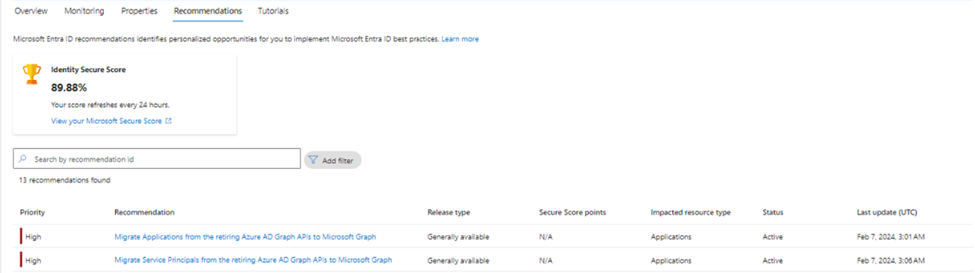
Configuring a new application for an extension of Azure AD Graph access
To allow an application created after June 30, 2024 to have an extension for access to Azure AD Graph APIs, you must make a configuration change on the application after it’s created. This configuration change is done through the AuthenticationBehaviors interface. By setting the blockAzureADGraphAccess flag to false, the newly created application will be able to continue to use Azure AD Graph APIs until further in the retirement cycle.
In this first stage, only applications created after June 30, 2024 will be impacted. Existing applications will be able to continue to use Azure AD Graph APIs even if the authenticationBehaviors property is not configured. Once this change is rolled out (after June 30, 2024), you may also choose to set blockAzureADGraphAccess to true for testing or to prevent an existing application from using Azure AD Graph APIs.
Microsoft Graph REST API examples:
Read the authenticationBehaviors property for a single application:
|
GET https://graph.microsoft.com/beta/applications/afe88638-df6f-4d2a-905e-40f2a2d451bf/authenticationBehaviors |
Set the authenticationBehaviors property to allow extended Azure AD Graph access for a new Application:
|
PATCH https://graph.microsoft.com/beta/applications/afe88638-df6f-4d2a-905e-40f2a2d451bf/authenticationBehaviors Content-Type: application/json { "blockAzureADGraphAccess": false } |
Microsoft Graph PowerShell examples:
Read the authenticationBehaviors property for a single application:
|
Import-Module Microsoft.Graph.Beta.Applications
Get-MgBetaApplication -ApplicationId afe88638-df6f-4d2a-905e-40f2a2d451bf -Property "id,displayName,appId,authenticationBehaviors" |
Set the authenticationBehaviors property to allow extended Azure AD Graph access for a new Application:
|
Import-Module Microsoft.Graph.Beta.Applications $params = @{ authenticationBehaviors = @{ blockAzureADGraphAccess = $false } } Update-MgBetaApplication -ApplicationId $applicationId -BodyParameter $params |
What happens to applications using Azure AD Graph after June 30, 2024?
- Existing applications will not be impacted at this date.
- Any applications created after June 30, 2024 will encounter errors (HTTP 403) when making requests to Azure AD Graph APIs, unless the blockAzureADGraphAccess attribute has been set to false in the authenticationBehaviors property for the application.
What happens in future retirement stages?
In this update, we’ve discussed the first stage of Azure AD Graph retirement, starting after June 30, 2024. In the coming months, we’ll provide updates on the timeline for the second stage of Azure AD Graph retirement. In the second stage, we’re planning for all applications, including existing applications, to be blocked from using Azure AD Graph APIs unless they’re configured with the AuthenticationBehaviors property (blockAzureADGraphAccess: false) to enable extended access.
A minimum of three (3) months of advance notice will be provided before this next stage of retirement. We’ll continue to provide routine updates as we work through this service retirement to provide clear expectations.
Current support for Azure AD Graph
Azure AD Graph APIs are in the retirement cycle and have no SLA or maintenance commitment beyond security-related fixes.
About Microsoft Graph
Microsoft Graph represents our best-in-breed API surface. It offers a single unified endpoint to access Microsoft Entra services and Microsoft 365 services such as Microsoft Teams and Microsoft Intune. All new functionalities will only be available through Microsoft Graph. Microsoft Graph is also more secure and resilient than Azure AD Graph.
Microsoft Graph has all the capabilities that have been available in Azure AD Graph and new APIs like identity protection and authentication methods. Its client libraries offer built-in support for features like retry handling, secure redirects, transparent authentication, and payload compression.
What about Azure AD and Microsoft Online PowerShell modules?
As of March 30, 2024, AzureAD, AzureAD-Preview, and Microsoft Online (MSOL) PowerShell modules are deprecated and will only be supported for security fixes. You should migrate these to Microsoft Graph PowerShell. Please read more here.
Available tools:
- Migrate from Azure Active Directory (Azure AD) Graph to Microsoft Graph
- Azure AD Graph app migration planning checklist
- Azure AD Graph to Microsoft Graph migration FAQ
Kristopher Bash
Product Manager, Microsoft Graph
Learn more about Microsoft Entra:
- See recent Microsoft Entra blogs
- Dive into Microsoft Entra technical documentation
- Learn more at Azure Active Directory (Azure AD) rename to Microsoft Entra ID
- Join the conversation on the Microsoft Entra discussion space
- Learn more about Microsoft Security
Published on:
Learn moreWe can help you with Important update: Azure AD Graph API retirement
If you want help implementing, troubleshooting, or improving this product, contact us and we’ll point you in the right direction.
Related posts
Sync identities from Rippling to Microsoft Entra ID
Today, we’re thrilled to announce that customers using Rippling HCM can now automatically provision users to on-premises Active Directory and ...
Microsoft Entra ID Governance for government
I’m pleased to announce that as of November 1, 2024, Microsoft Entra ID Governance is available for federal agencies, state and local governme...
Update to security defaults
As part of the Secure Future Initiative, we’ve evolved our security approach to align with three security principles: secure by design, secure...
Meet Microsoft Entra at Ignite 2024: November 18-22
Microsoft Ignite is just around the corner, taking place from Monday, November 18, 2024 through Friday, November 22, 2024, in Chicago, Illinoi...
Manage Microsoft Entra ID role assignments with Microsoft Entra ID Governance
I’m excited to announce that we now support Microsoft Entra role assignments in Microsoft Entra ID Governance's Entitlement Management feature...
The latest enhancements in Microsoft Authenticator
Hi folks, I'm thrilled to announce three major Microsoft Entra ID advancements that will help you protect your users with phishing-resi...
Microsoft Security announcements and demos at Authenticate 2024
The Microsoft Security team is excited to connect with you next week at Authenticate 2024 Conference, taking place October 14 to 16 in Carlsba...
What's new in Microsoft Entra - September 2024
We’re excited to announce the general availability of Microsoft Entra Suite—one of the industry’s most comprehensive secure access solutions f...
Explore the key benefits of Microsoft Entra Private Access
The traditional network security models are becoming increasingly ineffective in a world where remote work and cloud services are the norm. Co...
Join us at the Microsoft Entra Suite Showcase!
This fall, we are bringing the Microsoft Entra Suite Showcase to cities worldwide. Join us to explore how our latest advancements in secure id...