
Empowering SOCs with Azure AD Identity Protection in Microsoft 365 Defender

Howdy!
We’re delighted to share that the public preview of Azure Active Directory Identity Protection in Microsoft 365 Defender (M365D) is now rolling out, further empowering security professionals to detect and respond to identity compromise. You may already be familiar with investigating Identity Protection detections in the Microsoft Entra or Azure portal, and that’s not going away. What’s new is that these detections will now also be available as alerts in the Microsoft 365 Defender portal! If you use Microsoft 365 Defender to investigate endpoint, application, and email alerts, you no longer need to switch portals to see your Identity Protection alerts! Tracy Shi, product manager of Identity Protection, will take you through what this means for you.
Best regards,
Alex Weinert (@Alex_T_Weinert)
Director of Identity Security
Microsoft Identity and Network Access Security Team
Hi folks!
Azure Active Directory (Azure AD) Identity Protection alerts are now available in the Microsoft 365 Defender portal. We’re excited about the efficiency and simplicity this integration brings to security teams.
Azure AD Identity Protection leverages trillions of signals to detect compromised identities, provides insights into risky users and detections, and offers mechanisms to automatically remediate risks. Including Identity Protection detections as part of a larger incident in Microsoft 365 Defender now helps security teams identify the end-to-end attack story more efficiently and respond to compromised identities more quickly.
Identity compromise is the most common starting point for breach, so Identity Protection detections are often the first alarm that goes off. Now that these crucial early indicators are included in Microsoft 365 Defender incidents, they provide greater clarity on how identities were leveraged in the attack. If you’re interested in seeing just the Identity Protection alerts, you can filter by the service source. High-impact alerts are shown by default in Microsoft 365 Defender, and you can change the Alert service setting to view all or no Identity Protection alerts.
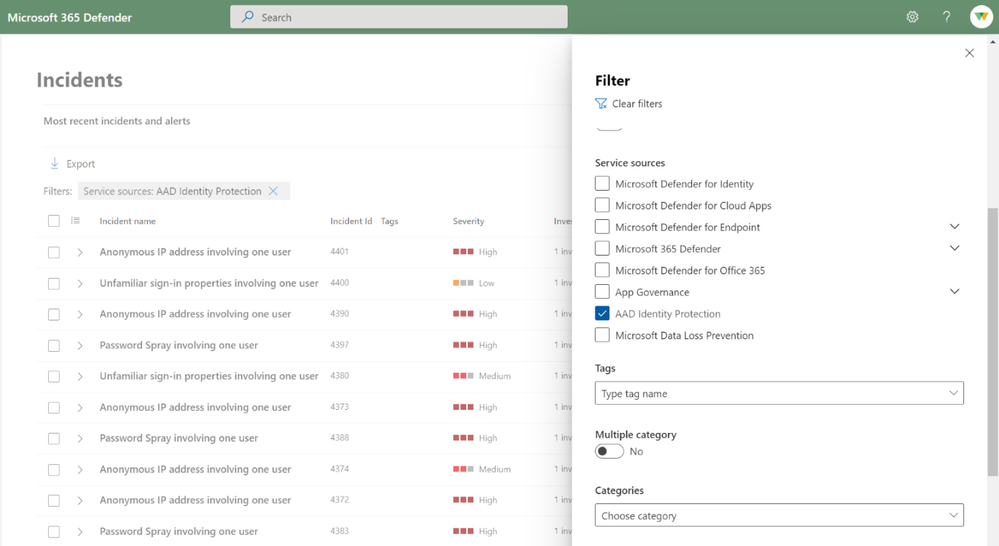
Once you’re finished with the investigation, you can update the status of the incident and the Identity Protection alert, and it will sync back to Azure AD Identity Protection. Alert status syncing between our first-party partners has been a long time ask, and we’re thrilled that it’s launching with this public preview! All Azure AD Identity Protection alerts within Microsoft 365 Defender are also available via Incidents API .
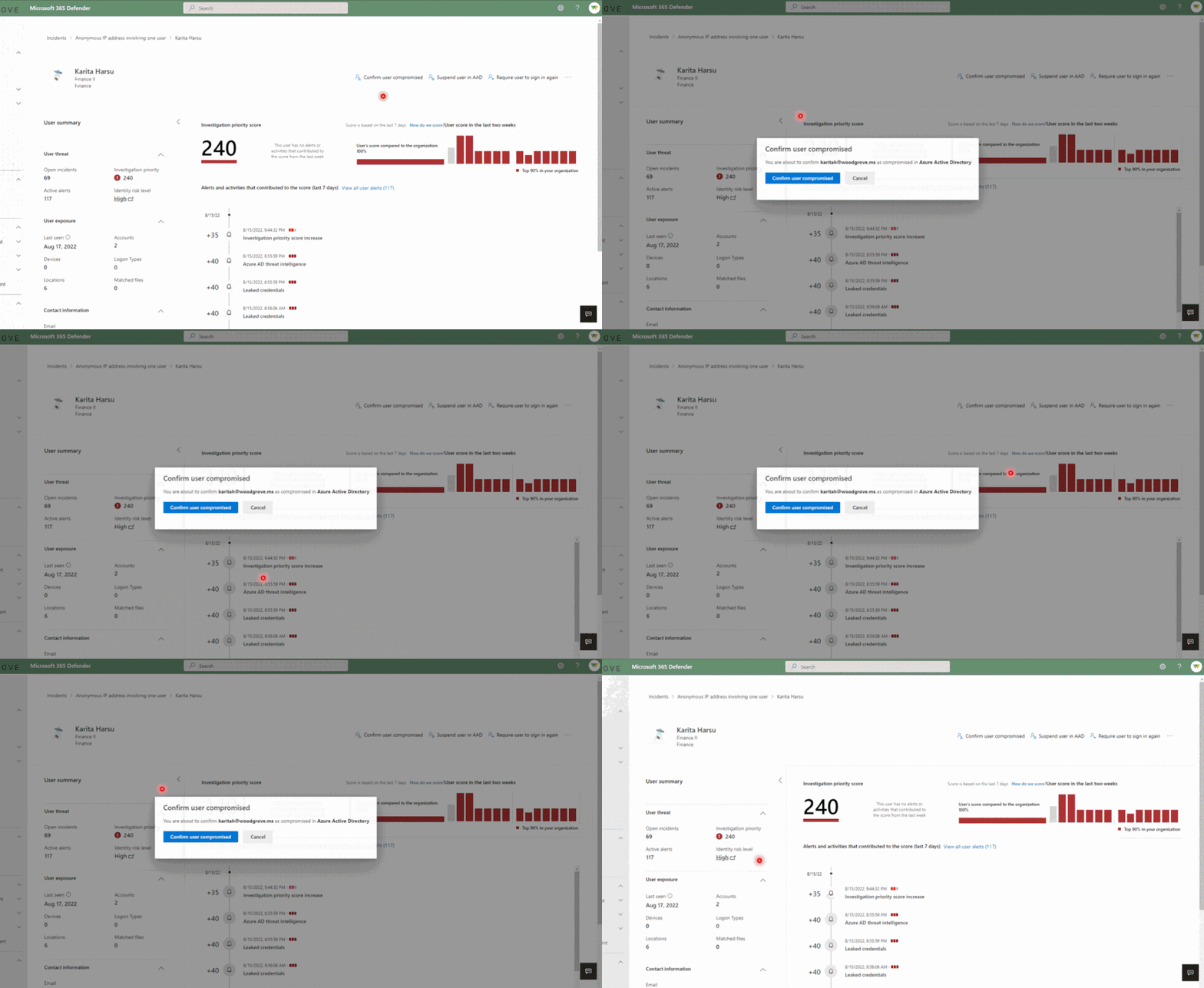
Additionally, the Microsoft 365 Defender User Page provides you the ability to see the user’s current risk score generated by Identity Protection and give feedback on potentially compromised risky users. You can confirm them as compromised to move them to high risk or dismiss them to resolve the risk. To best leverage these signals and the other wealth of identity threat intelligence in Identity Protection, we recommend enabling the risky user and risky sign-in policies for access control and automatic risk remediation.
We can’t wait for you to try it out and invite you to get started today by visiting security.microsoft.com and reviewing the documentation.
Stay Secure!
Tracy Shi
Product Manager II
Microsoft Identity and Network Access Security Team
Learn more about Microsoft identity:
- Return to the Azure Active Directory Identity blog home
- Join the conversation on Twitter and LinkedIn
- Share product suggestions on the Azure Feedback Forum
Published on:
Learn moreRelated posts
Sync identities from Rippling to Microsoft Entra ID
Today, we’re thrilled to announce that customers using Rippling HCM can now automatically provision users to on-premises Active Directory and ...
Microsoft Entra ID Governance for government
I’m pleased to announce that as of November 1, 2024, Microsoft Entra ID Governance is available for federal agencies, state and local governme...
Update to security defaults
As part of the Secure Future Initiative, we’ve evolved our security approach to align with three security principles: secure by design, secure...
Meet Microsoft Entra at Ignite 2024: November 18-22
Microsoft Ignite is just around the corner, taking place from Monday, November 18, 2024 through Friday, November 22, 2024, in Chicago, Illinoi...
Manage Microsoft Entra ID role assignments with Microsoft Entra ID Governance
I’m excited to announce that we now support Microsoft Entra role assignments in Microsoft Entra ID Governance's Entitlement Management feature...
The latest enhancements in Microsoft Authenticator
Hi folks, I'm thrilled to announce three major Microsoft Entra ID advancements that will help you protect your users with phishing-resi...
Microsoft Security announcements and demos at Authenticate 2024
The Microsoft Security team is excited to connect with you next week at Authenticate 2024 Conference, taking place October 14 to 16 in Carlsba...
What's new in Microsoft Entra - September 2024
We’re excited to announce the general availability of Microsoft Entra Suite—one of the industry’s most comprehensive secure access solutions f...
Explore the key benefits of Microsoft Entra Private Access
The traditional network security models are becoming increasingly ineffective in a world where remote work and cloud services are the norm. Co...
Join us at the Microsoft Entra Suite Showcase!
This fall, we are bringing the Microsoft Entra Suite Showcase to cities worldwide. Join us to explore how our latest advancements in secure id...